Hello Jippe,
Thanks for the details and the logs.
From the message:
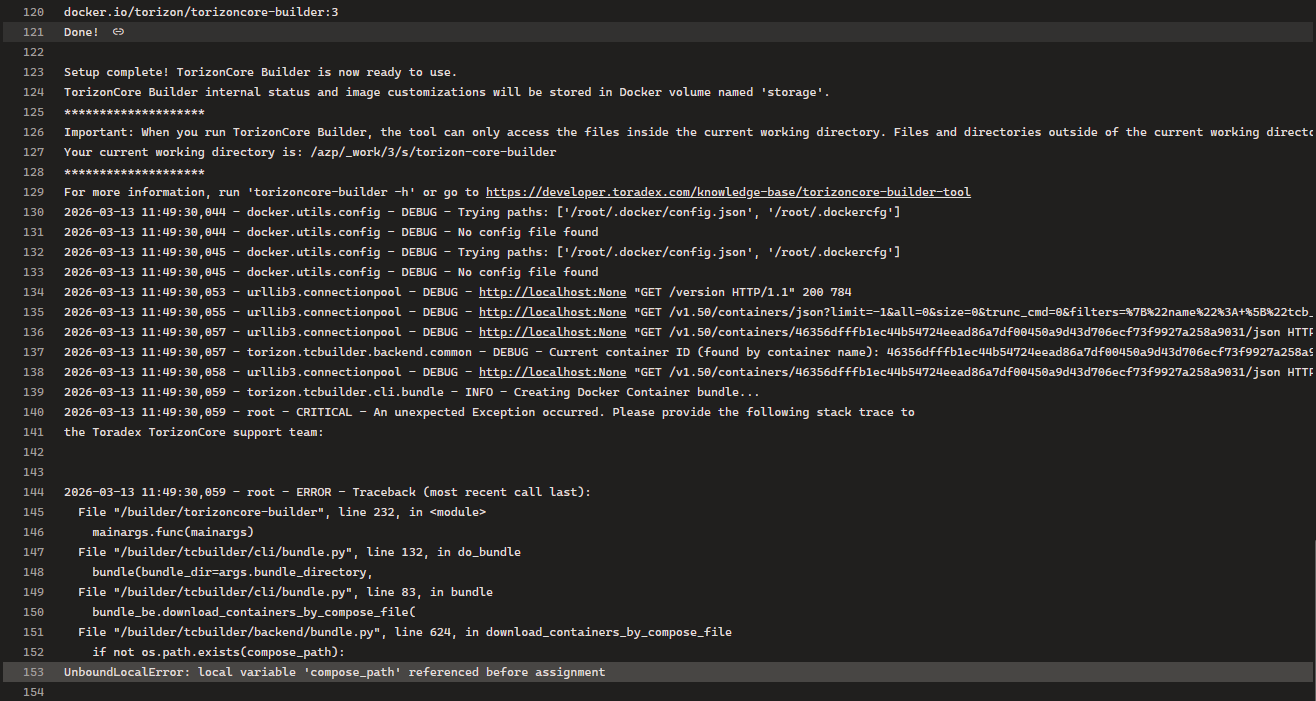
Your current working directory is: /azp/_work/3/s/torizon-core-builder
TorizonCore Builder can only see files inside this working directory as it is mounted into the container. Host‑absolute paths like $(pwd)/docker-compose.yml often don’t exist from inside the container, even if they work on a native Ubuntu shell.
To avoid this, please:
Make sure you’re in the directory that actually contains docker-compose.yml in your pipeline step:
cd /azp/_work/3/s/torizon-core-builder # adjust if neededls -l docker-compose.yml # confirm it’s here
Call bundle using a relative path, not an absolute one:
torizoncore-builder --log-level DEBUG \ bundle docker-compose.yml \ --platform=linux/arm64/v8 \ --bundle-directory bundle
If the compose file is in a subdirectory, use that relative path instead, for example:
torizoncore-builder bundle subdir/docker-compose.yml --bundle-directory bundle
If it still cannot find the file, could you share:
- the
pwd right before running the command, and
- the output of:
find . -maxdepth 3 -type f -name 'docker-compose.yml'
so we can see how the paths look inside your Azure pipeline workspace?
Best Regards,
Diego Maia
Toradex
Hello Jippe,
Thanks for the details and the logs.
From the message:
Your current working directory is: /azp/_work/3/s/torizon-core-builder
TorizonCore Builder can only see files inside this working directory as it is mounted into the container. Host‑absolute paths like $(pwd)/docker-compose.yml often don’t exist from inside the container, even if they work on a native Ubuntu shell.
To avoid this, please:
Make sure you’re in the directory that actually contains docker-compose.yml in your pipeline step:
cd /azp/_work/3/s/torizon-core-builder # adjust if neededls -l docker-compose.yml # confirm it’s here
Call bundle using a relative path, not an absolute one:
torizoncore-builder --log-level DEBUG \ bundle docker-compose.yml \ --platform=linux/arm64/v8 \ --bundle-directory bundle
If the compose file is in a subdirectory, use that relative path instead, for example:
torizoncore-builder bundle subdir/docker-compose.yml --bundle-directory bundle
If it still cannot find the file, could you share:
the pwd right before running the command, and
the output of: find . -maxdepth 3 -type f -name 'docker-compose.yml'
so we can see how the paths look inside your Azure pipeline workspace?
Best Regards,
Diego Maia
Toradex