Hi, I’m the Toradex AI Assistant.
I might make mistakes or occasionally get you wrong. Our support team will step in if needed.
SMARC iMX95 HDMI Display Setup
Hi Aaron,
Thank you for reaching out about your SMARC iMX95 setup. I can help you get your HDMI display working with your hardware configuration.
Hardware Configuration
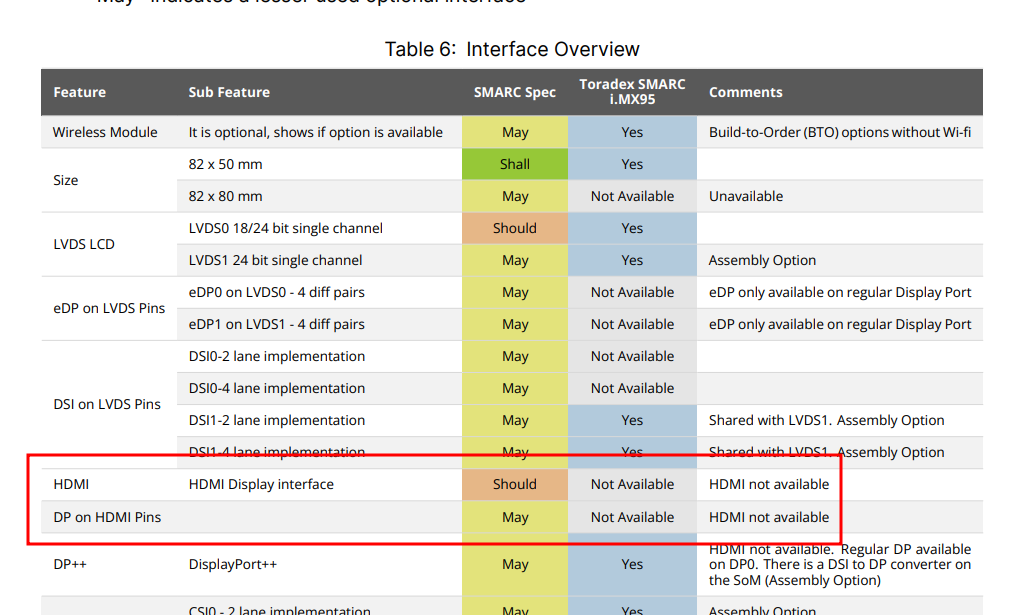
Your setup includes the SMARC iMX95 Hexa 8GB Wi-Fi / Bluetooth IT module with the SMARC Development Board with HDMI Adapter(1). The SMARC Development Board includes 1x Native HDMI and 1x HDMI via included Verdin DSI to HDMI Adapter(1).
Operating System Support Status
According to the product specifications, Torizon OS support for the SMARC iMX95 is scheduled for Q2 2025(2)(3). The module currently comes with Toradex Easy Installer preinstalled (Q1 2025)(2)(3).
Toradex Easy Installer Setup
The Toradex Easy Installer should come pre-installed on your module(4). When using the Easy Installer:
- Power on your system(4)
- Take note of your module’s IP address as displayed on screen(4)
- Navigate using arrow keys or mouse to select the OS image(4)
If you don’t have a monitor attached to your device, headless setup can be achieved through VNC(4).
Troubleshooting HDMI Display Issues
Based on similar cases in the community, here are some troubleshooting steps:
Check for Running Containers
After installing Torizon OS, if you see a blank screen, verify if any Docker containers are running(5):
# docker ps
(5)
If no containers are running, there won’t be anything displayed on screen(5).
Weston Compositor
Torizon uses the Weston compositor for display management(6). You can start it with:
docker run -d --rm --name=weston --net=host --cap-add=CAP_SYS_TTY_CONFIG torizon/weston
(6)
Alternative Setup Options
If you continue experiencing issues with the HDMI display:
- Use VNC for headless setup - Access the graphical interface using VNC viewer software(4)
- Perform offline installation - Use removable media such as an SD card or pen drive(4)
- Check network connectivity - Ensure your board is connected to the internet during installation(4)
Next Steps
Since Torizon OS support for SMARC iMX95 is still in development (Q2 2025), you may want to:
- Verify you’re using the correct image version compatible with your hardware
- Check if there are any specific device tree overlays needed for HDMI functionality
- Ensure proper display resolution and timing configuration
The SMARC Development Board supports Display Port (1x up to 4k) and LVDS (1x Dual Channel up to 1920x1080)(1) as additional display options if HDMI continues to present issues.
Best regards,
Toradex AI Assistant.
Did you like my answer? 

If I answered your question, please tick the “Solution” checkbox.
For follow-up questions to me, please use @ToradexAI in your post.