

Hi @unablesalt !
Thanks for sharing more details 
Here I am sharing an approach that you can use before diving into driver customization (which might be needed). This is based on @stefan_e.tx’s idea
Tool to be used: devmem2
You can try to modify the SLEW_ADJ on Linux during runtime by using devmem2. This devmem2 allows you to change physical addresses during runtime. Full disclosure: there might be some gotchas when using it, but I hope it will just work.
You can manually build it using a cross toolchain (quite simple to do it) and copy to your module. You will need to execute it using sudo.
I built it and I am sharing the resulting ARM64 cross-compiled executable here. But remember that executables are just like candy: you should not accept them from strangers 
devmem2 (18.4 KB)
For testing, you can use this directly on the host OS (no need for container).
Making sure that the address is accessible
As you are going to manipulate a register related to native LVDS, please be sure to have it enabled. In my case, I simple enabled it by activating the overlay verdin-imx8mp_mezzanine_panel-cap-touch-10inch-lvds_overlay.dtbo (reference: Setting up Displays with Torizon | Toradex Developer Center). You can use the same approach if needed.
Manipulating LVDS_CTRL’s field SLEW_ADJ
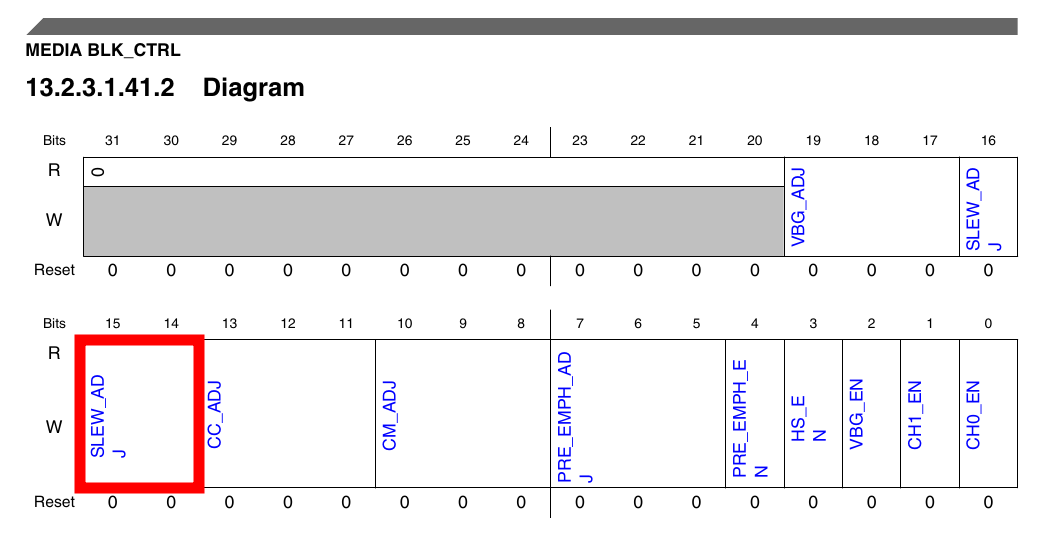
According to the i.MX8MP Reference Manual, the base address for MEDIA_BLK_CRTL is 0x32EC000. The SLEW_ADJ is defined by the bits 14-16 of the LVDS_CTRL register, which has an offset of 0x0128 (table from section 13.2.3.1.1 Memory map, and diagram tables from section 13.2.3.1.41 LVDS Control Register (LVDS_CTRL)).
Therefore we must use the address 0x32EC0128 with devmem2:
$ sudo ./devmem2 0x32ec0128
Password:
/dev/mem opened.
Memory mapped at address 0xffffb1959000.
Read at address  0x32EC0128 (0xffffb1959128): 0x00000005
From the output, we can see that SLEW_ADJ (which refers to bits 14-16) has a value of zero. Unfortunately, seems like NXP has no information about what the values for LVDS_CTRL’s meaning (therefore nothing for SLEW_ADJ as well): https://community.nxp.com/t5/i-MX-Processors/i-MX8MP-undocumented-LVDS-CTRL/m-p/1716248#M211936
As SLEW_ADJ is zero by default, you might want to try its highest possible value (which is 0x7), or maybe half (0x3 or 0x4). At the same time, you should keep the other fields of LVDS_CTRL the same. In my case here, since LVDS_CTRL has 0x5, I will write 0x1C005. The w in the command means I am dealing with data of word size (it doesn’t mean write  ).
).
$ sudo ./devmem2 0x32ec0128 w 0x0001c005
Password:
/dev/mem opened.
Memory mapped at address 0xffffa8e8f000.
Read at address  0x32EC0128 (0xffffa8e8f128): 0x00000005
Write at address 0x32EC0128 (0xffffa8e8f128): 0x0001C005, readback 0x0001C005

$ sudo ./devmem2 0x32ec0128
/dev/mem opened.
Memory mapped at address 0xffffbcef0000.
Read at address  0x32EC0128 (0xffffbcef0128): 0x0001C005
After doing this, you can perform the EMI test and hopefully the outcome will be better.
Remarks about the devmem2 approach
The modification done here is not persistent after reboot. So, if necessary, you need to execute the modification again after a reboot.
Also, please keep in mind that there is a driver taking care of the registers. This means that even if you manually modify registers, the driver might also modify them, so keep an eye on its value during your tests. You can use devmem2 to read the value.
Please let us know how it goes.
Best regards,