Bare metal code for Cortex M7 using Imx8mplus Verdin development (carrier) board

Hi,

I have been trying to just set/reset a gpio on a verdin development board with imx8mplus on it. I have the linux disabled and i can see the command prompt with uboot on it through putty.

Just to give you a background:

I want to run a simple baremetal code on cortex-M7 on the verdin development board with imx8mplus som.

  • I downloaded the SDK from NXP namely SDK_2.x_MIMX8ML8xxxKZ since that is the only one i found for imx8mplus on nxp website.

  • I am running this on visual studio with xpresso extension on it.

  • I created an example project from NXP (evkmimx8mp_igpio_led_output_cm7).

  • I modified the pin_mux.c to set the appropriate pinmux and pinconfig.

    • I have tried couple of gpios like sodimm141,206 etc but none of them worked.
    • Taking sodimm141 as example, i modified the pin_mux.c as this
      • IOMUXC_SetPinMux(IOMUXC_SD1_DATA5_GPIO2_IO07, 0U);
      • IOMUXC_SetPinConfig(IOMUXC_SD1_DATA5_GPIO2_IO07, 0x0170);
    • I also modified the app.h for the respective GPIO
      • #define EXAMPLE_LED_GPIO GPIO2
      • #define EXAMPLE_LED_GPIO_PIN 7U
    • changed the gpio_led_output.c to make a constant write of 0 or 1 but i couldnt see it changing.
      • int main(void)

        {

        /* Define the init structure for the output LED pin*/

        gpio_pin_config_t led_config = {kGPIO_DigitalOutput, 0, kGPIO_NoIntmode};

        /* Board pin, clock, debug console init */

        BOARD_InitHardware();

        /* Init output LED GPIO. */

        GPIO_PinInit(EXAMPLE_LED_GPIO, EXAMPLE_LED_GPIO_PIN, &led_config);

        while(true)

        {

        GPIO_PinWrite(EXAMPLE_LED_GPIO, EXAMPLE_LED_GPIO_PIN, 1U);

        }

        }

      • I checked that the clocks are enabled (GPIO_Clocks are called by gate enable which i think enables clocks for all the gpios)

        • (void)CLOCK_EnableClock(s_gpioClock[instance]); in fsl_gpio.c
      • Then i build the project under vscode with xpresso extension.

  •     For loading the igpio_led_output.bin i am using tftpd64 program that i installed and did the following to run the code.
    
    • assigned a static ip address 192.168.1.10
    • opened tftpd64 and opened 192.168.1.10 in the server interfaces and pointed the directory to the place where i have igpio_led_output.bin
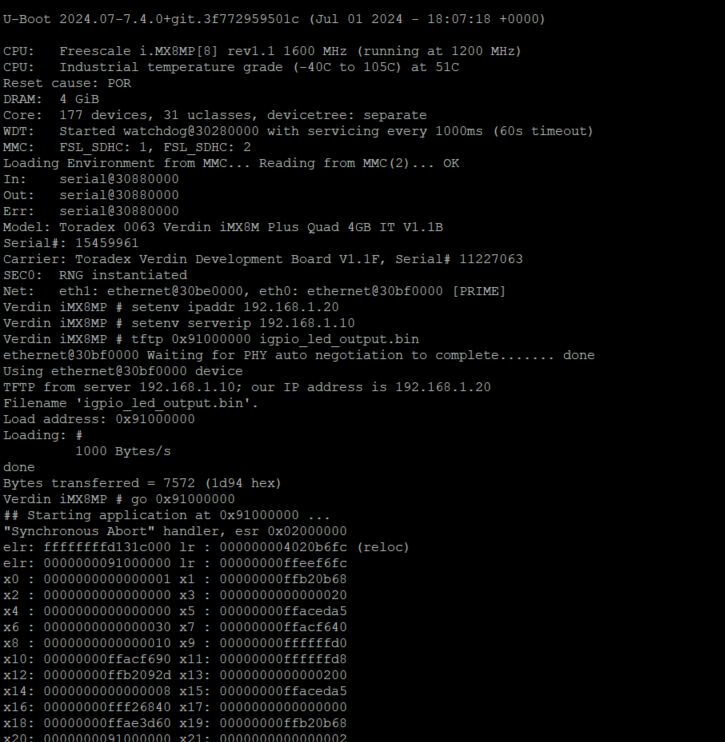
    • In the putty terminal i did the following :
      • setenv ipaddr 192.168.1.20
      • setenv serverip 192.168.1.10
      • tftp 0x91000000 igpio_led_output.bin
      • go 0x91000000
      • reboot happens but i cant see the gpio being set. ( i measuring the pin sodimm141 from multimeter.)
      • Like i mentioned i tried on various gpios but no success.
      • I would really appreciate if you could help me here.
      • Thanks.

Hi, I’m the Toradex AI Assistant.

I might make mistakes or occasionally get you wrong. Our support team will step in if needed.


Hello!

I can help you troubleshoot your GPIO configuration on the Verdin iMX8M Plus Cortex-M7. Based on the sources, there are several important considerations for running bare-metal code on the Cortex-M7.

Prerequisites and Setup

First, ensure you have the correct environment setup. According to the documentation, you need to(1):

  1. Set up the NXP SDK and GCC Toolchain as described in the MCUXpresso SDK setup
  2. Download the correct SDK: For Verdin iMX8M Plus you should download MIMX8ML8xxxKZ (which you’ve done correctly)(1)
  3. Use the recommended toolchain: The Arm GNU Toolchain AArch32 bare-metal target (arm-none-eabi)(1)

Memory Loading and Execution

Your TFTP loading approach needs adjustment. The proper way to load and execute Cortex-M7 firmware is(1):

> setenv load_cmd "ext4load mmc 0:2"  
> setenv cm_image "/home/root/hello_world.bin"  
> setenv cm_image_size 20000  
> setenv load_cm_image "${load_cmd} ${loadaddr} ${cm_image}"  
> setenv cm_boot "${load_cm_image}; cp.b ${loadaddr} 0x7e0000 ${cm_image_size}; dcache flush; bootaux 0x7e0000"  
> saveenv  
> run cm_boot  

(1)

The key difference is that the firmware should be loaded to 0x7e0000 and executed with bootaux rather than using go with your current address.

GPIO Pin Configuration Issues

There are known issues with certain GPIO pins on the Verdin iMX8M Plus when used from the Cortex-M7. Some pins may be pre-configured by U-Boot or have conflicts with other peripherals(2).

For SODIMM_141, you need to verify:

  1. Check the pin mapping in the Verdin iMX8M Plus datasheet
  2. Ensure no conflicts with other peripheral configurations
  3. Verify the correct GPIO bank and pin numbers

Recommended Approach

  1. Start with a working example: Use the Hello World example from the SDK first to verify your loading mechanism works(1)

  2. Build using the recommended method(1):

$ export ARMGCC_DIR=<PATH_TO_GCC_TOOLCHAIN>/<GCC_TOOLCHAIN_FOLDER>  
$ cd armgcc/   
$ ./build_debug.sh  
  1. Copy the binary to your device and load it properly(1):
$ scp debug/hello_world.bin root@<board-ip>:/home/root  
  1. Use the correct U-Boot commands as shown above rather than TFTP + go

Next Steps

I recommend starting with the Hello World example from the SDK to establish that your loading and execution mechanism works correctly, then gradually add your GPIO functionality. The issue is likely in the loading/execution method rather than your GPIO configuration.

Would you like me to guide you through setting up the Hello World example first to establish a working baseline?

Best regards, Toradex AI Assistant.


Did you like my answer? :+1: :-1:

If I answered your question, please tick the “Solution” checkbox.

For follow-up questions to me, please use @ToradexAI in your post.

Hello @mansari,

This is not the correct way to start a Cortex-M7 firmware on the Verdin iMX8MP.

The SDK is correct for the board you are using.
For reference, we maintain a list here: Setting Up MCUXpresso SDK and Toolchain for Cortex-M development | Toradex Developer Center
Please take a look at the following page, to see how we recommend to load the binaries to the Cortex M: How to Load Compiled Binaries into Cortex-M | Toradex Developer Center

Best Regards,
Bruno