Hi everyone,
I am running into a wall with a custom Yocto build integrating Mender and Toradex Secure Boot on an Apalis i.MX8QM. The kernel is panicking with an Asynchronous SError Interrupt during boot
Hardware & Software Setup
-
SoM: Toradex Apalis iMX8QM V1.1
-
Carrier Board: Apalis Ixora V1.2
-
bsp: 6.7.0
-
Boot Flow: U-Boot → FIT Image (Kernel, DTB, boot script) → dm-verity rootfs
The Problem: Kernel Panic (SError)
Once U-Boot passes control to the kernel, it begins booting but crashes at the 0.63 mark right after failing to power up audio-pll1sometimes after vpu reasons are different but always end up with that panic .
Here is the exact kernel panic log:
[    0.622503]  audio-pll1: failed to power up resource 492 ret -22
[    0.631241] SError Interrupt on CPU2, code 0x00000000bf000002 -- SError
[    0.631251] CPU: 2 PID: 1 Comm: swapper/0 Not tainted 5.15.148-6.7.0-devel+git.bfdbfb2c85fb #1
[    0.631258] Hardware name: Toradex Apalis iMX8QM V1.1 on Apalis Ixora V1.2 Carrier Board (DT)
[    0.631263] pstate: 40000005 (nZcv daif -PAN -UAO -TCO -DIT -SSBS BTYPE=--)
[    0.631270] pc : 0xffff8000085d5ac4
[    0.631273] lr : 0xffff8000087368b0
[    0.631275] sp : ffff80000938ba00
...
[    0.631370] Kernel panic - not syncing: Asynchronous SError Interrupt
[    0.631375] SMP: stopping secondary CPUs
[    0.753546] ---[ end Kernel panic - not syncing: Asynchronous SError Interrupt ]---
i always used to face U-Boot required-bootargs problem
Trying 'kernel' kernel subimage Description: unavailable Type: Kernel Image Compression: gzip compressed Data Start: 0x9d5000c0 Data Size: 8180103 Bytes = 7.8 MiB Architecture: AArch64 OS: Linux Load Address: 0x95400000 Entry Point: 0x95400000 Hash algo: sha256 Hash value: de9f7a0a85280c37c52fef4cc0a2063cbf4c73179173da726ff983e704e8a65e Verifying Hash Integrity ... sha256+ OK ## Loading fdt from FIT Image at 9d500000 ... Using 'conf-freescale_imx8qm-apalis-v1.1-ixora-v1.2.dtb' configuration Verifying Hash Integrity ... sha256,rsa2048:dev+ OK Trying 'fdt' fdt subimage Description: unavailable Type: Flat Device Tree Compression: uncompressed Data Start: 0x9dccd320 Data Size: 172067 Bytes = 168 KiB Architecture: AArch64 Load Address: 0x9d400000 Hash algo: sha256 Hash value: abd99dd5b0151b7c9114961614a1deca9987b41f62ff0183090ef59667d769a6 Verifying Hash Integrity ... sha256+ OK Loading fdt from 0x9dccd320 to 0x9d400000 ## Loading fdt from FIT Image at 9d500000 ... Trying 'secure_node' fdt subimage Description: unavailable Type: Flat Device Tree Compression: uncompressed Data Start: 0x9dcf7400 Data Size: 180 Bytes = 180 Bytes Architecture: AArch64 Hash algo: sha256 Hash value: cff45644a016b6cd15b9b79b9dea841a1e07e54b2b2f0e69420f69fe10cc937f Verifying Hash Integrity ... sha256+ OK Booting using the fdt blob at 0x9d400000 Uncompressing Kernel Image Loading Device Tree to 00000000fcddc000, end 00000000fce09046 ... OK ## WARNING: Required node "/chosen/toradex,secure-boot" could not be found in device-tree. ## WARNING: Allowing boot while device is open; please fix bootargs before closing device. Disable dma-controller@599F0000 rsrc 463 not owned Disable crypto@31400000 rsrc 501 not owned Disable jr@30000 rsrc 501 not owned Disable jr@40000 rsrc 502 not owned Disable usb-phy@5b160000 rsrc 263 not owned Disable clock-controller@5b280000 rsrc 263 not owned Disable mailbox@2d000000 rsrc 535 not owned Disable clock-controller@56243010 rsrc 268 not owned Disable irqsteer@57220000 rsrc 397 not owned

[ 0.340256] thermal_sys: Registered thermal governor 'step_wise' [ 0.347329] thermal_sys: Registered thermal governor 'power_allocator' [ 0.354008] cpuidle: using governor menu [ 0.364365] hw-breakpoint: found 6 breakpoint and 4 watchpoint registers. [ 0.370990] ASID allocator initialised with 65536 entries [ 0.376453] imx mu driver is registered. [ 0.380184] imx rpmsg driver is registered. [ 0.448542] HugeTLB registered 1.00 GiB page size, pre-allocated 0 pages [ 0.454921] HugeTLB registered 32.0 MiB page size, pre-allocated 0 pages [ 0.461632] HugeTLB registered 2.00 MiB page size, pre-allocated 0 pages [ 0.468290] HugeTLB registered 64.0 KiB page size, pre-allocated 0 pages [ 0.476165] cryptd: max_cpu_qlen set to 1000 [ 0.483572] ACPI: Interpreter disabled. [ 0.489519] iommu: Default domain type: Translated [ 0.494066] iommu: DMA domain TLB invalidation policy: strict mode [ 0.500500] vgaarb: loaded [ 0.503301] usbcore: registered new interface driver usbfs [ 0.508516] usbcore: registered new interface driver hub [ 0.513800] usbcore: registered new device driver usb [ 0.520591] mc: Linux media interface: v0.10 [ 0.524537] videodev: Linux video capture interface: v2.00 [ 0.530047] pps_core: LinuxPPS API ver. 1 registered [ 0.534939] pps_core: Software ver. 5.3.6 - Copyright 2005-2007 Rodolfo Giometti <giometti@linux.it> [ 0.544076] PTP clock support registered [ 0.548291] EDAC MC: Ver: 3.0.0 [ 0.553784] imx-scu scu: NXP i.MX SCU Initialized [ 0.583402] imx8qm-pinctrl scu:pinctrl: initialized IMX pinctrl driver [ 0.594018] clocksource: Switched to clocksource arch_sys_counter [ 0.599962] VFS: Disk quotas dquot_6.6.0 [ 0.603736] VFS: Dquot-cache hash table entries: 512 (order 0, 4096 bytes) [ 0.610720] pnp: PnP ACPI: disabled [ 0.619966] SError Interrupt on CPU2, code 0x00000000bf000002 -- SError [ 0.619976] CPU: 2 PID: 1 Comm: swapper/0 Not tainted 5.15.148-6.7.0-devel+git.bfdbfb2c85fb #1 [ 0.619983] Hardware name: Toradex Apalis iMX8QM V1.1 on Apalis Ixora V1.2 Carrier Board (DT) [ 0.619988] pstate: 40000005 (nZcv daif -PAN -UAO -TCO -DIT -SSBS BTYPE=--) [ 0.619995] pc : 0xffff8000085d5a70 [ 0.619998] lr : 0xffff8000087368b0 [ 0.620000] sp : ffff80000938ba00 [ 0.620003] x29: ffff80000938ba00 x28: 0000000000000000 x27: 0000000000000000 [ 0.620015] x26: ffff0008006c6938 x25: 0000000000000001 x24: 0000000000000000 [ 0.620025] x23: 0000000000000015 x22: ffff0008006c68f4 x21: 0000000000000000 [ 0.620033] x20: ffff800008736884 x19: ffff0008006c6810 x18: ffffffffffffffff [ 0.620042] x17: 000000000000003f x16: 000000000000000c x15: ffff00080070ea1c [ 0.620051] x14: 0000000000000000 x13: 006d63612e303030 x12: 30306539353a3032 [ 0.620059] x11: 3a64706e65673a64 x10: 706e65673a726569 x9 : 0000000000000001 [ 0.620068] x8 : 0101010101010101 x7 : 7f7f7f7f7f7f7f7f x6 : 0000000000000058 [ 0.620076] x5 : 0000000000000058 x4 : 0000000000000000 x3 : ffff800009ae0000 [ 0.620084] x2 : 0000000000000000 x1 : ffff00080075ac80 x0 : ffff800009a00000 [ 0.620097] Kernel panic - not syncing: Asynchronous SError Interrupt [ 0.620102] SMP: stopping secondary CPUs [ 0.742277] ---[ end Kernel panic - not syncing: Asynchronous SError Interrupt ]---
any way these are my attempts to make both secure boot and mender ota work together plus an m4 binary loading and a u-boot splash screen
my local.conf:
=========================================================================

Mender OTA Configurations

=========================================================================

Mender Artifact name

MENDER_ARTIFACT_NAME = “test-v1.0”

specify bsp version

TORADEX_BSP_VERSION=“toradex-bsp-6.2.0”


 CONFIGURATIONS
INHERIT += “mender-full”
INHERIT += “mender-toradex”
DISTRO_FEATURES:append = " systemd"
VIRTUAL-RUNTIME_init_manager = “systemd”
DISTRO_FEATURES_BACKFILL_CONSIDERED = “sysvinit”
VIRTUAL-RUNTIME_initscripts = “”

serveur

MENDER_SERVER_URL = “****”
MENDER_TENANT_TOKEN = “**"
MENDER_DEMO_HOST_IP_ADDRESS = "”

Comment/remove below to enable GRUB integration instead of U-Boot

MENDER_FEATURES_ENABLE:append = " mender-uboot mender-image mender-image-sd"
MENDER_FEATURES_DISABLE:append = " mender-grub mender-image-uefi"

IMAGE_CLASSES += “image_type_mender_tezi”
IMAGE_FSTYPES:append = " mender_tezi"
IMAGE_FSTYPES:remove = " teziimg"
IMAGE_INSTALL:append = " kernel-image-fitimage"

Remove files from boot partition that are loaded by Mender

IMAGE_BOOT_FILES:remove:mender-uboot = “zImage ${KERNEL_DEVICETREE} overlays.txt overlays/*;overlays/”

Add fitImage to the boot partition for Mender

IMAGE_BOOT_FILES:remove = " fitImage"
#IMAGE_BOOT_FILES:append = " ${IMAGE_LINK_NAME}.boot.fit;boot.fit.2 ${IMAGE_LINK_NAME}.boot.fit;boot.fit.3"
IMAGE_BOOT_FILES:append = " ${IMAGE_LINK_NAME}.boot.fit;boot.fit"

Settings for apalis-imx8


MENDER_IMAGE_BOOTLOADER_BOOTSECTOR_OFFSET:apalis-imx8 = “0”
OFFSET_SPL_PAYLOAD:apalis-imx8 = “”
#MENDER_BOOT_PART_SIZE_MB:apalis-imx8 = “32”
MENDER_BOOT_PART_SIZE_MB:apalis-imx8 = “64”
#MENDER_STORAGE_TOTAL_SIZE_MB:apalis-imx8 = “12288”
IMAGE_OVERHEAD_FACTOR = “1.0”
MENDER_ROOTFS_PART_SIZE_MB:apalis-imx8 = “2000”
IMAGE_ROOTFS_SIZE = “${@int(d.getVar(‘MENDER_ROOTFS_PART_SIZE_MB’)) * 1024 - 102400}”
MENDER_STORAGE_TOTAL_SIZE_MB:apalis-imx8 = “4200”
KERNEL_DEVICETREE:apalis-imx8 = “freescale/imx8qm-apalis-v1.1-ixora-v1.2.dtb”
MENDER_STORAGE_DEVICE:apalis-imx8 = “/dev/mmcblk0”
MENDER_BOOT_PART = “${MENDER_STORAGE_DEVICE_BASE}1”
MENDER_DATA_PART = “${MENDER_STORAGE_DEVICE_BASE}4”
MENDER_ROOTFS_PART_A = “${MENDER_STORAGE_DEVICE_BASE}2”
MENDER_ROOTFS_PART_B = “${MENDER_STORAGE_DEVICE_BASE}3”

#meta-mender-validation configuration
MENDER_FEATURES_ENABLE:append = " mender-prepopulate-inactive-partition"
IMAGE_INSTALL:append = " bootloader-validation"


 Update Modules
IMAGE_INSTALL:append = " mender-rootfs-version-check mender-update-modules"

#Signing artifacts
MENDER_ARTIFACT_SIGNING_KEY = “/home/rania/keys/client/private.key”

Append the Mender provided bootargs to tdxargs

MENDER_UBOOT_POST_SETUP_COMMANDS:append = " ; setenv tdxargs ${tdxargs} ${bootargs}; "

7b. FIT image carries the DTB internally — disable all separate DTB/overlay loading

MENDER_UBOOT_POST_SETUP_COMMANDS:append = " ;
setenv skip_fdt_overlays 1 ;
setenv fdtfile ;
setenv bootcmd_dtb true ;
setenv bootcmd_overlays true ;
setenv bootcmd_kernel true ;
setenv bootcmd_unzip true ;
"

M4 Boot Configuration

MENDER_UBOOT_POST_SETUP_COMMANDS:append = " ;
setenv m4_load_addr 0x88000000 ;
setenv m4_0_image /home/pixii/Cortex_M4/pixii_lls.bin ;
setenv m4boot ‘ext4load ${mender_uboot_root} ${m4_load_addr} ${m4_0_image} && dcache flush && bootaux ${m4_load_addr} 0’ ;
"

Boot command configuration

#MENDER_UBOOT_POST_SETUP_COMMANDS:append = " ; \

setenv bootcmd_boot 'echo Bootargs: ${bootargs} \

&& bootm ${kernel_addr_load}#conf-freescale_imx8qm-apalis-v1.1-ixora-v1.2.dtb’ ; \

#"

MENDER_UBOOT_POST_SETUP_COMMANDS:append = " ; setenv bootcmd_boot ‘fatload mmc 0:1 ${kernel_addr_load} boot.fit && source ${kernel_addr_load}:script-part${mender_boot_part} && bootm ${kernel_addr_load}#conf-part${mender_boot_part}’ ; "

=========================================================================

Secure Boot Configurations

=========================================================================

INHERIT += “tdx-signed”
TDX_IMX_HAB_ENABLE = “1”
TDX_IMX_HAB_CST_DIR = “/home/rania/cst-4.0.1”
TDX_IMX_HAB_CST_BIN = “${TDX_IMX_HAB_CST_DIR}/linux64/bin/cst”
TDX_IMX_HAB_CST_CERTS_DIR = “/home/rania/cst-4.0.1/crts”
TDX_IMX_HAB_CST_SRK_CA = “0”
TDX_IMX_HAB_CST_CRYPTO = “ecdsa”
TDX_IMX_HAB_CST_KEY_SIZE = “secp384r1”
TDX_IMX_HAB_CST_DIG_ALGO = “sha384”
TDX_IMX_HAB_CST_SRK_INDEX = “1”
TDX_IMX_HAB_CST_SRK_REVOKE_MASK = “0x0”
TDX_IMX_HAB_CST_SRK_CERT = “/home/rania/cst-4.0.1/crts/SRK1_sha384_secp384r1_v3_usr_crt.pem”

UBOOT_SIGN_ENABLE = “1”
FIT_GENERATE_KEYS = “0”
UBOOT_SIGN_KEYNAME = “dev”
UBOOT_SIGN_KEYDIR = “/home/rania/fit-keys”
UBOOT_MKIMAGE_DTCOPTS = “-I dts -O dtb -p 2000”

DM-Verity Image Generation

IMAGE_CLASSES += “dm-verity-img boot-fit-verity”
DM_VERITY_IMAGE = “tdx-reference-multimedia-image”
DM_VERITY_IMAGE_TYPE = “ext4”
DM_VERITY_IMAGE_DATA_BLOCK_SIZE = “4096”
DM_VERITY_IMAGE_HASH_BLOCK_SIZE = “4096”
KERNEL_IMAGETYPES:append = " Image.gz"
i also added a custom u-boot-distro-boot
KERNEL_BOOTCMD:aarch64 = "bootm"

DTB_PREFIX = "${@d.getVar('KERNEL_DTB_PREFIX').replace('/', '_') if d.getVar('KERNEL_DTB_PREFIX') else ''}"


do_compile:prepend() {

cd ${WORKDIR}

if [ -f boot.cmd.in ]; then

sed -e "s/@@KERNEL_BOOTCMD@@/${KERNEL_BOOTCMD}/g" \

            -e "s/@@KERNEL_IMAGETYPE@@/${KERNEL_IMAGETYPE}/g" \

            -e "s/@@KERNEL_DTB_PREFIX@@/${DTB_PREFIX}/g" \

boot.cmd.in > boot.cmd


sed -i 's/env set rootfsargs root/env set rootfsargs "root/g' boot.cmd

sed -i 's/ro rootwait/ro rootwait"/g' boot.cmd


echo "meta-custom: boot.cmd pre-generated and formatted OK"

else

bbfatal "meta-custom: boot.cmd.in missing"

fi

}


do_deploy:prepend() {

cd ${WORKDIR}

if [ -f boot.cmd ]; then

cp boot.cmd boot.cmd.amended

echo "meta-custom: saved amended boot.cmd"

fi

}


do_deploy:append() {

cd ${WORKDIR}

if [ -f boot.cmd.amended ]; then

echo "meta-custom: restoring amended boot.cmd -> regenerating boot.scr"

cp boot.cmd.amended boot.cmd

mkimage -T script -C none -n "Distro boot script" \

            -d boot.cmd ${DEPLOYDIR}/boot.scr-${MACHINE}

echo "meta-custom: boot.scr regenerated from amended boot.cmd ✓"

fi

}
and a custom class boot-fit-verity.bbclass
DEPENDS += "u-boot-tools-native dtc-native"


BOOT_FIT_DTB ?= "${KERNEL_DEVICETREE}"

BOOT_FIT_KERNEL_LOAD ?= "0x95400000"

BOOT_FIT_FDT_LOAD    ?= "0x9d400000"


python __anonymous () {

verity_image = d.getVar('DM_VERITY_IMAGE') or ""

verity_type = d.getVar('DM_VERITY_IMAGE_TYPE') or ""

pn = d.getVar('PN') or ""


if not verity_image or verity_image != pn or not verity_type:

return

dep = ' %s:do_image_%s' % (pn, verity_type.replace('-', '_'))

d.appendVarFlag('do_generate_boot_fit', 'depends', dep)

}


do_generate_boot_fit() {

set -e

    [ "${DM_VERITY_IMAGE}" = "${PN}" ] || exit 0


VENV="${STAGING_VERITY_DIR}/${IMAGE_BASENAME}.${DM_VERITY_IMAGE_TYPE}.verity.env"

    [ -f "$VENV" ] || bbfatal "boot-fit-verity: $VENV not found."

. "$VENV"


NUM_SECTORS=$(expr $DATA_SIZE / 512)

HASH_START_BLOCK=$(expr $DATA_SIZE / $HASH_BLOCK_SIZE)


WORKFIT="${WORKDIR}/boot-fit"

mkdir -p "$WORKFIT"

KERNEL_RAW="${DEPLOY_DIR_IMAGE}/Image.gz"

DTB_RAW="${DEPLOY_DIR_IMAGE}/$(basename ${BOOT_FIT_DTB})"

cp "$KERNEL_RAW" "$WORKFIT/kernel.bin.gz"


VERITY_BASE="vroot,,,ro,0 ${NUM_SECTORS} verity 1"

ARGS_BASE="ro rootwait console=tty1 console=ttyLP1,115200 root=/dev/dm-0"


dtc -I dtb -O dts -o "$WORKFIT/base.dts" "$DTB_RAW"


# PARTITION 2 CONFIGURATION

VBT_PART2="${ARGS_BASE} dm-mod.waitfor=/dev/mmcblk0p2 dm-mod.create=\\\"${VERITY_BASE} /dev/mmcblk0p2 /dev/mmcblk0p2 ${DATA_BLOCK_SIZE} ${HASH_BLOCK_SIZE} ${DATA_BLOCKS} ${HASH_START_BLOCK} ${HASH_ALGORITHM} ${ROOT_HASH} ${SALT} 1 ignore_zero_blocks\\\""

cp "$WORKFIT/base.dts" "$WORKFIT/part2.dts"

cat >> "$WORKFIT/part2.dts" <<EOF

/ { chosen { toradex,secure-boot { required-bootargs = "${VBT_PART2}"; }; }; };

EOF

dtc -I dts -O dtb -o "$WORKFIT/fdt-part2.dtb" "$WORKFIT/part2.dts"

cat > "$WORKFIT/script-part2.txt" <<EOF

setenv bootargs "${VBT_PART2} \${tdxargs}"

EOF


# PARTITION 3 CONFIGURATION

VBT_PART3="${ARGS_BASE} dm-mod.waitfor=/dev/mmcblk0p3 dm-mod.create=\\\"${VERITY_BASE} /dev/mmcblk0p3 /dev/mmcblk0p3 ${DATA_BLOCK_SIZE} ${HASH_BLOCK_SIZE} ${DATA_BLOCKS} ${HASH_START_BLOCK} ${HASH_ALGORITHM} ${ROOT_HASH} ${SALT} 1 ignore_zero_blocks\\\""

cp "$WORKFIT/base.dts" "$WORKFIT/part3.dts"

cat >> "$WORKFIT/part3.dts" <<EOF

/ { chosen { toradex,secure-boot { required-bootargs = "${VBT_PART3}"; }; }; };

EOF

dtc -I dts -O dtb -o "$WORKFIT/fdt-part3.dtb" "$WORKFIT/part3.dts"

cat > "$WORKFIT/script-part3.txt" <<EOF

setenv bootargs "${VBT_PART3} \${tdxargs}"

EOF


cat > "$WORKFIT/boot.its" <<ITS_EOF

/dts-v1/;

/ {

description = "Dual-Slot Hardened Mender FIT";

#address-cells = <1>;

images {

kernel {

data = /incbin/("$WORKFIT/kernel.bin.gz");

type = "kernel"; arch = "arm64"; os = "linux"; compression = "gzip";

load = <${BOOT_FIT_KERNEL_LOAD}>; entry = <${BOOT_FIT_KERNEL_LOAD}>;

hash-1 { algo = "sha256"; };

        };

fdt-part2 {

data = /incbin/("$WORKFIT/fdt-part2.dtb");

type = "flat_dt"; arch = "arm64"; compression = "none";

load = <${BOOT_FIT_FDT_LOAD}>;

hash-1 { algo = "sha256"; };

        };

fdt-part3 {

data = /incbin/("$WORKFIT/fdt-part3.dtb");

type = "flat_dt"; arch = "arm64"; compression = "none";

load = <${BOOT_FIT_FDT_LOAD}>;

hash-1 { algo = "sha256"; };

        };

script-part2 {

data = /incbin/("$WORKFIT/script-part2.txt");

type = "script"; arch = "arm64"; compression = "none";

hash-1 { algo = "sha256"; };

        };

script-part3 {

data = /incbin/("$WORKFIT/script-part3.txt");

type = "script"; arch = "arm64"; compression = "none";

hash-1 { algo = "sha256"; };

        };

    };

configurations {

default = "conf-part2";

conf-part2 {

kernel = "kernel"; fdt = "fdt-part2"; script = "script-part2";

hash-1 { algo = "sha256"; };

signature-1 { algo = "sha256,rsa2048"; key-name-hint = "${UBOOT_SIGN_KEYNAME}"; sign-images = "kernel", "fdt", "script"; };

        };

conf-part3 {

kernel = "kernel"; fdt = "fdt-part3"; script = "script-part3";

hash-1 { algo = "sha256"; };

signature-1 { algo = "sha256,rsa2048"; key-name-hint = "${UBOOT_SIGN_KEYNAME}"; sign-images = "kernel", "fdt", "script"; };

        };

    };

};

ITS_EOF


mkimage -f "$WORKFIT/boot.its" -k "${UBOOT_SIGN_KEYDIR}" -r "$WORKFIT/boot.fit"

install -d "${DEPLOY_DIR_IMAGE}"

install -m 0644 "$WORKFIT/boot.fit" "${DEPLOY_DIR_IMAGE}/${IMAGE_NAME}.boot.fit"

ln -sf "${IMAGE_NAME}.boot.fit" "${DEPLOY_DIR_IMAGE}/${IMAGE_LINK_NAME}.boot.fit"

}


swap_ext4_for_verity() {

if [ -f "${IMGDEPLOYDIR}/${IMAGE_LINK_NAME}.ext4.verity" ]; then

cp -f "${IMGDEPLOYDIR}/${IMAGE_LINK_NAME}.ext4.verity" "${IMGDEPLOYDIR}/${IMAGE_LINK_NAME}.ext4"

fi

}


addtask do_generate_boot_fit after do_image_ext4 before do_image_bootimg do_image_mender_tezi do_image_teziimg do_image_wic

do_generate_boot_fit[dirs] = "${WORKDIR}"

do_generate_boot_fit[cleandirs] = "${WORKDIR}/boot-fit"

do_image_sdimg[prefuncs] += "swap_ext4_for_verity"

do_image_mender[prefuncs] += "swap_ext4_for_verity"

do_image_mender_tezi[prefuncs] += "swap_ext4_for_verity"
and a custom mender module which didn’t even get the chance to test yet
#!/bin/sh

# Mender Update Module: dm-verity-rootfs


STATE="$1"

FILES="$2"


case "$STATE" in

NeedsArtifactReboot)

echo "Yes"

        ;;

SupportsRollback)

echo "Yes"

        ;;

ArtifactInstall)

# Explicitly calculate the inactive slot to avoid missing variable errors

ACTIVE_NUM=$(fw_printenv mender_boot_part 2>/dev/null | cut -d= -f2)

if [ "$ACTIVE_NUM" = "2" ]; then

INACTIVE_DEV="/dev/mmcblk0p3"

TARGET_PART_NUM="3"

else

INACTIVE_DEV="/dev/mmcblk0p2"

TARGET_PART_NUM="2"

fi

# Flash the verity rootfs

dd if="$FILES/image.ext4.verity" of="$INACTIVE_DEV" bs=1M || exit 1

# Mount and update the active FIT in the boot partition

mkdir -p /tmp/boot_mnt

mount /dev/mmcblk0p1 /tmp/boot_mnt || exit 1

cp "$FILES/boot.fit" "/tmp/boot_mnt/boot.fit.${TARGET_PART_NUM}" || { umount /tmp/boot_mnt; exit 1; }

sync

umount /tmp/boot_mnt

        ;;

esac

exit 0
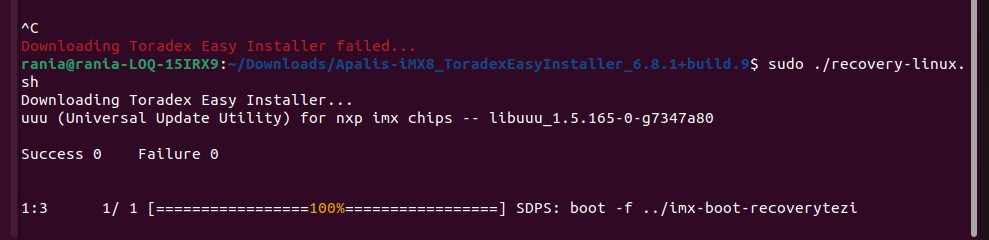
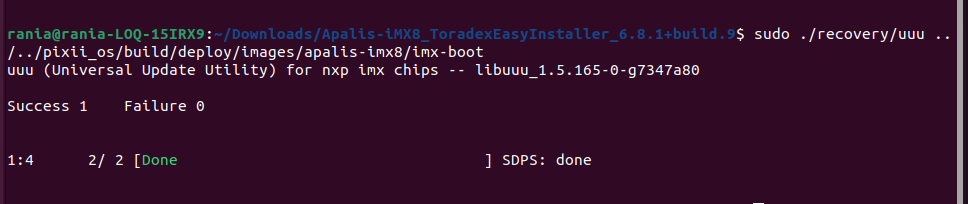
this last bbclass isn’t tested yet cause the secure boot is causing me serious problems once flashed with version the board no longer goes under recovery mode unless wiping its emmc
mmc dev 0 1
mmc erase 0 2000
mmc dev 0 2
mmc erase 0 2000
reset
till i ended up with a blank console and the module is no even loger flashable it’s completely ruined depite not efusing yet !!!
one last thing my configurations were inspired from here
https://hub.mender.io/t/mender-cm4-dm-verity/8260/7