3.2.0 Updated...now issues with device connection, etc

Hi. Same issues as:

Came in this morning, started up, extension had updated to 3.2.106, can no longer see any of the toradex devices, and doesn’t look for them. Here’s the startup log:

[11-24 07:32:53.350] Activating Torizon IDE …

[11-24 07:32:53.350] Torizon IDE version :: 3.2.106

[11-24 07:32:55.420] Latest Torizon IDE published :: 3.2.106

[11-24 07:32:55.420] Telemetry is enabled

[11-24 07:32:55.420] Extension collects completely anonymous telemetry data about templates usage. Participation in this anonymous program is optional, and you may opt-out if you’d not like to share any information. Check: Settings - Data Collection | Toradex Developer Center

[11-24 07:32:55.420] Telemetry allows us to accurately gauge templates usage. This data will help us to focus better on the most used templates, adding new features and putting effort in the right place.

[11-24 07:32:55.421] Resolving host IP address …

[11-24 07:32:56.576] Host IP address OK

[11-24 07:32:56.576] Bash as default shell OK

[11-24 07:32:56.753] Docker installed OK

[11-24 07:32:56.971] Docker running OK

[11-24 07:32:57.083] Docker compose OK

[11-24 07:32:57.093] PowerShell OK

[11-24 07:32:57.113] git OK

[11-24 07:32:57.120] dig OK

[11-24 07:32:57.128] avahi-resolve OK

[11-24 07:32:57.443] nmap OK

[11-24 07:32:57.459] iputils-ping OK

[11-24 07:32:57.468] file OK

[11-24 07:32:57.484] sshpass OK

[11-24 07:32:57.509] iproute2 OK

[11-24 07:32:57.518] rsync OK

[11-24 07:32:57.525] python3 OK

[11-24 07:32:57.532] pipx OK

[11-24 07:32:57.533] Cloning project templates

[11-24 07:32:57.533] Templates repo: GitHub - torizon/vscode-torizon-templates: VS Code Torizon Integrated Development Environment Templates

[11-24 07:32:57.533] Templates branch: dev

[11-24 07:32:57.533] Templates tag/hash: dev

[11-24 07:32:57.541] Project templates clone of branch dev OK

[11-24 07:33:13.016] Project templates fetched OK

[11-24 07:33:13.081] Checkout templates repo to tag origin/dev OK

[11-24 07:33:48.898] xonsh installation OK

It seems like it used to run a bunch of other scripts at startup also (didn’t pay that much attention cuz worked fine before.) I did notice that the “Ports” tab doesn’t have a forwarded port after startup now (I think it used to?)

Running on Windows.

Let me know what other info u want.

1 Like

Hi, I’m the Toradex AI Assistant.

I might make mistakes or occasionally get you wrong. Our support team will step in if needed.


Torizon IDE Extension Device Detection Issues

Based on your startup log and the issues you’re experiencing, there are several potential causes for the extension not detecting your Toradex devices after the update to version 3.2.106.

Troubleshooting Steps

1. Check Auto-Scan Settings

The extension has an auto-scan feature that can be disabled(1). Verify that automatic scanning is enabled:

  • Open VS Code settings and search for torizon.autoScan(1)
  • Ensure this boolean setting is set to true(1) (this is the default)
  • If set to false, the extension won’t automatically scan for devices when opening workspace folders(1)

2. Manual Device Addition

If automatic scanning isn’t working, you can manually add devices(2):

  • Click the Torizon icon in the left menu bar(2)
  • Click the + icon to manually add devices(2)
  • Input your device’s IP address(2)

3. Network and Port Requirements

Ensure the following ports are accessible between your machine and the development board(3):

  • 22 (Dev Board SSH Connection)(3)
  • 2375 (Docker API)(3)
  • 5002 (Local Docker Registry)(3)
  • 2222 (Container SSH Connection)(3)

4. Host IP Configuration Issues

Similar to the community reports, there may be an issue with host IP detection(4). Try setting the host IP manually:

  • Open VS Code global settings
  • Search for torizon.overwriteHostIp(1)
  • Set it explicitly to your host machine’s IP address(1)
  • This setting overwrites the automatically detected IP address and can resolve issues when the automatic detection gets the wrong interface(1)

5. Check Internal VS Code Logs

To get more detailed information about what’s happening during startup(3):

  1. Open the VS Code command palette and select Developer: Toggle Developer Tools(3)
  2. Click on the Console tab and check the logs(3)
  3. Look for any error messages related to device scanning or network detection

6. Verify Network Connectivity

Test basic connectivity to your device:

ping -W 1 -c 1 <device-ip-address>

If this fails with “Operation not permitted”, you may need to set ping capabilities(3):

sudo setcap cap_net_raw+ep /bin/ping

Extension Configuration

Your startup log shows the extension is using the dev branch for templates, which may indicate you’re using experimental features(1). Consider checking if the torizon.experimental setting is affecting device detection(1).

The missing port forwarding you mentioned could be related to the local Docker registry not starting properly, which would affect device communication.

Best regards, Toradex AI Assistant.


Did you like my answer? :+1: :-1:

If I answered your question, please tick the “Solution” checkbox.

For follow-up questions to me, please use @ToradexAI in your post.

Hey @Dave

There is the version v3.2.107 that should already have the fix. Try it, please.

BR,

Hi @matheus.tx

Ya, i grabbed that one. It found the devices, but seemed to have a little trouble with some of the other scripts:

* Executing task: xonsh /home/dmoore/configrest/.conf/share-wsl-ports.xsh /home/dmoore/configrest

* The terminal process failed to launch: Cannot launch a terminal process in an untrusted workspace with cwd \home\dmoore\configrest and userHome \home\dmoore.

* Executing task: xonsh /home/dmoore/configrest/.conf/run-container-if-not-exists.xsh --container-runtime docker --run-arguments “–rm --privileged torizon/binfmt:latest” --container-name binfmt

* The terminal process failed to launch: Cannot launch a terminal process in an untrusted workspace with cwd \home\dmoore\configrest and userHome \home\dmoore.
Container Runtime: docker
Run Arguments: --rm --privileged torizon/binfmt:latest
Container Name: binfmt
Container does not exist. Starting …
Cmd: docker run --name binfmt --rm --privileged torizon/binfmt:latest

* Executing task: /home/dmoore/.local/bin/xonsh /home/dmoore/configrest/.conf/run-container-if-not-exists.xsh --container-runtime docker --run-arguments “-d -p 5002:5000 --restart=always registry:2” --container-name registry

* The terminal process failed to launch: Cannot launch a terminal process in an untrusted workspace with cwd \home\dmoore\configrest and userHome \home\dmoore.
Container Runtime: docker
Run Arguments: -d -p 5002:5000 --restart=always registry:2
Container Name: registry
Container registry already created
Checking if container registry is running…
Container registry is already running.

And here’s the other output terminal stuff:
[11-24 09:01:20.778] Activating Torizon IDE …

[11-24 09:01:20.778] Torizon IDE version :: 3.2.107

[11-24 09:01:23.279] Latest Torizon IDE published :: 3.2.107

[11-24 09:01:23.280] Telemetry is enabled

[11-24 09:01:23.280] Extension collects completely anonymous telemetry data about templates usage. Participation in this anonymous program is optional, and you may opt-out if you’d not like to share any information. Check: Settings - Data Collection | Toradex Developer Center

[11-24 09:01:23.280] Telemetry allows us to accurately gauge templates usage. This data will help us to focus better on the most used templates, adding new features and putting effort in the right place.

[11-24 09:01:23.280] Resolving host IP address …

[11-24 09:01:24.643] Host IP address OK

[11-24 09:01:24.644] Bash as default shell OK

[11-24 09:01:24.652] Docker installed OK

[11-24 09:01:24.848] Docker running OK

[11-24 09:01:25.152] Docker compose OK

[11-24 09:01:25.159] PowerShell OK

[11-24 09:01:25.166] git OK

[11-24 09:01:25.174] dig OK

[11-24 09:01:25.183] avahi-resolve OK

[11-24 09:01:25.191] nmap OK

[11-24 09:01:25.199] iputils-ping OK

[11-24 09:01:25.206] file OK

[11-24 09:01:25.213] sshpass OK

[11-24 09:01:25.237] iproute2 OK

[11-24 09:01:25.245] rsync OK

[11-24 09:01:25.252] python3 OK

[11-24 09:01:25.260] pipx OK

[11-24 09:01:25.261] Cloning project templates

[11-24 09:01:25.261] Templates repo: GitHub - torizon/vscode-torizon-templates: VS Code Torizon Integrated Development Environment Templates

[11-24 09:01:25.261] Templates branch: dev

[11-24 09:01:25.261] Templates tag/hash: dev

[11-24 09:01:25.275] Project templates clone of branch dev OK

[11-24 09:01:40.762] Project templates fetched OK

[11-24 09:01:40.789] Checkout templates repo to tag origin/dev OK

[11-24 09:02:17.204] xonsh installation OK

[11-24 09:02:17.208] WARNING :: Project name not found in workspace metadata for single container workspace, or it matches the workspace name.

[11-24 09:02:17.210] Checking connected devices …

[11-24 09:02:17.211] Scanning Torizon devices …

[11-24 09:02:17.220] Debian bookworm packages list load OK

[11-24 09:02:17.221] Debug id_rsa OK

[11-24 09:02:17.273] Checking host ip sanity …

[11-24 09:02:18.022] Torizon IDE extension activated

[11-24 09:02:18.607] Host ip is OK

[11-24 09:02:18.655] Device 10.1.10.65 set as Docker Host

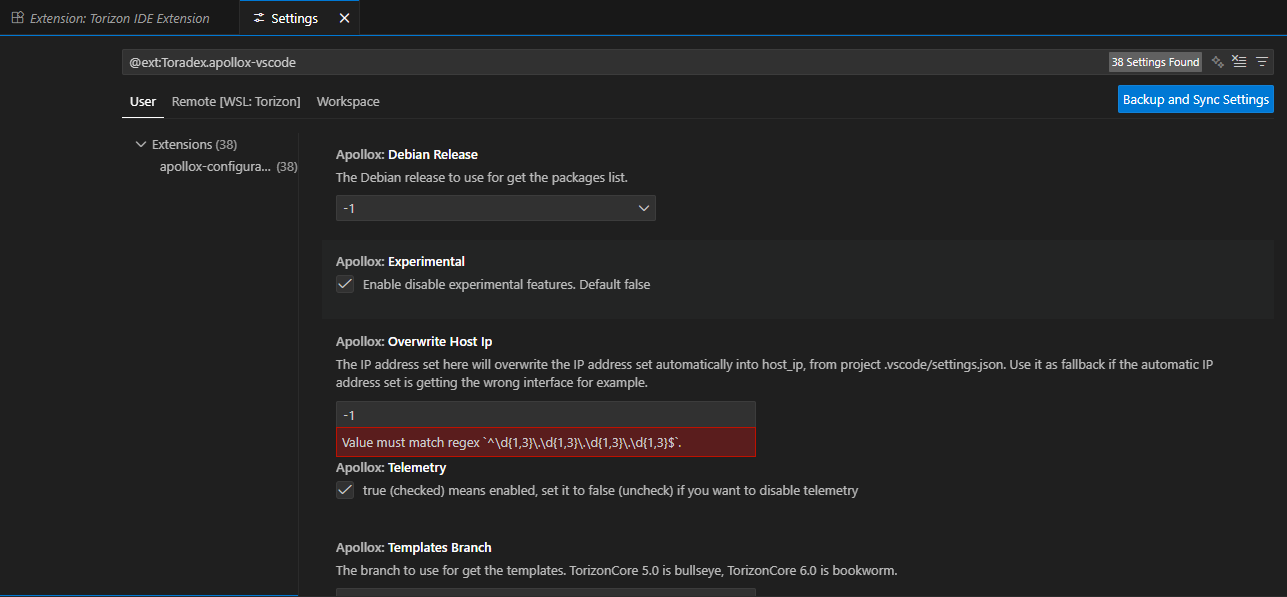
I did notice in the extension settings that it seems to have lost all of the settings there? Here’s a screenshot of that screen:

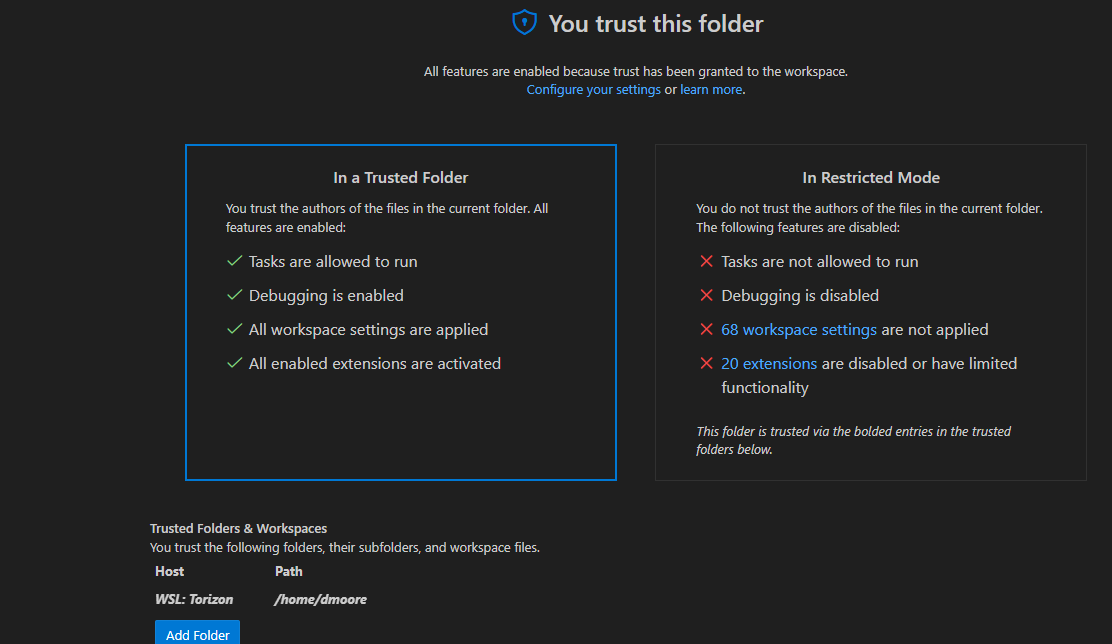
And vsc seems to trust that folder:

Hey @DaveM

Thanks for the logs.

About the:

The terminal process failed to launch: Cannot launch a terminal process in an untrusted

It seems a bug from VS Code side, although the message, the command executes successfully.

About the extension settings we do not support the settings UI, so if possible check the settings.json.

BR,

Ok, thanks @matheus.tx . Never saw it before the 3.2.x updates, so just thought I’d let you know.

1 Like

Hello @matheus.tx ,

I have the same issue when opening my folder at wsl:

Executing task: xonsh /home/dizaynvip/dizaynVIPSystem/.conf/share-wsl-ports.xsh /home/dizaynvip/dizaynVIPSystem

The terminal process failed to launch: Cannot launch a terminal process in an untrusted workspace with cwd \home\dizaynvip\dizaynVIPSystem and userHome \home\dizaynvip

And this happened after vs code updated to version: 1.106.3.

So do you have any idea why this happened please? Do you have a work around?

Best regards,

Tarek

fyi, if i just cut and paste the same command into a newly created terminal window, it runs just fine. @matheus.tx said the command actually does run successfully anyway, just seems like there is something a bit off now with vsc interaction.

I downgraded the VS Code version to 1.105.1 to resolve this issue. This problem started appearing every time I opened a folder containing a Torizon project, but after downgrading, this issue disappeared.