Hello,
We recently had an issue with one of our field devices, where SOM (Verdin AM62 D 1BG WB IT V1.2A) seems to have died due to an unknown cause. We use a custom carrier board based on Mallow Carrier Board. The power supply on our carrier board seems to operate correctly.
Observed behaviour:
When the SOM is plugged into the Yavia board for example, none of the LEDs indicating healthy power supply voltages or peripherals light up , which means that something on the SOM no longer functions eletrically.
The question:
Unfortunately, we don’t have capability/resources currently to debug the SOM hardware to find what failed and get closer to the root cause. Does Toradex provide some sort of service for this, or we just hope it doesnt happen again?
Hi, I’m the Toradex AI Assistant.
I might make mistakes or occasionally get you wrong. Our support team will step in if needed.
I understand you’re facing a challenging situation with a potentially failed Verdin AM62 module in the field. While the provided documentation doesn’t specifically address hardware failure analysis services, I can offer some guidance.
Initial Diagnostic Steps
Before concluding the SoM has failed, I’d recommend verifying a few things:
-
Confirm power rails - Even though your carrier board power supply appears correct, verify all required voltage rails are present at the SoM connector according to the specifications in the Verdin AM62 datasheet(1)
-
Test with known-good hardware - Since you mentioned testing on the Yavia board with no LED activity, this does suggest a potential SoM issue. However, if possible, test your carrier board with a known-good Verdin AM62 module to rule out any carrier board problems
-
Check for physical damage - Inspect the SoM connector pins and the module itself for any visible damage, corrosion, or signs of electrical stress
Toradex Support and RMA Process
For hardware failure analysis and potential replacement:
-
Contact Toradex Support directly - Reach out through the official support channels. You can find contact information at developer.toradex.com
-
RMA Process - Toradex typically has a Return Merchandise Authorization (RMA) process for defective hardware. They may be able to:
- Analyze the failed module
- Provide failure analysis reports
- Offer replacement under warranty (if applicable)
-
Field Failure Investigation - When contacting support, provide:
- Module serial number and version
- Operating conditions (temperature, voltage, environment)
- Any events preceding the failure
- Your carrier board design details
Preventive Measures
To help prevent future occurrences:
- Review the absolute maximum ratings in the Verdin AM62 datasheet(1)
- Ensure proper ESD protection on your carrier board
- Verify power sequencing meets requirements
- Consider implementing voltage monitoring and logging
I recommend reaching out to Toradex support directly to discuss your specific case and explore available options for failure analysis and potential replacement.
Best regards, Toradex AI Assistant.
Did you like my answer? 

If I answered your question, please tick the “Solution” checkbox.
For follow-up questions to me, please use @ToradexAI in your post.
Hi @stasgil!
In this case, we recommend opening an RMA request through the following link: Return Material Authorization (RMA)
Best regards.
Thanks, actually when i looked at the RMA form, i realised that i haven’t tried the board recovery procedure, as I was convinced that some component died. But from the serial logs of the recovery (attached), it looks like main eMMC read on the SOM completely fails.
ACU_08722751_recovery.log (8.1 KB)
Is this still something that is covered by the RMA ? The device is relatively new and was in the field for maybe a month.
Hi @stasgil!
Have you tried flashing the image again? If not, could you please put the module into recovery mode and flash the image again to check whether the issue persists?
Best regards.
Hi,
From the log it is clear that there is some serious issue is with the am62 chip eMMC, and attempts to flash a new image fail with following steps:
- Enter recovery mode
- Open vncviewer
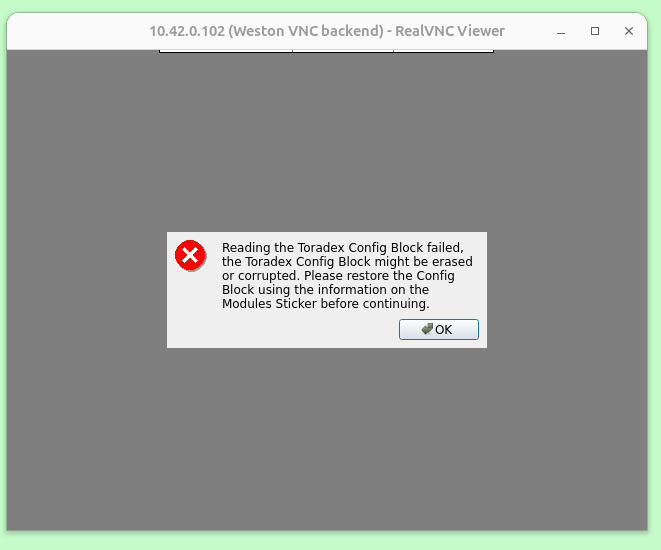
- Observe error message that config block failed
- Restore config block information through vncviewer UI
- Insert USB media with the image
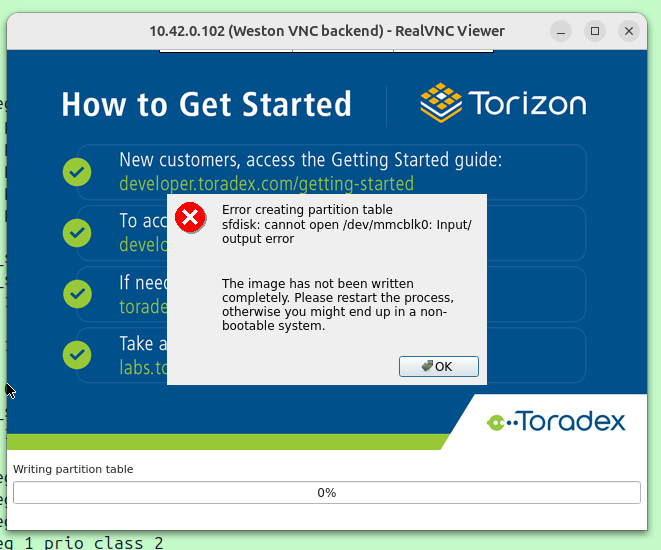
- Download stalls at “Writing partition table” step and then errors out:
Serial log captured during the attempt:
087722751_recover_attempt.log (17.1 KB)
Hi @stasgil!
Sorry for the delayed response.
Were you able to resolve the issue? If so, could you please share how you resolved it?
Best regards.