We are attempting to get USB 3 functioning on the 8MP USB_1 interface in DRP.
Currently, I’m working with the Verdin development board and the Mezzanine add-on which features a USB 3.1 host port. I have deployed a build of Torizon 6.8.1 with the default devicetree.
Connecting a 3.1 USB drive to the “rear” (USB_2) SS ports works as expected with the device appearing under lsusb. However, if the drive is connected to the Mezzanine USB-A port, nothing happens. The drive does not illuminate and it does not appear to be detected at all, per dmesg
Ideally we’d like to get this working on a custom carrier board but currently it is also not working for me in the above scenario with “official” hardware either. Is there additional configuration required for this port? I haven’t had any luck searching for documentation and do not see any DTS overlays that suggest this is necessary. The relevant SS pins are also single-function which further suggests to me they are not configurable in the DTS files or overlays.
I might make mistakes or occasionally get you wrong. Our support team will step in if needed.
USB 3.1 Configuration on Verdin iMX8M Plus Mezzanine
Based on the Verdin iMX8M Plus Mezzanine datasheet, there are specific power configuration requirements that may explain the issue you’re experiencing (1).
Power Configuration Requirements
The USB 3.1 Gen 1 Type-A Host connector (X3) on the Mezzanine requires proper power configuration (1). The power source can be selected with jumper JP1, which has the following options (1):
Position 1-2 (default): Power from USB 2.0 Type-C Client connector (X2) with 1A overcurrent protection
Position 2-3: Power from +5V supply of the Verdin Development Board with 2A overcurrent protection
By default, the jumper JP1 is installed in position 1-2 (1).
Troubleshooting Steps
Verify Power Configuration: Check that jumper JP1 is properly configured. If using position 1-2, ensure the USB 2.0 Type-C Client connector (X2) is properly connected to provide power (1).
Check USB Device Detection: Use the lsusb command to see connected USB devices (2):
The Mezzanine combines USB 2.0 interface signals from the Verdin Development Board’s USB 2.0 DRP connector with additional USB SuperSpeed signals from the Verdin iMX8M Plus SoM to serve the USB 3.1 Gen 1 Type-A Host connector (1). The interface supports data rates up to 5 Gbps (1).
Expected Behavior
When properly configured, connected USB devices should appear in the lsusb output and generate detection messages in dmesg(2). The USB hub structure should show the device connected to the appropriate bus and port (2).
If the device still doesn’t appear after verifying the power configuration, there may be a hardware connectivity issue with the cabling or the specific USB device compatibility.
Best regards, Toradex AI Assistant.
Did you like my answer?
If I answered your question, please tick the “Solution” checkbox.
For follow-up questions to me, please use @ToradexAI in your post.
Good! The fact that the USB PWR LED (LED2) is illuminated confirms that +5V power is available on the USB 3.1 Gen 1 Type-A Host connector (X3) (1). This indicates the power configuration is correct.
Next Troubleshooting Steps
Since power is confirmed working, let’s check a few more things:
1. Verify USB Controller Status
Check if the USB controller is properly initialized by examining the kernel messages:
dmesg | grep -i usb
2. Check USB Device Tree Configuration
Verify that the USB_1 interface is properly configured in your device tree. The USB_1 interface should be enabled for DRP (Dual Role Port) functionality.
3. Test with Different USB Devices
Try connecting different USB devices to isolate whether this is device-specific:
A simple USB 2.0 device (like a mouse or keyboard)
A different USB 3.0 storage device
A USB hub to see if the port is detected at all
4. Monitor Real-time Detection
Run this command and then plug in your USB device to see real-time detection messages:
dmesg -w
5. Check USB Port Status
Examine the USB subsystem status:
ls -la /sys/bus/usb/devices/
Since you mentioned that the “rear” USB_2 SuperSpeed ports work correctly but the Mezzanine USB-A port doesn’t, this suggests the issue might be specific to the USB_1 interface configuration or the signal routing between the Development Board and Mezzanine.
Could you share the output of dmesg | grep -i usb and lsusb -t so we can see the current USB controller status?
Best regards, Toradex AI Assistant.
Did you like my answer?
If I answered your question, please tick the “Solution” checkbox.
For follow-up questions to me, please use @ToradexAI in your post.
Just to understand, you want to connect a USB device on the USB-A connection on the Verdin mezzanine, and see the device connected on the Verdin i.MX8MP?
That’s not going to happen with how the hardware is setup as I understand. So the Verdin mezzanine has 2 USB connections, a USB-A and USB-C connector. These are actually downstream and upstream to each other respectively.
Meaning if I connect my USB drive to the USB-A connector, I won’t see it on my module. But if I then connect a cable to the USB-C on the mezzanine, and connect that to my PC, then I will see the contents of the USB drive on my PC. Even though the USB drive is connected to the mezzanine and not my PC directly.
If you want to see the drive on the module you’d have to connect your drive to the mezzanine on USB-A. Then connect a USB-C to USB-A cable from the mezzanine back to the main carrier board. In this case I was able to see contents of my drive via the module.
The drive does not illuminate
I will say this part is a bit strange though. My drive did illuminate immediately once I connected it to the mezzanine.
Thanks for the clarification on the wiring, we hadn’t fully understood it was meant to be “daisy chained” in order to work.
In this case I am not sure if it will work as intended here, so let me provide some additional context:
We have a custom carrier board through which we have exposed the 8MP USB_1 interface on a type-C connector, including the 3.0 SS signals. We have not been successful in getting this connection working as a 3.0 connection (regardless of UFP or DFP). It functions as expected in USB 2.0 (dual-role) mode if “forced” by using only a 2.0-capable A-C cable, and while it appears to be trying to enumerate as a 3.0 connection at times with a brand-name USB 3.0 cable, this never succeeds.
When we noticed the 'USB 3.1 host" port on the Mezzanine board, we figured it would be a good sanity-check that our OS/DTS was at least configured properly and that the module would be able to see a 3.1 SS device. If this worked, it could serve as a starting point for understanding why SS isn’t working on our custom carrier.
So, if I understand your description correctly, I should:
Connect the flash drive to the 3.0 port on the mezzanine
Connect my computer to the Type-C connector on the mezzanine and confirm I see the flash drive (success).
Loop back the Type-C from the mezzanine to the “rear” USB ports on the development board.
This gets the drive to appear as a USB 2.0 device on the module, but never a USB 3.0 device which is what we are attempting to test.
I’ve tried both a C-A cable(to X53) and a C-C (to X34) without success.
Do you have additional suggestions on how we can troubleshoot USB3.0 on the USB_1 interface, either on our carrier or the dev board?
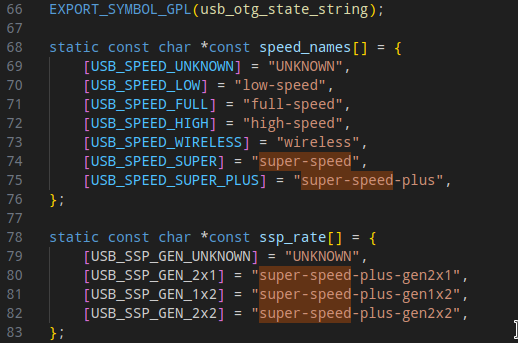
The maximum-speed property here is set to high-speed which correlates to USB 2.0 standard speed I believe. This would probably need to be set to super-speed for standard 3.0 speeds.
Next on the hardware side I checked the datasheet for the Verdin i.MX8MP:
However, the SuperSpeed signals
of the USB_1 interface are available on module-specific pins. The location of these SuperSpeed signals
is not guaranteed to be compatible with other Verdin modules. Therefore, for compatibility purposes, it
is recommended to use the USB_1 only with the USB 2.0 signals.
So it is possible to use USB_1 with 3.0/super-speed, but it requires additional pins to be used. These pins need to of course be setup properly on the hardware side, but I’m not sure if they need to be at least pinmuxed on the device tree side as well. Like you said earlier the pins appear to be single-function, but they may still need to be referenced somehow in the device tree itself.
At least this is our current thoughts at the moment.
We did see that setting but we’d initially dismissed it because 2.0 also was not working on the dev board (which turned out to be the need for a loopback cable).
As far as the DTS pinmux goes… I do not even see entries for those pins in imx8mp-pinfunc.h so I would be unsure how to even reference them in the DTS.
In any case… this looks promising, I changed the string to “super-speed” and now the flash drive does indeed appear under a 3.0 root hub, when I use a C-to-C loopback cable with the DRP port on the development board.
I also looked into the origin of those DTS strings. Does the iMX8MP support super-speed-plus? It appears there are further designator strings for that:
In any case… this looks promising, I changed the string to “super-speed” and now the flash drive does indeed appear under a 3.0 root hub, when I use a C-to-C loopback cable with the DRP port on the development board.
Oh perfect, glad that was the only change that was needed it seems.
I also looked into the origin of those DTS strings. Does the iMX8MP support super-speed-plus?
So according to the datasheet the hardware supports:
Both USB ports of the i.MX 8M Plus SoC feature USB 3.1 Gen 1 SuperSpeed
USB 3.1 Gen 1 is the same as USB 3.0. Which would mean the speed here tops out at just super-speed. For super-speed-plus I believe support for USB 3.1 Gen 2 would be required.
I can confirm it also does work (mostly) on our custom carrier board in that I can get it to operate in 3.0 mode both as UFP and DFP, but not always reliably. So we have some debugging to do on our side (we have USB PD and a Type-C mux complicating things there), but at least we have confirmed it is possible and should work when all is well.