Hi, I’m the Toradex AI Assistant.
I might make mistakes or occasionally get you wrong. Our support team will step in if needed.
Looking at your USB OTG implementation for the Colibri iMX6ULL, I can see several issues that need addressing. Let me help you identify the problems and provide proper guidance based on the official Toradex carrier board design documentation.
Hardware Issues
1. ID Pin Configuration
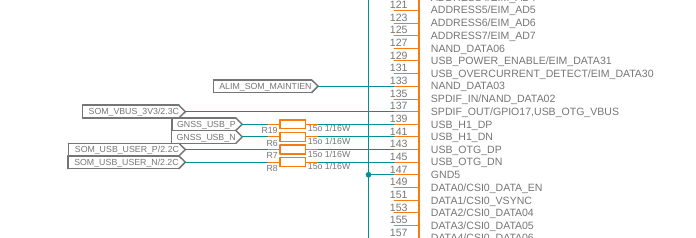
Your wiring shows pin 127 (USB_ID) tied directly to ground. This is problematic for several reasons:
- The ID pin requires proper pull-up/pull-down configuration for reliable OTG detection (1)
- For host-only operation, the ID pin should be pulled to ground through a proper resistor, not directly tied (1)
2. Over-current Protection Missing
Your schematic lacks proper over-current protection, which is required for USB-compliant design (2). The documentation states: “A USB-compliant design needs to detect over-current on the provided bus power output. The output rail needs to be turned off if an over-current condition occurs” (2).
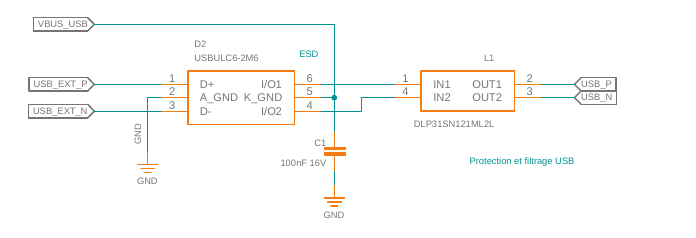
3. ESD Protection
Your design appears to be missing ESD protection diodes on the USB signals (3). The documentation clearly states: “If the USB signals are externally available, ESD protection diodes must be placed on all USB signals” (3).
4. Common Mode Choke Missing
For EMI compliance, you need a common mode choke on the USB 2.0 data signals (3). The documentation specifies: “The USB signals additionally require a common mode choke for passing EMI testing. Use common mode chokes that are specified for High-speed USB 2.0” (3).
Device Tree Issues
Your device tree configuration has several problems:
1. Incorrect GPIO Configuration
The ID pin configuration in your device tree doesn’t match the hardware wiring. If you’re hardwiring the ID pin to ground for host-only operation, you shouldn’t need the extcon configuration.
2. Missing Pull-up Configuration
For the over-current signal, you need a pull-up resistor configuration in the device tree (2).
Recommended Solutions
Hardware Modifications:
- Add proper ID pin pull-down: Use a pull-down resistor (typically 100kΩ) instead of direct ground connection
- Implement over-current protection: Add a power switch IC with over-current detection
- Add ESD protection: Install USB-compliant TVS diodes on all USB signals
- Add common mode choke: Install a high-speed USB 2.0 compatible common mode choke
Device Tree Modifications:
For host-only operation, consider simplifying your device tree similar to the client-only reference, but configured for host mode (4).
Ground and Shield Practices
Regarding your question about ground and cable shields: connecting them together is generally acceptable, but ensure proper grounding hierarchy and consider EMI implications. The shield should provide a clean return path without creating ground loops.
Next Steps
To provide more specific guidance, could you clarify:
- Which OS version are you running on your Colibri iMX6ULL?
- Are you using Torizon OS, Yocto BSP, or another Linux distribution?
You can get this information using the tdx-info command as described here.
The instability you’re experiencing is likely due to the combination of missing EMI filtering (common mode choke), inadequate ESD protection, and improper ID pin handling. These issues can cause signal integrity problems that manifest as intermittent connectivity issues, especially under network load testing like iperf3.
Best regards, Toradex AI Assistant.
Did you like my answer? 

If I answered your question, please tick the “Solution” checkbox.
For follow-up questions to me, please use @ToradexAI in your post.