Good morning,
my team and I have been working with the Apalis imx8 (ixora carrier) using a custom tdx-reference-minimal image to netboot from a TFTP server (which works perfectly) … now we want to be able to use the CSI camera Ar0521. I was told that the Camera can only be used with the tdx-reference-multimedia-image and not the tdx-reference-minimal-image. Hence, we re-configured our image with the same file from the minimal image as the following:
→ local.conf + a few IMAGE_INSTALL such as gstreamer-plugging-good only (removing bad, ugly and base) adding Vulkan tools etc…
→ bblayers.conf has our custom layers and the layers that make the tdx-reference-multimedia-image works, layers such as:
${TOPDIR}/../layers/meta-openembedded/meta-gnome
${TOPDIR}/../layers/meta-toradex-demos
${TOPDIR}/../layers/meta-openembedded/meta-networking
${TOPDIR}/../layers/meta-openembedded/meta-multimedia
${TOPDIR}/../layers/meta-openembedded/meta-python
${TOPDIR}/../layers/meta-qt5 \
After building the image $ bitbake tdx-reference-multimedia-image and try to get the board to netboot, I get the following error: [ 69.023330] Memory Limit: none [ 69.026382] —[ end Kernel panic - not syncing: System is deadlocked on memory ]—
However, when I unzip the tezi_Image.tar and put it on an SD card (Using the Easy Installer) the custom image was able to work. After a couple weeks spent to fix the image it still failed.
I guess I am on my own on this one (9 days later and counting lol).
Though, I am able to get rid of the kernel panic issue. Now it boots and I m only able to interact with it using the serial debug - we have blackscreen now: the demo: “wayland-qtdemo-launch-cinematicexperience” not showing. Error: Dependency failed for start a wayland application.
Does this mean you are still using the core-minimal-reference image, but have added the layers that would be included in the reference-multimedia-image?
Also, does this issue only occur when you add the requirements for the AR0521? Can you isolate what addition to the image causes this weston issue?
The kernel Panic issue has been solved.
by adding “cma=512” in the kernel command: setenv bootargs other_parameters consoleblank=0 earlycon console=${console},${baudrate} rootwait cma=512 etc...
and by adding the below lines in the rootfs files for the kernel-recipes and oe-core/build/conf/local.conf:
|
|
To answer your questions: no, I haven’t added the AR0521 requirements (though thats the next step).
I do not use the core-minimal-image but i have it build in the ~/oe-core/build/deploy/image/apalis-imx8/.
I build the tdx-reference-multimedia-image on top with the same bblayers.conf and local.conf files {after building the core-minimal-image & the tdx-reference-minimal}.
The issue is still kind of remain since the qt-demo with HDMI display is working when I boot the board from SD card , but, when I Netboot the image to the board I get a blackscreen (no HDMI) … I can only see whats going on using the serial debug and I get the ERRORS:
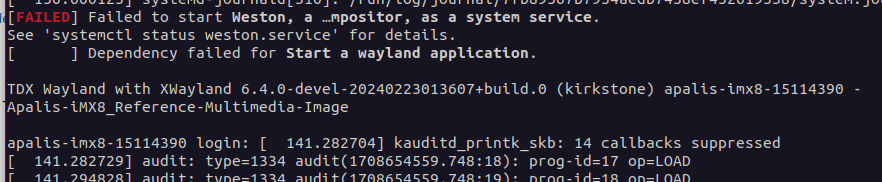
 [FAILED] Failed to start Weston, a …mpositor, as a system service.
See 'systemctl status weston.service' for details.
[DEPEND] Dependency failed for Start a wayland application.
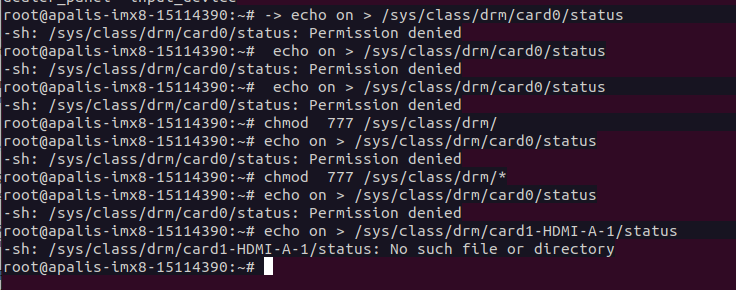
the command below to turn on the HDMI does not work:
→ echo on > /sys/class/drm/card1-HDMI-A-1/status root@apalis-imx8-15114390:~# echo on > /sys/class/drm/card1-HDMI-A-1/status -sh: /sys/class/drm/card1-HDMI-A-1/status: No such file or directory
Thanks for the added info. And the image works as intended when you deploy the image to the board from an SD card but not from Netboot? Can you describe your netboot setup?
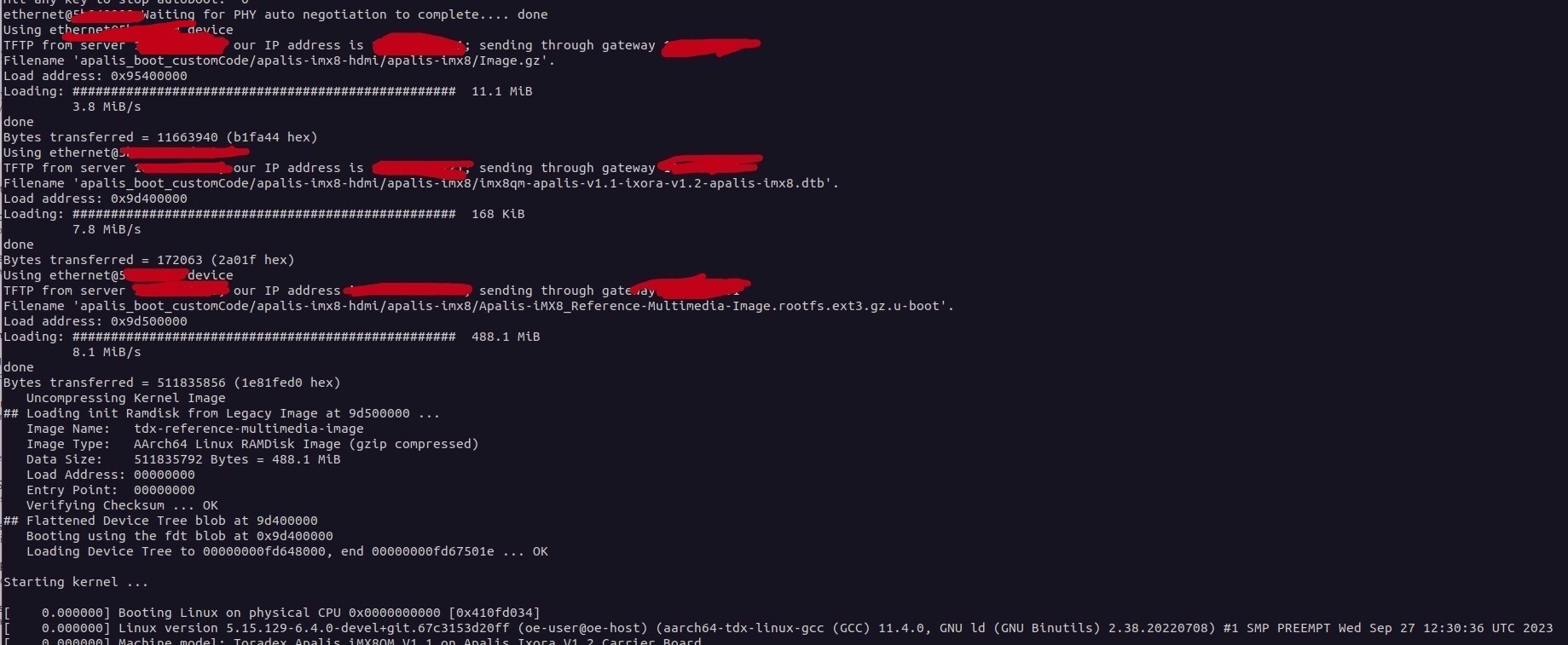
The netboot setup is as followed:
→ Using minicom: Hold keyboard space bar prior to turn on the board to boot into kernel
→ set a few commands like these:
All these commands work before to netboot the core-image-minimal, the core-image-full-cmdline and the tdx-reference-minimal-image. Now we need to netboot the board with the tdx-reference-multimedia-image to prep it for the CSI AR0521 camera. I mean the board boots (Netboot) using the tdx-reference-multimedia-image but we can only see it via serial debug, HDMI not loading/blackscreen, hence, no wayland-qtdemo-launch-cinematicexperience
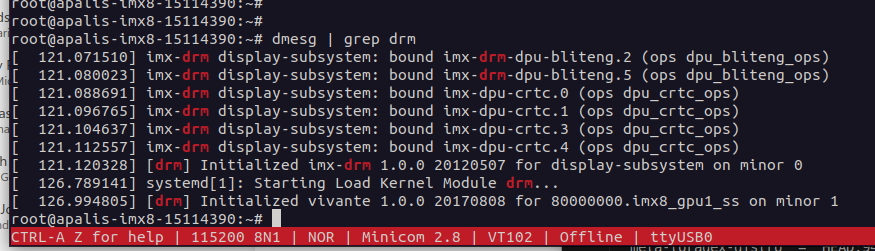
maybe this might help narrow down the issue: in the attached image when netboot and run the command “dmesg | grep drm” we get[drm] Initialized vivante 1.0.0 20170808 for 80000000.imx8_gpu1_ss on minor 1but when booting the same image from SD Card we get instead something like80000000.hdmi and the wayland-qtdemo-launch-cinematicexperience is running
Can you run and post the output from the two scenarios of cat /proc/cmdline
This will let us see if the set variables are different between the working image upload and non-working image upload.
From the Netboot output, your getting root =/dev/ram which looks indicative of not having the root filesystem on the module. Which would come from from the NFS server. Do you have a NFS configured/setup? It may require some adjustments.
What is common (and our guide) uses TFTP to transfer the kernel/device tree/overlays and NFS to reference the rootfs ( w/ DCHP). Linux will mount the NFS filesystem over the network. Transferring the rootfs via TFTP isn’t really what TFTP is designed for (large unsecured files). I’m not sure this would work/be reliable. Are you able to try the NFS method via the guides?
Yes, it has been working for the past 6-months. Yes, we are locked in with this method.
Note: The ext3.gz.u-boot should work as long as it was created inside the oe-core/build/deploy/images/apalis-imx8/
and this is part of the local.conf :
Can you attempt to boot a base reference minimal image without any modifications, besides the required changes to get the ext3.gz.u-boot.
This will allow us to isolate just the image and the booting process. And see if this works.
Yes, that’s one of the first steps we did when we first got the board. We have been using reference-minimal-image the whole time. Only switch to reference-multimedia-image bacause we want to use the CSI camera.
Sorry I meant to say a base tdx-reference-multimedia-image, without any modifications, aside from the requirements for the filesystem image ext3.gz-u-boot
Sorry again for late reponse.
I try the tdx-reference-minimal image. No modification at all. Simply : bitbake tdx-refrence-minimal-image.
HDMI still not showing. I still have to use the serial debug to get a terminal to interact with the board.
For the tdx-reference-mutltimedia-image → it will not compile at all without modification of the local.conf and other files such as removed gstreamer-pluggin-bad and forced it to use gstreamer-plugging-good and pluggin-base.