Trusted Platform Module TPM Integration with IVY carrier Board

Hello All,

I am using IVY carrier board with running our custom Torizon OS Reference Minimal Image and kernel version is 6.6.94.

I want to add TPM support driver in our custom Torizon OS that we build in Yocto. I did following steps:

#TPM Integration
1. Enable TPM driver SLB9670 in kernel configuration
	bitbake -c menuconfig virtual/kernel
	//nevigate Device Drivers --> Character devices --> TPM Hardware Support
	//Ensure the corresponding driver (e.g., CONFIG_TCG_TPM, CONFIG_TCG_TIS_SPI) is enabled as a module (M) or built-in (Y).
2. Open your build/conf/local.conf file in a text editor add below line
	DISTRO_FEATURES:append = " tpm2"
	IMAGE_INSTALL:append = " tpm2-tools tpm2-tss"
	
3. 	bitbake-layers create-layer ../layers/meta-tpm-driver // Create the custom layer
	// Add customer layer path in conf/bblayers.conf you can do manually or using below command
	bitbake-layers add-layer ../layers/meta-tpm-driver 
	// For modifying the kernel using yocto, create a custom recipes-kernel/linux recipe inside your layer, 
	// a linux-toradex directory to store your additional sources and a .bbappend file.
	mkdir -p recipes-kernel/linux/linux-toradex
	//Please note that instead of % you may want to append the change to a specific version (e.g. recipes-kernel/linux/linux-toradex_5.15%.bbappend)
	touch recipes-kernel/linux/linux-toradex/linux-toradex_6.6%.bbappend
	// Create the files folder under /home/vishal/oe-core/layers/meta-tpm-driver/recipes-kernel/linux
	// below contents in my .bbappend file
	# In meta-my-project/recipes-kernel/linux/linux-imx_%.bbappend

	# 1. Point to your DTS source file in the 'files' directory
	SRC_URI += "file://slm9670-tpm.dts"

	# 2. Tell the kernel build system to compile this file into a .dtbo
	IMX8M_KERNEL_DEVICETREE_OVERLAYS += "overlays/slm9670-tpm.dtbo"

	# 3. Tell the Toradex boot scripts to activate it by default
	IMX8M_EXTRA_CONFIG += "dtoverlay=slb9670-tpm"

4. //Create the .dts file in files folder go ot below
	cd ~/oe-core/layers/meta-my-project/recipes-kernel/linux/files/
	nano slm9670-tpm.dts
//Use below device tree	
/dts-v1/;
/plugin/;

/ {
    fragment@0 {
        target = <&ecspi2>;
        __overlay__ {
            status = "okay"; // Ensure the parent bus is active

            tpm: tpm@0 {
                compatible = "infineon,slm9670";
                reg = <0>;
                spi-max-frequency = <10000000>;
                status = "okay";
            };
        };
    };
};

5. Verify TPM driver
	ls -l /dev/tpm*
	dmesg | grep -i tpm

When i did 5th steps in above “No such file or directory“ message will appear.

Please help me to address problem where I am doing wrong?

Thanks in Advanced..!!

Vishal

Hi, I’m the Toradex AI Assistant.

I might make mistakes or occasionally get you wrong. Our support team will step in if needed.


Issues with Your TPM Driver Integration

There are several issues with your current approach that need to be addressed. Let me help you implement TPM support correctly for your Torizon OS build.

1. Kernel Configuration Issues

Instead of using bitbake -c menuconfig virtual/kernel, you should use configuration fragments as recommended for Torizon OS builds (1). Create a configuration fragment file:

Create recipes-kernel/linux/linux-toradex/tpm.cfg:

CONFIG_TCG_TPM=m
CONFIG_TCG_TIS_SPI=m
CONFIG_TCG_TIS_SPI_CR50=m

(1)

2. Correct bbappend Structure

Your bbappend file structure needs correction. Based on the documentation for customizing the kernel (2), create:

recipes-kernel/linux/linux-toradex_%.bbappend:

FILESEXTRAPATHS:prepend := "${THISDIR}/linux-toradex:"

SRC_URI += "\
    file://tpm.cfg \
    file://slb9670-tpm.dts \
"

do_configure:append() {
    # For arm64 bit freescale/NXP devices
    cp ${WORKDIR}/slb9670-tpm.dts ${S}/arch/arm64/boot/dts/freescale
}

(2)

3. Device Tree Overlay Integration

For proper device tree overlay integration in your Yocto build (3), you need to:

  1. Add your overlay to the build system properly
  2. Enable it in the final image

Create a machine-specific configuration file as shown in the documentation (2):

conf/machine/verdin-imx8mp-extra.conf (adjust for your specific machine):

KERNEL_DEVICETREE:append = " freescale/slb9670-tpm.dtb"

(2)

4. Enable Overlays in Production Build

To enable your overlays in the Yocto Project build (3), you need to modify the TEZI_EXTERNAL_KERNEL_DEVICETREE_BOOT variable. You can do this in your machine configuration file or through a bbappend.

5. Verify Git Repository

Ensure your custom meta layer is initialized as a Git repository (2):

$ git init
$ git commit -m "Initial Commit" -m "Add <meta-tpm-driver> from template"

(2)

This is mandatory for Torizon OS builds due to how layer revision information is included with OSTree (2).

6. Rebuild and Deploy

After making these corrections:

  1. Clean and rebuild your kernel:

    bitbake -c clean virtual/kernel
    bitbake virtual/kernel
    
  2. Rebuild your image:

    bitbake torizon-minimal
    
  3. Deploy to your device and verify:

    ls -l /dev/tpm*
    dmesg | grep -i tpm
    

The key issues in your original approach were incorrect bbappend syntax, missing configuration fragments, and improper device tree overlay integration. Following the documented Toradex procedures should resolve the TPM driver integration.

Best regards, Toradex AI Assistant.


Did you like my answer? :+1: :-1:

If I answered your question, please tick the “Solution” checkbox.

For follow-up questions to me, please use @ToradexAI in your post.

Hello,

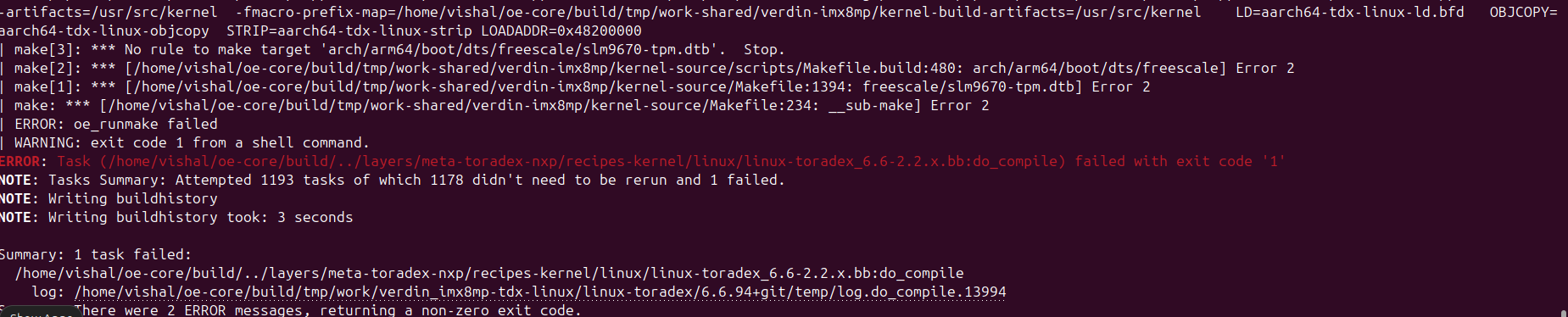
I did as @ToradexAI suggested steps but getting below ERROR:

Could please help me where I am wrong?

Thanks,

Vishal Borle

Fixing the Device Tree Compilation Error

Looking at your error, the issue is that the device tree file is not being found in the expected location during compilation. Let me help you fix this step by step.

1. Correct File Structure and Naming

Based on the Toradex documentation for device tree overlays(1), you need to structure your files properly:

Create your device tree overlay file as: recipes-kernel/linux/linux-toradex/slb9670-tpm.dts

2. Fix Your Device Tree Overlay Syntax

Your device tree overlay should follow the proper overlay format(1). Here’s the corrected version:

/dts-v1/;
/plugin/;

/ {
    compatible = "toradex,verdin-imx8mp"; // Adjust for your specific module
    
    fragment@0 {
        target = <&ecspi2>;
        __overlay__ {
            status = "okay";
            
            tpm@0 {
                compatible = "infineon,slb9670";
                reg = <0>;
                spi-max-frequency = <10000000>;
                status = "okay";
            };
        };
    };
};

(1)

3. Correct Your bbappend File

Your bbappend file should be named linux-toradex_%.bbappend and contain(1):

FILESEXTRAPATHS:prepend := "${THISDIR}/linux-toradex:"

SRC_URI += "file://slb9670-tpm.dts"

# For device tree overlays, use the proper build process
do_configure:append() {
    cp ${WORKDIR}/slb9670-tpm.dts ${S}/arch/arm64/boot/dts/freescale/
}

(1)

4. Alternative Approach: Use Device Tree Overlay Integration

Instead of modifying the main device tree, use the proper overlay integration method as documented(1):

Create a bbappend for device tree overlays:

FILESEXTRAPATHS:prepend := "${THISDIR}/device-tree-overlays:"

CUSTOM_OVERLAYS_SOURCE = " \
    slb9670-tpm.dts \
"

CUSTOM_OVERLAYS_BINARY = " \
    slb9670-tpm.dtbo \
"

SRC_URI += " \
    file://slb9670-tpm.dts \
"

TEZI_EXTERNAL_KERNEL_DEVICETREE += " \
    ${CUSTOM_OVERLAYS_BINARY} \
"

TEZI_EXTERNAL_KERNEL_DEVICETREE_BOOT = " \
    ${CUSTOM_OVERLAYS_BINARY} \
"

do_collect_overlays:prepend() {
    for DTS in ${CUSTOM_OVERLAYS_SOURCE}; do
        cp ${WORKDIR}/${DTS} ${S}
    done
}

(1)

5. Verify Your Layer Structure

Make sure your layer structure follows this pattern(1):

meta-tpm-driver/
├── conf/
│   └── layer.conf
└── recipes-kernel/
    └── linux/
        ├── linux-toradex_%.bbappend
        └── linux-toradex/
            └── slb9670-tpm.dts

6. Clean and Rebuild

After making these changes:

  1. Clean the kernel build:
bitbake -c clean virtual/kernel
  1. Rebuild:
bitbake virtual/kernel

The key issue in your error is that the build system cannot find the device tree source file in the expected location. Following the proper Toradex device tree overlay structure(1) should resolve this compilation error.

Best regards, Toradex AI Assistant.

**


Did you like my answer? :+1: :-1:

If I answered your question, please tick the “Solution” checkbox.

For follow-up questions to me, please use @ToradexAI in your post.

Hey @vishalborle92 ,

How are you doing with this? It may be as the AI suggested. Did this help?

-Eric

Thanks @eric.tx for your response.

I did below steps:

# Steps to Modify Kernel using Dev Tool TPM Support Driver
1. Start Devtool:
	devtool modify linux-toradex
	//Go to Source: cd into the directory printed by devtool (usually build/workspace/sources/linux-toradex).
	//Add the file manually: Create arch/arm64/boot/dts/freescale/slm9670-tpm.dts with your content.
2. Edit the Makefile manually: Open arch/arm64/boot/dts/freescale/Makefile and add below to the list.
	dtb-$(CONFIG_ARCH_MXC) += slm9670-tpm.dtb 
3. Commit changes:
	git add arch/arm64/boot/dts/freescale/slm9670-tpm.dts
	git add arch/arm64/boot/dts/freescale/Makefile
	git commit -m "Add SLM9670 TPM support"
4. Build to test:
	devtool build linux-toradex
	//Finish (Generate Recipe Update): If it builds successfully: If this finishes without error, your DTS is correct.
5. Finalize and Export: This will automatically create the .patch file and update your recipe. 
	//Replace meta-your-layer with the actual name of your custom layer (e.g., meta-custom or meta-toradex-nxp).
	devtool finish linux-toradex ../layers/meta-tpm-driver
	//(This automatically generates the .patch file and updates your .bbappend).
6. Updated the .bbappend file as below
	
	FILESEXTRAPATHS:prepend := "${THISDIR}/${PN}:"

	SRC_URI += "file://tpm.cfg file://0001-Add-SLM9670-TPM-support-for-IVY-carrier-board.patch"

	# Ensure your DTB is compiled and installed alongside the default ones
	KERNEL_DEVICETREE:append = " freescale/slm9670-tpm.dtb"

7. Clean & Build the OS
	bitbake -c cleansstate linux-toradex
	bitbake tdx-reference-minimal-image

Image successfully build and I am using IVY carrier board V1.1 without TPM chipset.

Actually my target is before get our carrier board with TPM chipset I want to make sure successfully integrated TPM driver in Reference Minimal Image and ready for test.

Could please help me is the above steps correct and recommended way to integrate TPM driver?

Thanks,

Vishal

Hey @vishalborle92 ,

Glad you got it to boot. Can you share the source of this text file you have posted? It is from our meta security layer?

-Eric

Hi @eric.tx No, I did not got in boot basically I want to verify whether the TPM driver successfully added in my custom OS. This above text is the steps that I did during addition of TPM driver.

No it is not from meta security layer. Now we changed the TPM chipset to ST33HTPH2X32AHD8 Could please tell me If the TPM part number is changed (Previous SLB9672)then is it required to update device tree as well for compatible with ST33H series?

Thanks,

Vishal

Hello @vishalborle92 ,

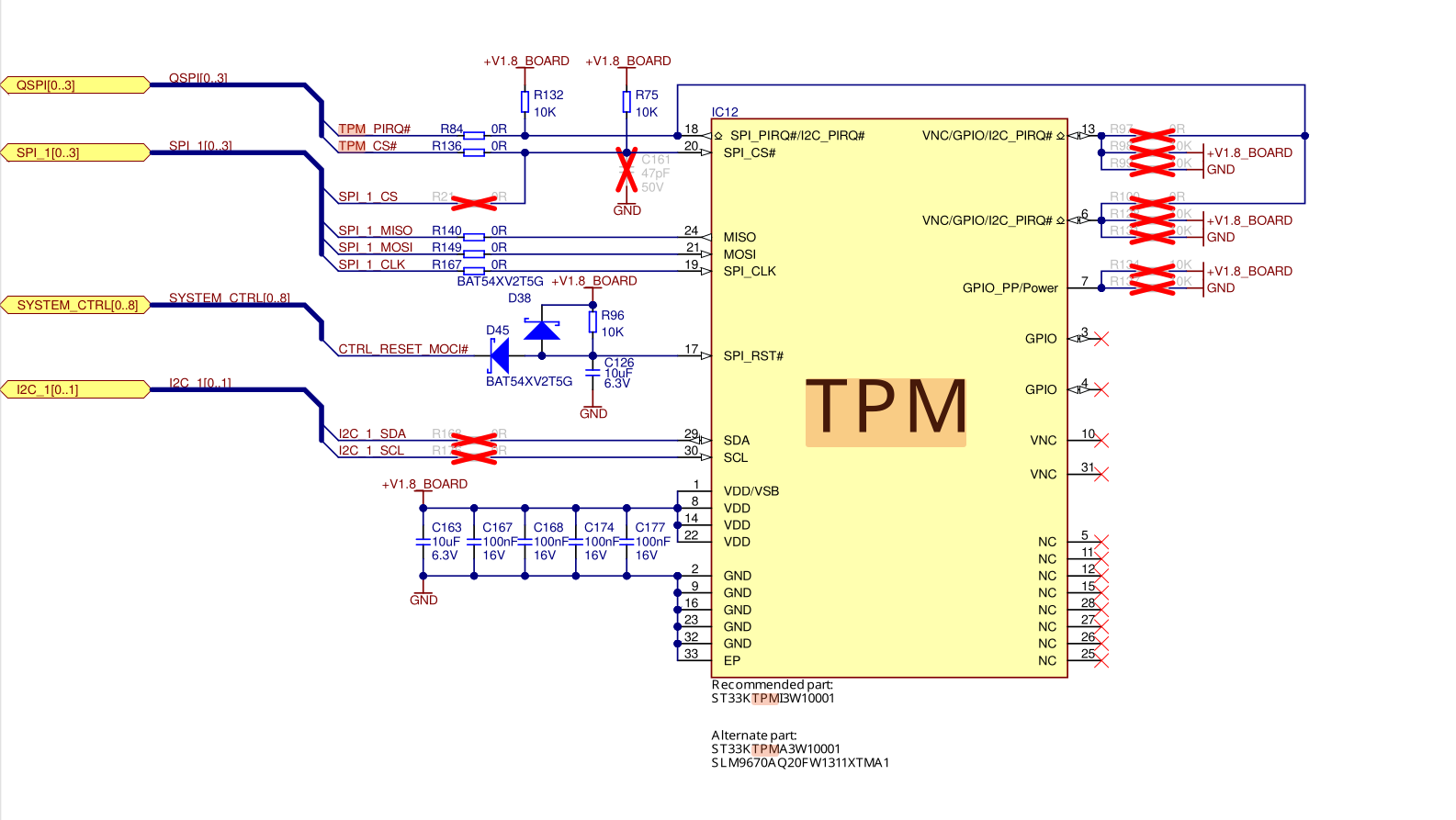
You can reference the mallow device tree files to see what might need modification based on your changes. The QSPI and SPi interfaces are connected to the TMP. I don’t have access to your link, requires login. But you can compare the new chip against the current ones requirements.
We have the recommended part, and some alternatives, but they are not the one you have listed. See bottom of schematic.

Here is the the escpi1 node w/ sub node for the tmp and qspi referenced. Aside from pinout requirements, you should also validate the other properties, they might need adjusting based on your chipset selection. i.e driver/ frequency requirements of your alternative chip.

&ecspi1 {
	pinctrl-0 = <&pinctrl_ecspi1>, <&pinctrl_tpm_cs>;
	cs-gpios = <&gpio5 9 GPIO_ACTIVE_LOW>, <&gpio3 16 GPIO_ACTIVE_LOW>;
	status = "okay";

	tpm@1 {
		compatible = "infineon,slb9670", "tcg,tpm_tis-spi";
		reg = <1>;
		pinctrl-names = "default";
		pinctrl-0 = <&pinctrl_tpm_irq>;
		interrupt-parent = <&gpio3>;
		interrupts = <14 IRQ_TYPE_LEVEL_LOW>;
		spi-max-frequency = <18500000>;
	};
};

-Eric

Hi @eric.tx

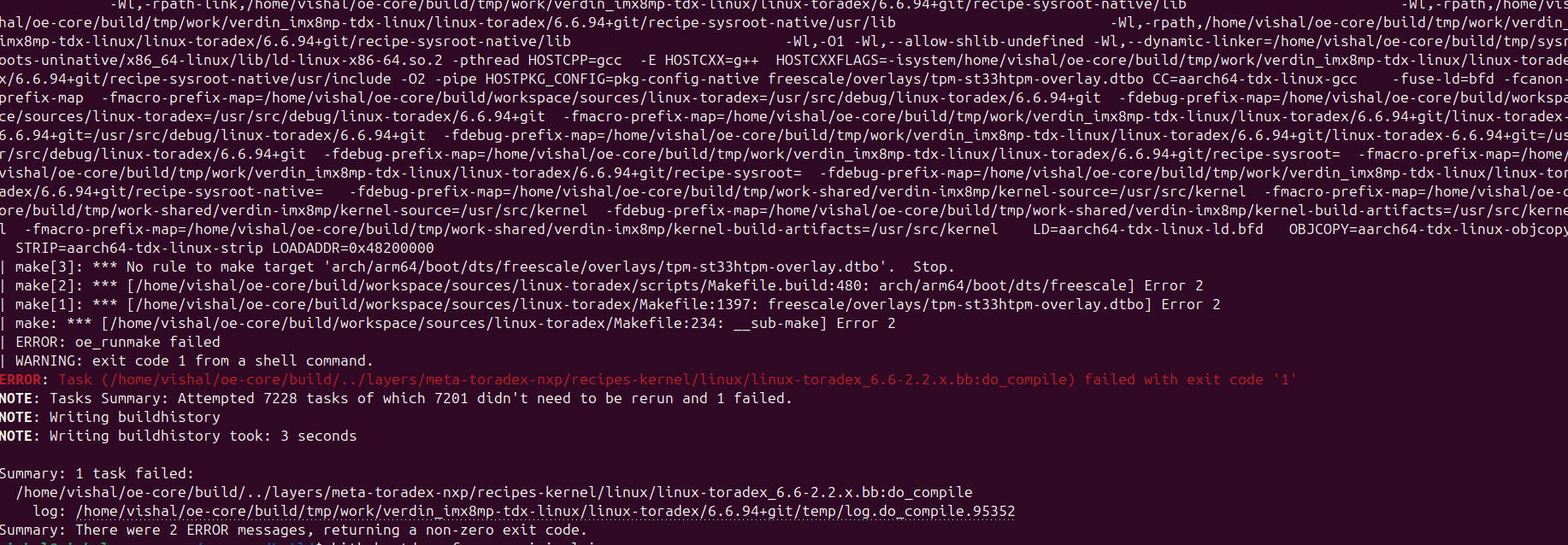
If i used to add device tree using overlay I am getting below error:

Our ST33H TPM chipset is interface with SPI port 3. I check in IVY carrier board not able to see SPI3 enable? How to activate SPI port 3 for our carrier board?

Thanks.

Hey @vishalborle92,

From what I can see it looks like there is an error with yocto build process. the “No rules to make target … tmp-st33htmp-overlay.dtbo” Most common is a syntax/structure error somewhere within the yocto build when building the dtbo from the dts. Can you verify all of the steps, sometimes this is a misplaced directory or misspelled one.

-Eric