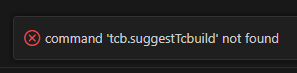
Using the Torizon extension in vscode I can see my network and connected devices in the Torizon panel. When I click Set Default for the target board I wish to use I see an error message:
”command ‘tcb.suggestTcbuild’ not found”
The selected board does not show the circle target icon next to its name.
However the board is successfully selected and does run, debug etc as expected. This feature used to work but may have stopped working following a recent upgrade of the Torizon extension.
The feature is useful as there are a number of boards attached and at a glance I used to be able to see which I was using as default.
I might make mistakes or occasionally get you wrong. Our support team will step in if needed.
The command ‘tcb.suggestTcbuild’ not found error you’re experiencing appears to be related to the Torizon IDE extension. While the specific error isn’t directly addressed in the available sources, this type of command error typically occurs when there are issues with the extension’s internal commands or after extension updates.
Troubleshooting Steps
1. Check Internal VS Code Logs
To diagnose extension-related issues, you can check the internal VS Code logs(1). Open the VS Code command palette and select Developer: Toggle Developer Tools(1). This will open a new window where you can click on the Console tab and check the logs for any additional error messages related to the Torizon extension(1).
2. Extension Reload
Since you mentioned this issue started after a recent Torizon extension upgrade, try:
Reloading VS Code completely
Disabling and re-enabling the Torizon extension
Checking if there are any pending extension updates
3. Verify Extension Functionality
The fact that your board successfully runs and debugs as expected suggests the core extension functionality is working properly(1). The issue appears to be specifically with the visual indicator command rather than the underlying connection functionality.
Workaround
While the visual target icon isn’t displaying due to this command error, you can still identify your default target device through:
The extension’s device management interface
Checking which device is being used when you deploy/debug projects
Since this appears to be a regression following an extension update, you may want to report this specific command error to ensure it gets addressed in future extension releases.
Best regards, Toradex AI Assistant.
Did you like my answer?
If I answered your question, please tick the “Solution” checkbox.
For follow-up questions to me, please use @ToradexAI in your post.
Strange issue, you’re saying this only started to occur recently?
For clarity, what version of the extension do you have running?
Finally, what kind of project do you have open in VSCode when you try to set a default device? Is it just a normal code project or is it a TorizonCore Builder project?
(I do have Torizon Core Builder 0.0.16 installed but I am not using that)
I believe this is the root of your problem here. The tcb.suggestTcbuild command that is not found comes from the latest version of the TorizonCore Builder extension (0.0.22 at the time of writing). So you should update this and make sure it is installed, running, and activated.
Just to clarify the TorizonCore Builder extension is needed for the main extension to work. Even if you’re not in a TorizonCore Builder project.