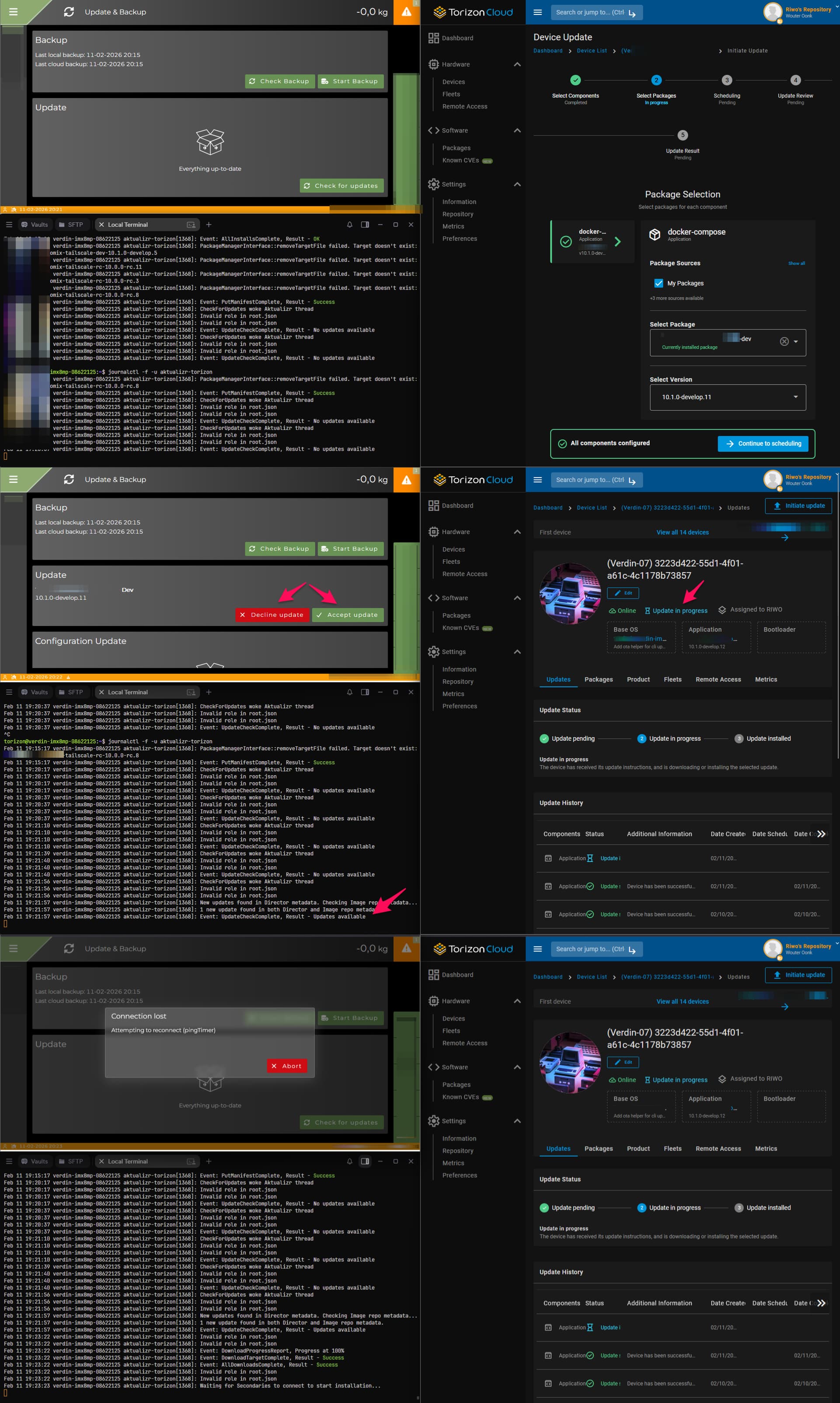
We are experiencing an issue with OTA updates in Torizon related to how user approval is handled.
When we schedule an OTA update, the device immediately switches to the status “Update in Progress”. From that moment onward:
we cannot cancel the update
we cannot replace it with a new update
and this happens even though the end user has not accepted or declined the update on the device
In our setup, the user is expected to manually accept or decline the update. However, many users do not interact at all. They do not accept and they do not decline. Despite this lack of user action, the device already transitions to “Update in Progress”.
Because of this, we lose the ability to retract or update the rollout for these devices, since the “in progress” state cannot be cancelled and prevents us from sending a new update.
Ideally, the device would remain in a state such as “Update Pending” until the user explicitly accepts the update. While the device is pending, we would still be able to:
cancel the update
schedule a newer update
handle situations where the user takes no action
My questions:
Is this behavior expected in Torizon, or could this be a bug in the OTA workflow?
How are others handling situations where end users do not accept or decline the update?
Is there a way to ensure that an update only moves to “in progress” after explicit user acceptance?
I might make mistakes or occasionally get you wrong. Our support team will step in if needed.
Understanding Torizon OTA Update Behavior
Your issue with OTA updates transitioning to “Update in Progress” before user acceptance is a known challenge with the default Torizon OTA implementation. Let me address your questions based on the available information:
1. Expected Behavior vs. Bug
This behavior appears to be the default implementation of Torizon Remote Updates (1). The system uses Aktualizr, which polls the server for updates every 5 minutes and applies them automatically when available (1)(2). This automatic behavior is by design for seamless OTA functionality.
2. Customizing Update Behavior for User Approval
Based on the community discussion, there are approaches to implement user approval workflows (2):
Using flock command: You can block updates using the flock command to prevent automatic application until user confirmation (2)
Custom notification mechanism: Implement a system to notify your application when updates are available, allowing you to present the choice to users (2)
User confirmation workflow: Only proceed with updates after explicit user acceptance (2)
The flock approach is considered safe even after reboots and can effectively maintain update blocking until you explicitly allow them (2).
3. Update Cancellation Limitations
Regarding update cancellation, the API documentation shows that updates can only be cancelled when they are in “Pending” status (3). Once a device has received its update instructions, the update can no longer be cancelled from the server side (3).
Recommended Approach
To achieve your desired workflow:
Implement update blocking: Use flock to prevent automatic updates
Create notification system: Set up a mechanism to notify your application when updates are available
User interaction handling: Present update options to users and only release the flock upon user acceptance
Configuration files: Investigate .toml configuration files for Aktualizr customization (2)
This approach ensures updates remain in a controllable state until user approval, maintaining your ability to cancel or replace updates as needed.
Best regards, Toradex AI Assistant.
Did you like my answer?
If I answered your question, please tick the “Solution” checkbox.
For follow-up questions to me, please use @ToradexAI in your post.
Thanks for the explanation. We are already using the blocking mechanism in Torizon and our application shows the user a prompt where they can accept or decline the update.
The problem is that as soon as we schedule the update in the OTA dashboard, the device immediately switches to “Update in Progress”, even though:
the update is not downloaded
the user has not accepted or declined
the update is still blocked on the device via flock
Once it is marked “In Progress”, we cannot cancel it or push a new update anymore. This causes issues when users simply do nothing, because the update stays stuck and cannot be managed server‑side.
The real issue is the early transition to “In Progress” on the OTA backend. We expected the device to stay in Pending until the user explicitly accepts the update.
Our questions:
Is this early switch to “In Progress” expected when using flock?
Shouldn’t a device remain in “Pending” until the lock is released?
Is there a way to prevent the OTA backend from setting updates to “In Progress” before user acceptance?
I’d be glad to help! Could you let me know which OS and version you are using?
To provide you with the most accurate guidance for handling OTA update behavior with user approval workflows, I need to understand your specific platform setup.
Could you please run the tdx-info command on your device and share the output? This will help me provide platform-specific guidance for your Torizon implementation.
Nice to see you on here and welcome to our community.
Thank you for sharing the detailed description of the hurdle you are facing. I have brought this up with our Torizon team and will get back to you on this thread as soon as I have further information.
I just received some information regarding this topric from our Torizon team:
The blocking mechanism has unfortunately never been for allowing users to accept/decline an update. Its purpose is to delay an update from occurring during a specific moment, for example during some critical system process. The update will go through once the block has been lifted.
If you would like to implement a consent-based update procedure you could take a look at our recent dbus API for Aktualizr:
This was designed for allowing device-side acceptance/cancellation of updates. If you want to give this a try you would need a relatively recent version of Torizon OS (at least 7.4.0).
Furthermore, once a device has “seen” an update from the server the server can no longer cancel the update. The device has to give some kind of final result (success, failure, cancelled), but this has to be from the device-side and is how our update framework is designed.
We have already implemented the Aktualizr D‑Bus API for user interaction. The user can accept or decline the update from our application, and we send the appropriate D‑Bus calls to Aktualizr.
However, our problem remains:
Even when we wait for user interaction on the device, the OTA backend already switches the device to “Update in Progress” as soon as the update is detected. At that moment:
the update has not been accepted
nothing is being installed or downloaded
we are only waiting for the user’s decision
but the server already marks it as “In Progress” and we can no longer cancel or replace the update
This is exactly the behavior we are trying to avoid.
What we would expect is that with the D‑Bus consent workflow, the device should stay in a Pending state until we send an explicit accept or cancel command via D‑Bus. Only after acceptance should it transition to “In Progress”.
Is this how the D‑Bus consent mechanism is intended to work?
Or is there currently no way to keep the device in “Pending” while waiting for user approval?
fist I would like to share a few words from one of our domain experts about how our update system fundamentally works
When you first create an update to a device in the web UI it will be in a “Pending” state. This means the update has not yet been seen by the device, it will be seen once the device next polls the server for available updates. In the “Pending” state one can still cancel an update from the web UI itself. This is okay, because well the device doesn’t know the update exists yet, it only exists server-side.
Once the device has polled the server and seen the update the state moves to “In Progress”. At this point the server can’t get out of this state on it’s own. The device is the one that needs to tell the server to get out of this state. This is done by the device sending some kind of result back to the server (i.e succeed/fail/cancelled). The reason the server can’t cancel from this state anymore is because it opens a lot of weird possibilities/edge cases that would be difficult to account for. For example what if you cancel the update server-side, but on the device its already mid-install. How do we reconcile this and many other possible states?
with that said, to avoid getting stock on this pending state, a possible workaround could be to create logic on that device that auto-declines (or auto accepts) an update after a certain amount of time from the device via the D-Bus API.
I imagine a scenario where, for example, after x days of the user ignoring the update message, the updates are being cancelled on the devices where users did not take actions. Then on day x+1 you could (or not) potentially resend the update request. In theory the devices that were updated should see this and ignore it, as they are updated, and for the devices where the update was rejected, the process goes trough again
let us know if this would work for you
thanks & best regards
Max
We now understand the reasoning behind why the server switches a device to “In Progress” as soon as it detects the update. Also to be clear: we fully understand that once an installation has actually started, it cannot be cancelled server‑side that makes complete sense.
However, our use case with the D‑Bus consent workflow runs into a different issue:
We would like the update to remain in “Pending” until the user explicitly accepts it on the device.
Right now, the OTA backend transitions to “In Progress” immediately when the device sees the update, even though:
nothing is being downloaded
nothing is being installed
the device is only waiting for the user to accept or decline via D‑Bus
Because of this early status change:
we cannot cancel the update anymore
we cannot replace it with a newer version
and if the user ignores the prompt, the device stays stuck in “In Progress”
While auto‑declining after X days is possible, it feels like a workaround rather than a proper consent‑based flow.
Is there any way currently or planned for a device using the D‑Bus consent mechanism to remain in “Pending” until it explicitly accepts the update?
This would align perfectly with a user‑consent workflow and avoid unwanted state transitions before the user has made a decision.
I don’t think that we have a plan as today to rework the logic to create this Pending or similar state. This is sorta how our update framework operates and it would be a risky change that would affect other customers.
can I also ask why do they want to enforce an accept/decline workflow for updates? is this a requirement of your project? I am not saying that this is not a valid point, I am just opening the question why not just deploying the update.
regarding these points:
Because of this early status change:
we cannot cancel the update anymore
why would you need to do this ?
we cannot replace it with a newer version
this should be resolved if you implement an mechanism as suggested for devices to decline/accept updates automatically.
and if the user ignores the prompt, the device stays stuck in “In Progress”
same as above
perhaps this workaround suggested is not the most elegant solution, but it is a potential solution. Otherwise you can consider rethinking the logic. Your point is valid, it is good to have a consent‑based flow, but unfortunately we don’t have an out-of-the box solution for that, so it could be this or similar workaround or making the update not consent‑based.
To answer your question about why we need an accept/decline workflow:
This is not just a design preference. Under the EU Cyber Resilience Act, end‑users must be able to postpone or decline updates. Because of this requirement, we cannot automatically install updates on all devices. We must give the end‑user the choice to accept or refuse an update.
We will manage a fleet of many devices, and we want to keep them up‑to‑date. However, when an end‑customer does not accept the previous update, it becomes impossible for us to provide them with the latest update. This is especially relevant for our end‑users, who are farmers working with agricultural machines. They typically do not install updates quickly.
Automatically declining updates could be a workaround, but in our opinion it is not a very elegant solution.
you are bringing up a valid point about the CRA requirements. I brought this up with the Cloud team, so we will discuss what the best way to approach this matter is and get back to you as soon as possible
just to give you a quick update on this. We had an internal discussion, it seems that we are leaning more towards changing this Mechanismus as your are correct with your claim as I previously mentioned
I cannot say when and how this will be implemented, my hope is sooner than later, but I will keep you updated on this
Do you have an specific timeline for this? (beside the obvious CRA 2027 date) and can you live for the moment with the time base workaround until we properly fix this?
Okay, that’s good to hear! For now, we can update the machines manually since it currently concerns only five test machines. In May, we hope to deploy another 15 machines in the field, and from that point on it will become more important to update them as Fleets. Hopefully we can have this mechanism in place by then.
In the meantime, we are waiting for your response, and thank you for taking the effort to look into this.
I wanted to kindly check in to see if there have been any updates regarding this matter. We’re still preparing for the upcoming rollout in May, so any new information would be greatly appreciated.
there was an internal discussion, and the conclusion was, as far as I see, that we will implement a fix. We don’t have a concrete date yet, but my guess is that sooner than later. If you give me a few days I can give your more precise information.
this is a bit strange, SSP-870 is indeed the identifier that we are using to track this, however I checked with the SW Product Team today, and we expect to implement this in Q2
I can give soon an update with a more precise date and version. For now I can only say Q2, if no set backs. I hope this dates fit well in you schedule.