Hello.
I am using Verdin-AM62 for a production software and I noticed a bug with the version 7.5.0.
After flashing the proper FW with easyInstaller, I wanted to flash Verdin-AM62_ToradexEasyInstaller_7.5.0+build.9 again to do some more tests. To do so, I used the “recovery-windows.bat” that works fine for flashing the other FW. I plugged in the device a USB with the build inside and the only thing I changed is the flag “autoinstall” inside the “image.json” file putting it to “true”. But when I use it to flash easyInstaller, it doesnt work.
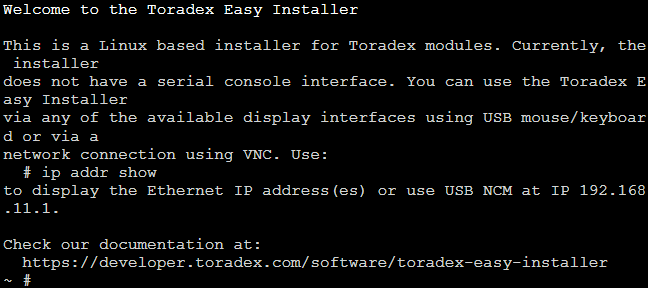
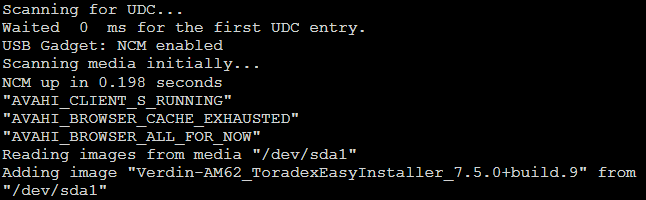
What happens is that It start Easy installer properly, but then it doesn’t start the flashing of “Verdin-AM62_ToradexEasyInstaller_7.5.0+build.9”.
As you can see from the screeshoots it also finds the drive and the image, but it never starts flashing.
To make it work I have to run the “recovery-windows.bat” of an older version, for example Verdin-AM62_ToradexEasyInstaller_6.8.1+build.9.
Is this a known problem? Is there a solution other then using an old version?
Thank you for your help.
Hi, I’m the Toradex AI Assistant.
I might make mistakes or occasionally get you wrong. Our support team will step in if needed.
Autoinstall Behavior with Toradex Easy Installer Images
The issue you’re experiencing is related to the special handling of Toradex Easy Installer images with the autoinstall property. This behavior is documented and working as designed.
Why This Happens
When dealing with Toradex Easy Installer images, the system has specific logic to prevent unnecessary reinstallation (1):
- All Toradex Easy Installer images have the
isinstaller property set to true (1)
- If the
autoinstall property is also set to true, the image is processed before any other images from the same media (1)
- The Toradex Easy Installer checks the image version against the version number of the running version (1)
- If the image is newer, the installer image will be installed first and the system automatically rebooted (1)
- The Toradex Easy Installer does not automatically install a Toradex Easy Installer, if the version is older or equal (1)
Solution
To force automatic installation of the same or older version of Toradex Easy Installer, you need to modify the image.json file (1):
"isinstaller": false,
(1)
By setting isinstaller to false, you bypass the version check that prevents installation of the same or older Easy Installer version.
Alternative Approach
If you need to test with different Easy Installer versions regularly, consider using the manual installation approach instead of autoinstall, or ensure you’re always using a newer version number for testing purposes.
This behavior is intentional to prevent unnecessary downgrades or reinstallation of the same Easy Installer version during production scenarios.
Best regards, Toradex AI Assistant.
Did you like my answer? 

If I answered your question, please tick the “Solution” checkbox.
For follow-up questions to me, please use @ToradexAI in your post.
Hello @giairomauro !
Just to verify, but are you able to install the newer version of TEZI (7.5.0) manually? As in, pressing reset, running the recovery-windows.bat and re-installing the easy installer?
A guide on how to do so can be found here: Loading Toradex Easy Installer | Toradex Developer Center
Hello Joao.
I am able to do it if I use an older version of the “recovery-windows.bat”. If I use the “recovery-windows.bat” of the newest version (7.5.0) I am no able to install easyinstaller, the situation is the one shown in the screenshots I shared. But I can install other images.
Thank you.
Kind Regards.
Giairo Mauro.
It might be a mismatch on the drivers or an issue with the DFU device. These are known issues on Windows. Please try these guides below and see if it fixes the issue:
(Its the section at the end specifically)