We are using the Ixora Board with the iMX8 SoM. The OS is Torizon OS7 7.3.0+build.18.
I am working on integrating additional storage using the mSATA slot but I am running into an issue.
We initially tested Kingston KC600 512GB MSATA SSDs and did not observe any issues. As I have build more setups I am seeing issue an issue where drives will randomly not show up on boot, as in the drive will not appear in /dev at all.
Does anyone have suggestions on how to troubleshoot this or any thoughts on how to resolve this?
I might make mistakes or occasionally get you wrong. Our support team will step in if needed.
mSATA Troubleshooting on Ixora Carrier Board
Based on the Ixora carrier board specifications, the mSATA interface is supported and should work reliably with compatible drives (1). Here are several troubleshooting approaches for your intermittent mSATA detection issue:
Hardware Verification Steps
Check Physical Connections
Ensure the mSATA drive is properly seated in the connector
Verify that the drive is making good contact with all pins
Check for any physical damage to the mSATA connector on the Ixora board
Power Supply Analysis
The Ixora board provides power through its on-board supplies (2)
Monitor system power consumption during boot to ensure adequate power delivery
Consider testing with a known-good power supply if using borderline power ratings
Software Diagnostics
Boot-time Diagnostics
Check kernel messages during boot using dmesg | grep -i sata to see SATA controller initialization
Monitor for any error messages related to SATA or storage detection
Use lspci to verify the SATA controller is being detected by the system
Drive Health Assessment
Test the Kingston KC600 drives on a different system to rule out drive-specific issues
Use SMART tools when the drive is detected to check for any health indicators
Consider testing with different mSATA drive models to isolate compatibility issues
Systematic Testing Approach
Environmental Factors
Test at different temperatures, as thermal issues can affect drive detection
Check if the issue correlates with specific environmental conditions
Verify the operating temperature range is within specifications for both the Ixora board (2) and the SSD
Timing and Power Sequencing
Some mSATA drives require specific power-up timing
Try adding delays in the boot process to allow drives more time to initialize
Monitor power sequencing to ensure proper startup timing
The Ixora V1.2 datasheet confirms mSATA support through the X23 connector (2), so the hardware capability is definitely present. Since you’ve confirmed the setup works with some drives but fails intermittently, this points to either timing issues, power delivery problems, or drive-specific compatibility concerns.
Best regards, Toradex AI Assistant.
Did you like my answer?
If I answered your question, please tick the “Solution” checkbox.
For follow-up questions to me, please use @ToradexAI in your post.
Could you please specify which setups you have built? Additionally, please collect full boot logs (captured from the debug UART) from the same system in both scenarios — when the drive is detected and when it is not — and share them as text files
U-Boot 2024.04-7.3.0+git.4db7ef83ebd6 (Jan 01 1970 - 00:00:00 +0000)

CPU:   NXP i.MX8QM RevB A53 at 1200 MHz at 30C

DRAM:  8 GiB
Core:  203 devices, 24 uclasses, devicetree: separate
MMC:   FSL_SDHC: 0, FSL_SDHC: 1, FSL_SDHC: 2
Loading Environment from MMC... OK
In:    serial
Out:   serial
Err:   serial
Model: Toradex 0067 Apalis iMX8QM 8GB WB IT V1.1A
Serial#: 15610250
Boot:  MMC0
Reset cause: POR

 BuildInfo:
  - SCFW 83624b99, SECO-FW c9de51c0, IMX-MKIMAGE 71b8c18a, ATF lf-6.6.
  - U-Boot 2024.04-7.3.0+git.4db7ef83ebd6

flash target is MMC:0
Net:   eth0: ethernet@5b040000
Fastboot: Normal
Normal Boot
Hit any key to stop autoboot:  0
MMC: no card present
MMC: no card present
switch to partitions #0, OK
mmc0(part 0) is current device
Scanning mmc 0:1...
Found U-Boot script /boot.scr
969 bytes read in 1 ms (946.3 KiB/s)
## Executing script at 9d480000
7086 bytes read in 2 ms (3.4 MiB/s)
179208 bytes read in 6 ms (28.5 MiB/s)
38 bytes read in 2 ms (18.6 KiB/s)
Working FDT set to 9d400000
Applying Overlay: lpuart0-dma-overlay.dtbo
473 bytes read in 2 ms (230.5 KiB/s)
11497894 bytes read in 250 ms (43.9 MiB/s)
13143221 bytes read in 286 ms (43.8 MiB/s)
   Uncompressing Kernel Image to 0
## Flattened Device Tree blob at 9d400000
   Booting using the fdt blob at 0x9d400000
Working FDT set to 9d400000
   Loading Device Tree to 00000000fd628000, end 00000000fd676fff ... OK
Working FDT set to fd628000
/bus@5a000000/dma-controller@5a1f0000, 58480
/bus@5a000000/dma-controller@5a9f0000, 59712
/bus@59000000/dma-controller@591f0000, 24036
/bus@59000000/dma-controller@591f0000, 24036
/bus@59000000/dma-controller@599f0000, 25388

Starting kernel ...

[    1.120496]  mu_a1: failed to power off resource 214 ret -22
Starting systemd-udevd version 255.21^
sysroot.readonly configuration value: 0 (fs writable: 1)
Using legacy ostree bind mount for /
[    6.798400] nvmem imx-scu-ocotp0: cell mac raw len 6 unaligned to nvmem word size 4
[    6.806261] nvmem imx-scu-ocotp0: cell mac raw len 6 unaligned to nvmem word size 4
[    6.998543] imx-audmix imx-audmix.0: failed to find SAI platform device
[   23.223376] Bluetooth: hci0: unexpected event for opcode 0x0000

Torizon OS 7.3.0+build.18 apalis-imx8-15610250 ttyLP1
I personally haven’t reproduced the case of the mSATA drive not populating in /dev, it appears for me, so this should be the success log. Is there something we’re looking for here, that would be absent in the failure case?
Could you please share the dmesg output for both cases? I’m looking for differences between the two. Also, please check if the SSD is securely installed to rule out poor pin contact.
There were several devices besides the SATA drive that were not properly initialized in the failure case (e.g., internal USB hub, DRM firmware, HDMI). Do you have another Apalis module available? If so, can you try to reproduce the issue on that module?
Another thought — do you have a heatsink with a fan installed on your Ixora board? Issues like this can be caused by overheating. It’s highly recommended not to run Apalis iMX8QM modules without adequate cooling.
We are using both the toradex heatsink and an appropriate fan. In my testing I have see that the CPU temps for all zones are <45C.
We have seen the issue on multiple setups. I have 4 board builds with Ixora V1.3, IMX8QM+HS and Fan, mSATA and have run tests to repeatedly reboot and check for presence of the mSATA in /dev. We have seen the issue occur on 2 boards with failure occurring on up to to 10% of boots.
Another piece of data, we attempted to have the kernel rescan for devices after boot using:
echo “- - -” | sudo tee /sys/class/scsi_host/host0/scan
In the case where the drive failed to mount we see this in dmesg:
[16181.563511] ata1: found unknown device (class 0)
[16181.731621] ata1: found unknown device (class 0)
[16181.731644] ata1: SATA link up 6.0 Gbps (SStatus 133 SControl 300)
[16181.731662] ata1: link online but 1 devices misclassified, retrying
[16181.731673] ata1: reset failed (errno=-11), retrying in 10 secs
[16192.163181] ata1: SATA link down (SStatus 1 SControl 300)
[16192.163220] ata1: link online but 1 devices misclassified, retrying
[16192.163232] ata1: reset failed (errno=-11), retrying in 10 secs
[16202.433600] ata1: found unknown device (class 0)
[16202.601618] ata1: found unknown device (class 0)
[16202.601642] ata1: SATA link down (SStatus 1 SControl 300)
[16202.601657] ata1: link online but 1 devices misclassified, retrying
[16202.601668] ata1: reset failed (errno=-11), retrying in 35 secs
[16237.271647] ata1: limiting SATA link speed to
[16237.775562] ata1: found unknown device (class 0)
[16237.941616] ata1: found unknown device (class 0)
[16237.941637] ata1: SATA link up 6.0 Gbps (SStatus 133 SControl 3F0)
[16237.941654] ata1: link online but 1 devices misclassified, device detection might fail
[16240.361627] ata1: found unknown device (class 0)
[16240.361675] ata1: SATA link down (SStatus 1 SControl 300)
[16240.361717] ata1: link online but 1 devices misclassified, retrying
[16240.361729] ata1: reset failed (errno=-11), retrying in 8 secs
[16249.671628] ata1: found unknown device (class 0)
[16249.841629] ata1: found unknown device (class 0)
[16249.841650] ata1: SATA link up 6.0 Gbps (SStatus 133 SControl 300)
[16249.841667] ata1: link online but 1 devices misclassified, retrying
[16249.841678] ata1: reset failed (errno=-11), retrying in 9 secs
[16260.611627] ata1: SATA link down (SStatus 1 SControl 300)
[16262.831634] ata1: SATA link down (SStatus 1 SControl 300)
In the case where the drive mounted we see this:
[ 30.151783] ata1: SATA link up 6.0 Gbps (SStatus 133 SControl 300)
[ 30.152568] ata1.00: supports DRM functions and may not be fully accessible
[ 30.153474] ata1.00: supports DRM functions and may not be fully accessible
[ 30.154109] ata1.00: configured for UDMA/133
"Sounds like a hardware problem to me. As I mentioned earlier, a lot of hardware components were not properly initialized in the failure case:
[ 6.487399] amphion-vpu-core 2d090000.vpu-core: [1] = encoder
[ 6.509348] amphion-vpu-core 2d0a0000.vpu-core: [2] = encoder
[ 6.773089] usb3503 3-0008: switched to HUB mode
[ 6.773116] usb3503 3-0008: usb3503_probe: probed in hub mode
[ 6.966917] sgtl5000 3-000a: sgtl5000 revision 0x11
[ 7.002626] nvmem imx-scu-ocotp0: cell mac raw len 6 unaligned to nvmem word size 4
[ 7.003926] imx8q-pcie-phy 5f180000.pcie-phy: phy impedance ratio is not specified.
[ 7.004191] input: system-controller:keys as /devices/platform/system-controller/system-controller:keys/input/input0
[ 7.033025] imx-sc-rtc system-controller:rtc: registered as rtc1
[ 7.053274] ci_hdrc ci_hdrc.0: EHCI Host Controller
[ 7.135392] cdns-mhdp-imx 56268000.hdmi: lane-mapping 0x93
[ 7.209573] imx6q-pcie 5f010000.pcie: host bridge /bus@5f000000/pcie@5f010000 ranges:
[ 7.209651] imx6q-pcie 5f010000.pcie: IO 0x007ff80000..0x007ff8ffff → 0x0000000000
[ 7.209673] imx6q-pcie 5f010000.pcie: MEM 0x0070000000..0x007fefffff → 0x0070000000
[ 7.212713] imx6q-pcie 5f000000.pcie: host bridge /bus@5f000000/pcie@5f000000 ranges:
[ 7.212785] imx6q-pcie 5f000000.pcie: IO 0x006ff80000..0x006ff8ffff → 0x0000000000
[ 7.212808] imx6q-pcie 5f000000.pcie: MEM 0x0060000000..0x006fefffff → 0x0060000000
[ 7.213902] imx8q-pcie-phy 5f190000.pcie-phy: PHY PLL is locked
I don’t have a better explanation at the moment, other than a possible hardware failure or some external factors such as strong EMI, unstable supply voltage etc.
Can you clarify what you mean by a hardware problem?
When it comes to the drives them selves they don’t inherently seem to be the cause. As we have seen this on multiple carrier boards with different drives. Another thing to note is that we also were playing around with using the miniPCIe slot to add an m.2 drive via an adapter. That is also installed on one of the systems that is having issues. In my reboot tests I was checking to see if both that m.2 drive and the mSATA drive failed to be discovered. That m.2 also failed to be discovered but at a lower frequency then the mSATA drive. However, what was interesting was that the m.2 failure only occurred with the mSATA failure (i.e. we never saw the mSATA succeed and the m.2 Fail). To me that suggests something that they share in common and not the drives themselves.
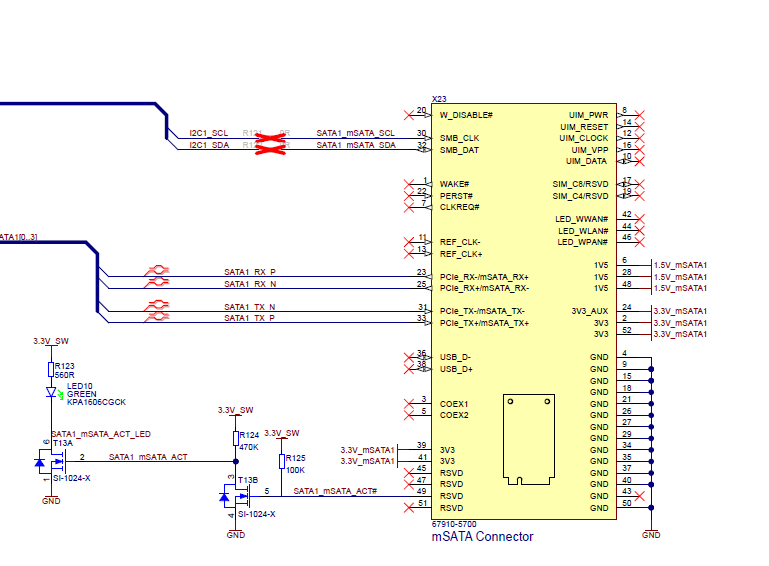
I assume this is normal but also when observing the cases where the drive fails to mount LED10 on the Ixora Board is off. The documentation says that is this indicates that the mSATA is active:
Is this just a symptom or something that could point to a cause? Maybe not just wanted to point it out.
That means I can’t imagine how a software issue, such as a race condition, could result in a dozen hardware components—both internal and external to the SoC—failing to initialize. However, damaged silicon (e.g., due to overheating or static discharge) often behaves similar way.
Also, LED10 is connected only to the mSATA connector and is not controlled by the SoM.
Do you have access to an oscilloscope? If so, could you check the 3.3V rail on the mSATA connector? The combined load from the SoM and the SATA drive could cause a voltage drop, potentially leading to hardware misbehavior.
Also, what is the revision of your Ixora board, and what is the current (amperage) rating of your wall power supply?
As for the power supply we have run the in two ways with the same results (equivalent failure rate).
In our system: 64A rated power supply (everything else is unplugged on the system for the tests, so nothing else is drawing current)>
Directly powered from wall: 2.5A rating.
I will try setting up a scope. Will get back with the results.
The Ixora board’s power supply is rated for up to 8A on the 3.3V rail which should be enough but … When you have access to a scope, could you please also monitor the 3.3V_SW rail?
I performed approximately 20 power on/off cycles using an Apalis iMX8QM V1.1E module flashed with Torizon OS 7 (v7.3.0+build.18), installed on an Ixora v1.2A carrier board with a Kingston mS200 30GB mSATA SSD.
In all cases, the drive was successfully detected and automatically mounted.
I’ve ordered a Kingston KC600 512GB mSATA SSD and will repeat the testing once it arrives.
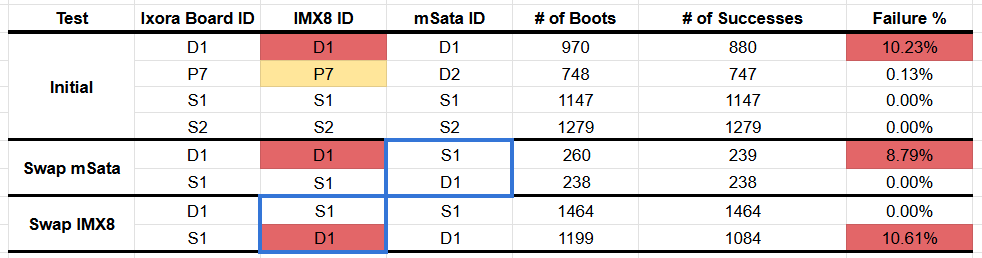
It is very clear that the failure follows the IMX8 SOM not the carrier board or the SSD. As you mentioned before, this suggests a hardware issue and we have one clear failure case (D1 above) and another potential case (P7).
Is there a way to open a ticket for additional discussion as this may no long be suitable for a forum discussion?