IMX95 CM7 UART and GPIO

Hi

Using IV+ carrier board.

My tdx-info

Bootloader: U-Boot
Kernel version: 6.6.142-rt75-7.7.0-devel #1 SMP PREEMPT_RT Fri Jun 19 08:16:23 UTC 2026
Kernel command line: root=PARTUUID=3b3a59ad-02 ro rootwait console=tty1 console=ttyLP2,115200 iommu.passthrough=1 clk_ignore_unused pd_ignore_unused
Distro name: NAME=“TDX Wayland with XWayland RT”
Distro version: VERSION_ID=7.7.0-devel-20260828073543-build.0
Distro variant: -
Hostname: verdin-imx95-08937371

Hardware info

HW model: Toradex Verdin iMX95 on Ivy Board
Toradex version: 0227 V1.1A
Serial number: 08937371
Processor arch: aarch64

I am aiming to run the UART and GPIO for the start.

I had compiled the code from the VerdinEVK SDK Version 25.12 as well as tried on SDK V 26.03 .

Compiler and able to run the code on M7 Core ,

root@verdin-imx95-08937371:~# cat /sys/class/remoteproc/remoteproc1/state
running

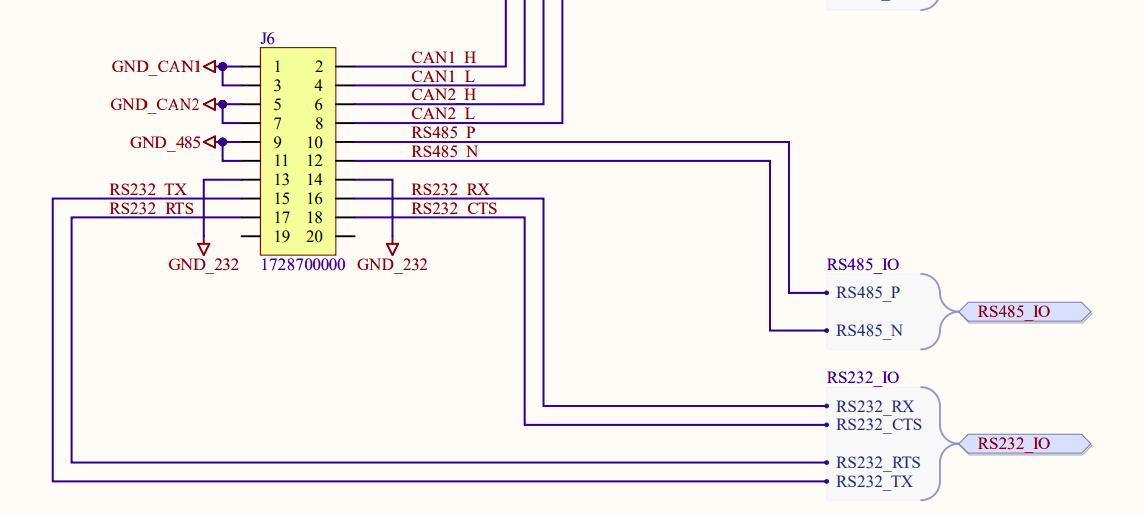
In IVY PLus , the RS232 General purpose is connected to UART7 and named in the PCB as UART1.

So here is my overlay

/dts-v1/;
/plugin/;

/ {
compatible = “toradex,verdin-imx95-nonwifi-ivy”,
“toradex,verdin-imx95-nonwifi”,
“toradex,verdin-imx95”,
“fsl,imx95”;
};

&lpuart7 {
status = “reserved”;
};

but i could not able to get the uart output , so i could not know at which point the program has issues.

Pls suggest.

Thanks,.

Hi, I’m the Toradex AI Assistant.

I might make mistakes or occasionally get you wrong. Our support team will step in if needed.


To reserve UART7 for the Cortex-M7 core on your Verdin iMX95 with Ivy Plus carrier board, your device tree overlay needs to use status = "disabled" instead of status = "reserved".

Here’s the corrected overlay:

/dts-v1/;
/plugin/;

/ {
    compatible = "toradex,verdin-imx95-nonwifi-ivy",
                 "toradex,verdin-imx95-nonwifi",
                 "toradex,verdin-imx95",
                 "fsl,imx95";
};

&lpuart7 {
    status = "disabled";
};

(1)

Additional Configuration Required

You also need to update the U-Boot environment variables to prevent the Linux kernel from disabling the Cortex-M7 UART clocks. Run these commands in the U-Boot console:

> setenv tdxargs "clk_ignore_unused pd_ignore_unused"
> saveenv
> reset

(1)

Note: I can see from your tdx-info output that you already have clk_ignore_unused pd_ignore_unused in your kernel command line, which is correct.

Verifying Your Setup

After applying the overlay and rebooting:

  1. Check that the RemoteProc driver loaded correctly:
# dmesg | grep -E "remote|rproc"

(2)

  1. Verify your Cortex-M7 firmware is running:
# cat /sys/class/remoteproc/remoteproc1/state

(2)

  1. Connect to the RS232 port on your Ivy Plus board to see the UART7 output from the Cortex-M7 core.

SDK Configuration

Make sure your firmware code initializes UART7 correctly for the Verdin iMX95. The UART initialization should match the hardware configuration in your MCUXpresso SDK example.

If you’re still not seeing UART output after these changes, verify that:

  • Your firmware is actually writing to UART7
  • The baud rate matches between your firmware and terminal (typically 115200)
  • You’re connected to the correct physical RS232 port on the Ivy Plus carrier board

Best regards,
Toradex AI Assistant.


Did you like my answer? :+1: :-1:

If I answered your question, please tick the “Solution” checkbox.

For follow-up questions to me, please use @ToradexAI in your post.

Hi Ramesh,

If you want to debug M7 program, you need to connect M7 bundled UART to check debug log, but on Ivy plus carrier, this UART is not exposed, so you have to use other carrier like Verdin development board or Dahlia board to debug the M7 core.

Hai Qin
Toradex

Hi Hai.tx

Thanks for your reply.

I fixed it, under the IVY, it was UART7 was brought out.

But in the image I build , i see Uart7 is tied to only Linux. So overlay does not impact.

So i rebuild the image with the following SM config and configure it for Uart7 and fixed the issues.

verdin-imx95.cfg (30.4 KB)

Thanks.

Ramesh.