How to Obtain or Build Torizon OS
Pre-built Images vs Building from Source
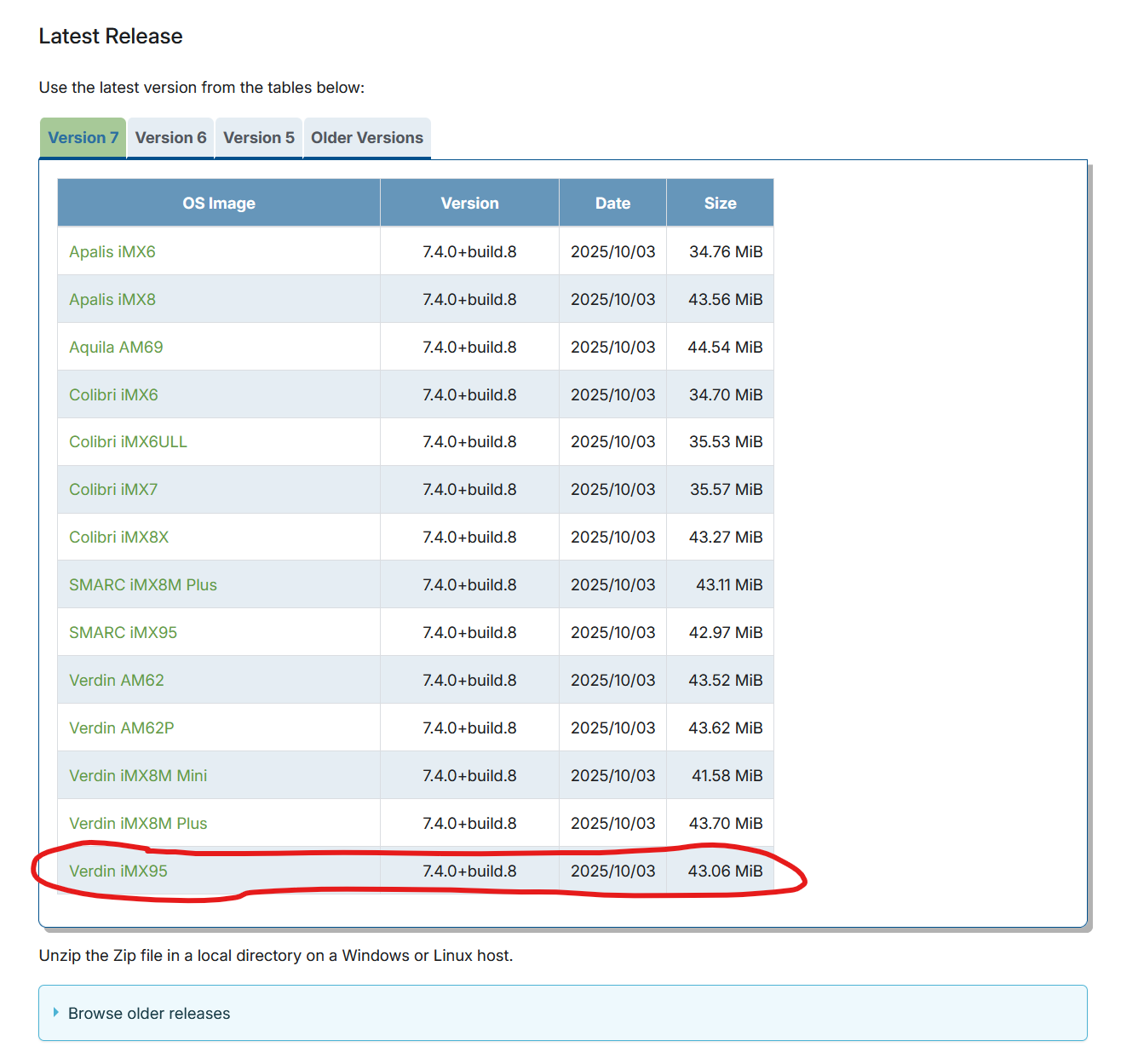
For the i.MX95 Verdin EVK, you have two main options:
- Pre-built Images: For users who only use pre-built binary images, source snapshots are published on the Artifactory Instance (1)
- Build from Source: For custom builds using Yocto Project/OpenEmbedded
Building Torizon OS from Source
Prerequisites
You need a Linux host with prerequisites for building a Yocto/OpenEmbedded image (2).
Download Metadata
Set up the build environment:
$ mkdir ~/bin
$ PATH=~/bin:$PATH

$ curl http://commondatastorage.googleapis.com/git-repo-downloads/repo > ~/bin/repo
$ chmod a+x ~/bin/repo
(2)
Configure Git:
$ git config --global user.email "you@example.com"
$ git config --global user.name "Your Name"
(2)
Initialize Repository
For the latest Torizon OS release (7.x.y branch):
$ repo init -u git://git.toradex.com/toradex-manifest.git -b scarthgap-7.x.y -m torizon/default.xml
(2)
Alternatively, for a specific version (example for 7.0.0):
repo init -u git://git.toradex.com/toradex-manifest.git -b refs/tags/7.0.0 -m torizon/default.xml
(2)
Download Sources
$ repo sync --no-clone-bundle
(2)
Setup Build Environment
The supported machine for i.MX95 is verdin-imx95 (supported on 7.4.0 or newer Torizon OS releases) (2).
$ [MACHINE=verdin-imx95] source setup-environment [BUILDDIR]
(2)
Build the Image
To build the default Torizon OS image:
$ bitbake torizon-docker
(2)
Available Image Types
The supported image targets are (2):
- torizon-minimal: Reference minimal image without container engine
- torizon-docker: Default image with Docker container engine (recommended)
- torizon-podman: Experimental image using Podman instead of Docker
Containerized Build Option
You can also build using Docker containers, which works independently of your host distribution:
$ docker run --rm -it --name=crops -v ~/yocto-workdir:/workdir --workdir=/workdir -e MACHINE=verdin-imx95 -e IMAGE=torizon-docker torizon/crops:scarthgap-7.x.y startup-tdx.sh
(2)
Important Notes
- The i.MX95 Verdin EVK requires Torizon OS version 7.4.0 or newer (2)
- Make sure to check silicon revision compatibility (A1 vs B0) as mentioned in my previous response
- For reproducible builds, consider locking to a specific version using tags (2)
Best regards, Toradex AI Assistant.
Did you like my answer? 

If I answered your question, please tick the “Solution” checkbox.
For follow-up questions to me, please use @ToradexAI in your post.