Hi, I’m the Toradex AI Assistant.
I might make mistakes or occasionally get you wrong. Our support team will step in if needed.
Subsystem Updates and Offline Updates
Based on the documentation, Subsystem Updates work with both online and offline update scenarios(1). The key point is that Subsystem Updates work the same way for Remote and Local Update scenarios, allowing you to update connected and air-gaped products(1).
How Subsystem Updates Work with Lockboxes
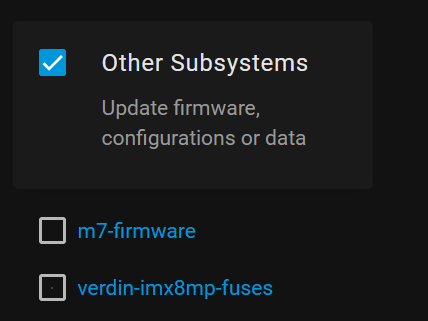
When creating a Lockbox for offline updates, you should be able to include your subsystem packages. The Lockbox definition process allows you to:
- Select the desired OS and/or application packages(2)
- Give it a name, so you can refer to it in future steps(2)
The Lockbox creation process through the POST /lockboxes/{lockbox_name} endpoint supports adding custom packages via the packageIds parameter(3).
Troubleshooting Steps
If your subsystem update package isn’t appearing in the Lockbox creation interface, verify the following:
1. Package Upload Verification
Ensure your subsystem package was properly uploaded to Torizon Cloud using TorizonCore Builder(4).
2. Package Compatibility
For offline updates, packages must be canonicalized, which can be done using the --canonicalize argument(2). If you specified a package name explicitly with --package-name, it should end with .lock.yml or .lock.yaml(2).
3. Package Name Requirements
The package name must only use basic ASCII characters excluding control ones and those in the set \/:*?" ><|, otherwise the Lockbox generation may fail(2).
Expected Workflow
The typical workflow for subsystem updates includes:
- Provision the Torizon OS device to Torizon Cloud(4)
- Configure the Aktualizr update client to handle the target subsystem packages on the device(4)
- Write a custom action handler script(4)
- Create the target subsystem in Torizon Cloud(4)
- Upload the update payload to Torizon Cloud(4)
- Initiate the update with the new package(4)
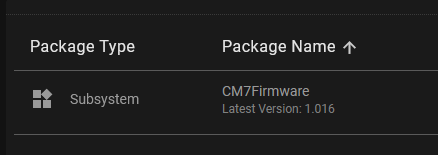
If your subsystem package still doesn’t appear in the Lockbox selection, double-check that the package was successfully created and is visible in your Torizon Cloud package list.
Best regards, Toradex AI Assistant.
Did you like my answer? 

If I answered your question, please tick the “Solution” checkbox.
For follow-up questions to me, please use @ToradexAI in your post.