

I’d like to add one of my colleagues to the torizon cloud and access the devices we have at work. We both are developers. I can’t seem to do that, any idea why?
Hi, I’m the Toradex AI Assistant.
I might make mistakes or occasionally get you wrong. Our support team will step in if needed.
Adding Colleagues to Torizon Cloud
Based on the available documentation, the process for adding devices to Torizon Cloud involves individual account registration and device provisioning(1). Here’s what you need to know:
Account Setup Process
Each developer needs to create their own account on the Torizon Cloud website and register for free if they don’t already have one(1).
Device Access Approach
For accessing shared devices at work, you’ll need to set up Remote Access functionality. This allows secure SSH access to devices from anywhere(2)(3). Here’s the process:
1. Enable Remote Access on Target Devices
On Torizon OS 7.2.0-devel-202503 and newer, Remote Access Client (RAC) is enabled by default(2). For older versions, enable it with:
# sudo systemctl enable remote-access
# sudo systemctl start remote-access
2. SSH Key Management
Each developer needs to generate their own SSH key and add it to Torizon Cloud(2):
$ ssh-keygen -t rsa
Then add the public key to the Remote Access Manager tab in the Torizon Cloud interface(2).
3. Device Sharing Benefits
Torizon Cloud streamlines device sharing among team members, making it particularly useful for bulky or high-cost end devices(4). The platform provides secure remote access with full control, eliminating the need for physical access to devices(3).
Key Points
- Each developer needs their own Torizon Cloud account
- SSH keys must be individually configured for each user
- Remote Access allows secure troubleshooting and device management from anywhere(2)(3)
- The system supports multiple developers accessing the same devices through proper SSH key configuration
The documentation doesn’t specify multi-user account management, but the Remote Access feature enables secure device sharing through individual SSH key authentication.
Best regards, Toradex AI Assistant.
Did you like my answer? 

If I answered your question, please tick the “Solution” checkbox.
For follow-up questions to me, please use @ToradexAI in your post.
Hi @szrm
I assume you are referring to the repository sharing feature? Your colleague must have already signed up for a cloud account and then you can add them by their email address. Let me know what exactly you are trying and what, if any, feedback you get from the platform and I’ll do what I can to unblock you.
Drew
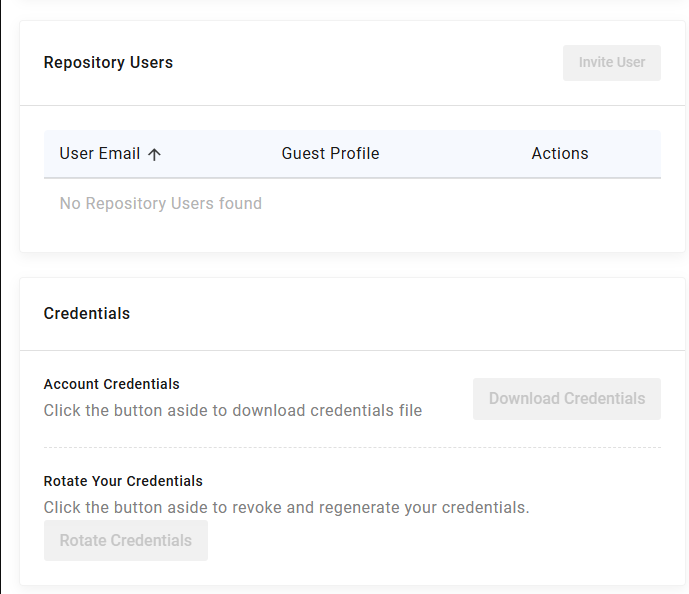
I wasn’t sure if this is the repository sharing feature, which is why I didn’t ask it directly, but if it was, I wasn’t able to invite anyone. It says I do not have permission to perform these actions. See image, they’re greyed out.
Hi Sara,
The account owning the repository to be shared needs to be on one of our commercial plans. You can sign up for a 30 day free trial to get started quickly.
Drew
Drew Moseley
Toradex