

Greetings @jeremias.tx.
Thank’s for your dts file and your great idea of using ldb1 (being configured with pins 61 - 91; LVDS0_CH0_) and ldb2 (being configured with pins 246 - 302; LVDS1_A_ and LVDS1_B_*).
Having tested this, we have been able to reproduce your results using LVDS_1 (ldb2 ; LVDS1_A_) and LVDS_3 (ldb1 ; LVDS0_CH0_).
So far, we have used LVDS_1 (ldb2 ; LVDS1_A_) and LVDS_2 (ldb2 ; LVDS1_B_) only. Hence, this is a success and I am going to declare this topic as a solution!
Here, you can find a visual impression having a weston on both displays and an application running on the smaller display:
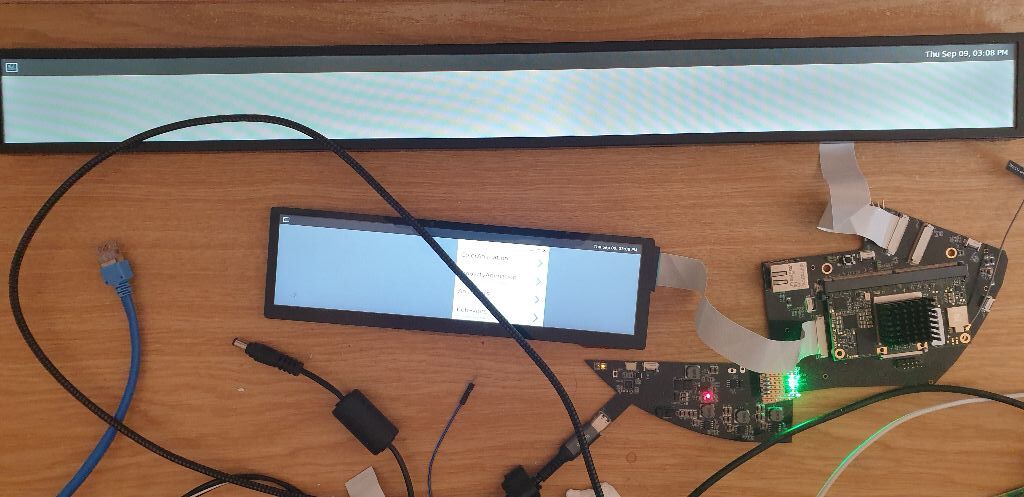

Since we have used touch at LVDS_2, now, touch is not working any more.
Here, we are faced with the problem of activating i2c_6 instead of i2c_2, which is kind of complicated at imx8. As this is not part of this topic, we have created another topic, which you can find here.
Although LVDS_1 and LVDS_3 nicely start both displays (see figure presented above), we have not been able to start the two displays using LVDS_1 and LVDS_2. Regrettably, this is our preferred configuration because the imx6 can do this. Here, only one display can be used and the other remains black at our preferred configuration. Hence, our last question regarding this topic is:
Is it possible to use ldb1 with different pins, such as the pins from LVDS_1 (ldb2 ; LVDS1_A_*)?
As our initially posted weston logs of our preferred configuration indicate errors about ldb2, it might be, that this is a ldb-related issue… Maybe you can have an internal check on this…?
If you find an issue on this and you are going to create an update here, it was great if you just can reply to this. Of course, we are going to test this and post test results, here.
However, we have an alternative configuration by using LVDS_1 and LVDS_3.
Thank’s a lot for your support.
Best,
Marcus