

Hmm. I may have reproduced this. Give me a bit to do some testing.
from the command above:

I am going to try from the linux system in just a few see if any difference. just got it to debug.
That’s definitely not correct. If you have a torizon-docker based image that file should exist. What does sudo ls -ld /var/sota/storage/docker-compose; sudo ls -lR /var/sota/storage/docker-compose show?
Just to verify I am running that on the device.
torizon@apalis-imx8-14760601:~$ sudo ls -ld /var/sota/storage/docker-compose; sudo ls -lR /var/sota/storage/docker-compose
Password:
drwx------ 3 root root 4096 Aug 26 16:11 /var/sota/storage/docker-compose
/var/sota/storage/docker-compose:
total 188
drwx------ 2 root root   4096 Aug 25 21:03 metadata
-rw-r--r-- 1 root root   1679 Aug 25 21:04 sec.private
-rw-r--r-- 1 root root    451 Aug 25 21:04 sec.public
-rw-r--r-- 1 root root 176128 Aug 26 16:11 sql.db
-rw-r--r-- 1 root root      0 Aug 26 12:28 storage.lock
-rw-r--r-- 1 root root     18 Aug 25 21:00 target_name

/var/sota/storage/docker-compose/metadata:
total 0
torizon@apalis-imx8-14760601:~
Hi Lon,
Yes, that was intended to be run on the device. It seems you have no docker package installed but that is likely a symptom of the installation failure and not the cause. I’ll let you know what I find on my setup locally.
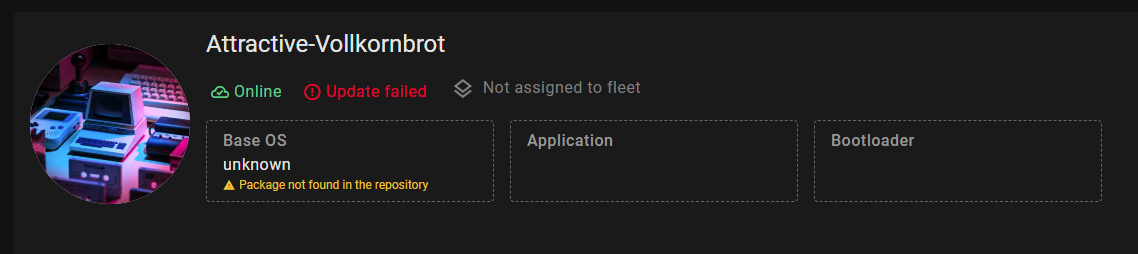
Not exactly. My comment above was about the docker-compose application package itself and not the base OS. Essentially, if you install an OS from Toradex Easy Installer, and that specific package has not been uploaded to your account using torizoncore-builder platform push then it will show as “not found”. That’s because there is no such version signed by your account credentials. When you reinstalled yesterday with the Easy Installer, I suspect that is when this changed. Once you are working with customized versions of the OS they will all be part of your repository and will show properly.
OK, so the good news is that this issue is not you doing something wrong. It is an error in the pre-release version of the extension. I have created a bug ticket for the dev team to address.
In the meantime, you can manually edit the docker-compose.yml file to work around this. Note that this will likely break debug mode, so you may need to manually undo this if you need to switch back. Hopefully, the team can address this one quickly.
The change you need to make is to remove the yaml profiles settings from each of the services. You can see the diff I have locally here:
diff --git a/docker-compose.yml b/docker-compose.yml
index c4f0c5a..b7249ef 100644
--- a/docker-compose.yml
+++ b/docker-compose.yml
@@ -22,8 +22,6 @@ services:
       # ... for /dev/dri devices
       - "c 226:* rmw"
     depends_on: [weston]
-    profiles:
-      - debug

   helloavalonia:
     build:
@@ -46,8 +44,6 @@ services:
       # ... for /dev/dri devices
       - "c 226:* rmw"
     depends_on: [weston]
-    profiles:
-      - release

   weston:
     image: torizon/weston${GPU}:4
@@ -81,6 +77,3 @@ services:
       - "c 226:* rmw"
       # ... for /dev/dma_heap device
       - "c 253:* rmw"
-    profiles:
-      - release
-      - debug
Let me know how it goes. Not ideal I realize but hopefully this works as a workaround until the team fixes it properly.
Well look at that a successful update and the app ran!
With that I will go home and look at this all closer in the morning. Thank you.
But just a heads up. do NOT try to reload the vs code window with the yml file modified that way. I have to revert to get everything running properly then modify it.
That’s excellent. It was a long road with a lot of backtracking and catching up again but I’m glad you are able to at least use the production workflows. I’ll keep this ticket open so I can post updates as the dev team resolves the issues we discovered.
Let me know if you have anything else I can help with.
OH I am sure you will hear more from me. 
Hi @Lon
I received confirmation from the dev team that a number of the issues we workaround above related to the production workflows is now resolved in the latest Early Release version of the Torizon extension. You should be able to use the “Create-production-image” task and others that we tried. I have not tested this myself but if you do try it and have issues please reach out and create a new ticket and we’ll do what we can to get you past it.
Drew
thank you drew. I am working on a multi container setup at the moment. I will see if I can try it next week.
Have a good one.