

In this section, see the bits about the Torizon Cloud API v2 Client ID and Secret.
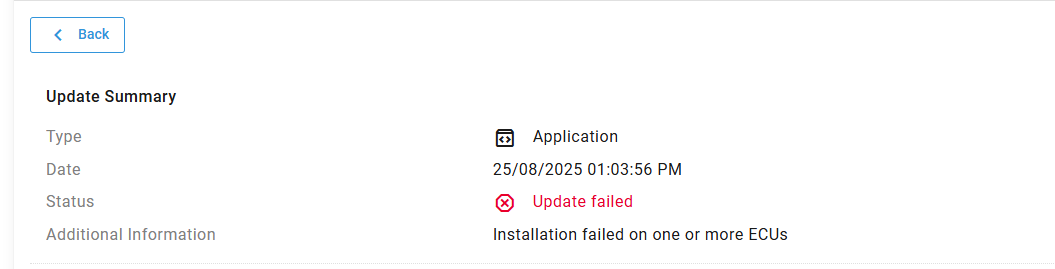
alright I have got the tcb-platform-publish to work I actually have a package on torizon cloud. but when I push the application it is failing. how do you trouble shoot or view logs for that?
What is shown in the execution terminal for the task? Unfortunately, if you are using a multicontainer project, at the moment you need to make sure your credentials.zip file is stored in both the workspace root and in the project root. The team has a bug to fix that but for now just make sure it exists in both spaces.
ok so credentials.zip in both directories.
output of the attempt I did:
No specific initial task defined for this template
 *  Terminal will be reused by tasks, press any key to close it.

 *  Executing task in folder Powis6000PlusOven: xonsh .conf/validate-deps-running.xsh


⚠️ VALIDATING ENVIRONMENT

OS:         Linux
OS Version: 5.15.167.4-microsoft-standard-WSL2
OS Arch:    x86_64
Under WSL:  Torizon
VS Code:
1.103.2
6f17636121051a53c88d3e605c491d22af2ba755
x64

TOR Extension:  toradex.apollox-vscode@3.1.114

✅ Environment is valid!

 *  Terminal will be reused by tasks, press any key to close it.

 *  Executing task in folder Powis6000PlusOven: bash -c [[ ! -z "10.10.10.87" ]] && true || false

 *  Terminal will be reused by tasks, press any key to close it.

 *  Executing task in folder Powis6000PlusOven: bash -c [[ "aarch64" == "aarch64" ]] && true || false

 *  Terminal will be reused by tasks, press any key to close it.

 *  Executing task in folder Powis6000PlusOven: sleep 2

 *  Terminal will be reused by tasks, press any key to close it.

 *  Executing task in folder Powis6000PlusOven: sshpass -p torizon scp -P 22 -o UserKnownHostsFile=/dev/null -o StrictHostKeyChecking=no /home/powis/PowisPlus6000/Powis6000PlusOven/docker-compose.yml torizon@10.10.10.87:~/

Warning: Permanently added '10.10.10.87' (ED25519) to the list of known hosts.
 *  Terminal will be reused by tasks, press any key to close it.

 *  Executing task in folder Powis6000PlusOven: /home/powis/PowisPlus6000/Powis6000PlusOven/.conf/remove-dangling-images.xsh 10.10.10.87:2375

Waiting for prune lock on host 10.10.10.87:2375
Pruning dangling images on 10.10.10.87:2375
Total reclaimed space: 0B
 *  Terminal will be reused by tasks, press any key to close it.

 *  Executing task in folder Powis6000PlusOven: docker compose -p torizon stop powis6000oven powis6000oven-debug && docker compose -p torizon rm -f powis6000oven powis6000oven-debug

No stopped containers
 *  Terminal will be reused by tasks, press any key to close it.

 *  Executing task in folder Powis6000PlusOven: xonsh /home/powis/PowisPlus6000/Powis6000PlusOven/.conf/torizon-packages.xsh arm64

Applying torizonPackages.json:
Applying to Dockerfile.debug ...
✅ Dockerfile.debug
Applying to Dockerfile ...
✅ Dockerfile
torizonPackages.json applied
 *  Terminal will be reused by tasks, press any key to close it.

 *  Executing task in folder Powis6000PlusOven: DOCKER_HOST= docker compose build --pull --build-arg SSHUSERNAME=torizon --build-arg APP_ROOT=/home/torizon/app --build-arg IMAGE_ARCH=arm64 --build-arg GPU=-imx8 powis6000oven

WARN[0000] The "LOCAL_REGISTRY" variable is not set. Defaulting to a blank string.
Compose can now delegate builds to bake for better performance.
 To do so, set COMPOSE_BAKE=true.
[+] Building 25.7s (17/17) FINISHED                                                                                           docker:default
 => [powis6000oven internal] load build definition from Dockerfile                                                                      0.0s
 => => transferring dockerfile: 3.08kB                                                                                                  0.0s
 => [powis6000oven internal] load metadata for docker.io/torizon/dotnet8-gtk3-imx8:4                                                    0.5s
 => [powis6000oven internal] load metadata for mcr.microsoft.com/dotnet/sdk:8.0                                                         0.2s
 => [powis6000oven auth] torizon/dotnet8-gtk3-imx8:pull token for registry-1.docker.io                                                  0.0s
 => [powis6000oven internal] load .dockerignore                                                                                         0.0s
 => => transferring context: 56B                                                                                                        0.0s
 => [powis6000oven deploy 1/5] FROM docker.io/torizon/dotnet8-gtk3-imx8:4@sha256:6579aa7418aed31e925be8ab4032391ecb69223a5f533c3b39ea2  0.0s
 => [powis6000oven internal] load build context                                                                                         0.1s
 => => transferring context: 58.23kB                                                                                                    0.0s
 => CACHED [powis6000oven build 1/4] FROM mcr.microsoft.com/dotnet/sdk:8.0@sha256:7fd287cec03e027e39be13fb06ca1347f1338c7a6ab4ad305d94  0.0s
 => [powis6000oven build 2/4] COPY . /home/torizon/app                                                                                  2.0s
 => [powis6000oven build 3/4] WORKDIR /home/torizon/app                                                                                 0.1s
 => [powis6000oven build 4/4] RUN dotnet restore Powis6000PlusOven.csproj &&     if [ "arm64" = "arm64" ] ; then         export ARCH=  22.8s
 => CACHED [powis6000oven deploy 2/5] RUN apt-get -q -y update &&         if [ "-imx8" = "-vivante" ] || [ "-imx8" = "-imx8" ]; then    0.0s
 => CACHED [powis6000oven deploy 3/5] RUN apt-get -y update && apt-get install -y --no-install-recommends     libice6     libsm6     l  0.0s
 => CACHED [powis6000oven deploy 4/5] COPY --from=build /home/torizon/app/bin/Release/net8.0/linux-arm64/publish /home/torizon/app      0.0s
 => CACHED [powis6000oven deploy 5/5] WORKDIR /home/torizon/app                                                                         0.0s
 => [powis6000oven] exporting to image                                                                                                  0.0s
 => => exporting layers                                                                                                                 0.0s
 => => writing image sha256:b75147f2bc4182d4ec27998591ebbbe2c14c2d758b1227f2c90cf0e8d6cb8bc5                                            0.0s
 => => naming to localhost:5002/powis6000oven:v0.0.0                                                                                    0.0s
 => [powis6000oven] resolving provenance for metadata file                                                                              0.0s
[+] Building 1/1
 ✔ powis6000oven  Built                                                                                                                 0.0s
 *  Terminal will be reused by tasks, press any key to close it.

 *  Executing task in folder Powis6000PlusOven: DOCKER_HOST= docker compose push powis6000oven

WARN[0000] The "LOCAL_REGISTRY" variable is not set. Defaulting to a blank string.
WARN[0000] The "GPU" variable is not set. Defaulting to a blank string.
[+] Pushing 19/19
 ✔ Pushing localhost:5002/powis6000oven:v0.0.0: 5f70bf18a086 Layer already exists                                                       0.0s
 ✔ Pushing localhost:5002/powis6000oven:v0.0.0: d91e423467e0 Layer already exists                                                       0.0s
 ✔ Pushing localhost:5002/powis6000oven:v0.0.0: 15238996ac1d Layer already exists                                                       0.0s
 ✔ Pushing localhost:5002/powis6000oven:v0.0.0: 1fb755a0e8d8 Layer already exists                                                       0.0s
 ✔ Pushing localhost:5002/powis6000oven:v0.0.0: 3d841b49a493 Layer already exists                                                       0.0s
 ✔ Pushing localhost:5002/powis6000oven:v0.0.0: 59244eb5c953 Layer already exists                                                       0.0s
 ✔ Pushing localhost:5002/powis6000oven:v0.0.0: 2da1959d71d7 Layer already exists                                                       0.0s
 ✔ Pushing localhost:5002/powis6000oven:v0.0.0: a08717df756a Layer already exists                                                       0.0s
 ✔ Pushing localhost:5002/powis6000oven:v0.0.0: 1a1a241b720c Layer already exists                                                       0.0s
 ✔ Pushing localhost:5002/powis6000oven:v0.0.0: bc77e74bbeab Layer already exists                                                       0.0s
 ✔ Pushing localhost:5002/powis6000oven:v0.0.0: ed712a069357 Layer already exists                                                       0.0s
 ✔ Pushing localhost:5002/powis6000oven:v0.0.0: 92794eb47086 Layer already exists                                                       0.0s
 ✔ Pushing localhost:5002/powis6000oven:v0.0.0: a0d574c32d15 Layer already exists                                                       0.0s
 ✔ Pushing localhost:5002/powis6000oven:v0.0.0: e1366b98fe4c Layer already exists                                                       0.0s
 ✔ Pushing localhost:5002/powis6000oven:v0.0.0: e8a46612ab26 Layer already exists                                                       0.0s
 ✔ Pushing localhost:5002/powis6000oven:v0.0.0: f58c1a1ecdef Layer already exists                                                       0.0s
 ✔ Pushing localhost:5002/powis6000oven:v0.0.0: d0508e0dd1be Layer already exists                                                       0.0s
 ✔ Pushing localhost:5002/powis6000oven:v0.0.0: a1d50827e227 Layer already exists                                                       0.0s
 ✔ Pushing localhost:5002/powis6000oven:v0.0.0: f0f023a63482 Layer already exists                                                       0.0s
 *  Terminal will be reused by tasks, press any key to close it.

 *  Executing task in folder Powis6000PlusOven: DOCKER_HOST=10.10.10.87:2375 LOCAL_REGISTRY=192.168.63.2 DOCKER_LOGIN=192.168.63.2:5002 TAG=v0.0.0 GPU=-imx8 DEBUG_SSH_PORT=2224 DEBUG_PORT1= DEBUG_PORT2= DEBUG_PORT3= docker compose --profile release pull powis6000oven

[+] Pulling 1/1
 ! powis6000oven Warning Get "http://192.168.63.2:5002/v2/": net/http: request canceled while waiting for con...                       30.0s
WARNING: Some service image(s) must be built from source by running:
    docker compose build powis6000oven
1 error occurred:
        * Error response from daemon: Get "http://192.168.63.2:5002/v2/": net/http: request canceled while waiting for connection (Client.Timeout exceeded while awaiting headers)


 *  The terminal process "/usr/bin/bash '-c', 'DOCKER_HOST=10.10.10.87:2375 LOCAL_REGISTRY=192.168.63.2 DOCKER_LOGIN=192.168.63.2:5002 TAG=v0.0.0 GPU=-imx8 DEBUG_SSH_PORT=2224 DEBUG_PORT1= DEBUG_PORT2= DEBUG_PORT3= docker compose --profile release pull powis6000oven'" terminated with exit code: 1.
 *  Terminal will be reused by tasks, press any key to close it.
alright. this is the retry with credentials.zip in both directories.
 Executing task in folder Powis6000PlusOven: xonsh /home/powis/PowisPlus6000/Powis6000PlusOven/.conf/create-docker-compose-production.xsh /home/powis/PowisPlus6000/Powis6000PlusOven v0.0.0 powis6000oven -imx8


Merging settings from: /home/powis/PowisPlus6000/PowisPlus6000.code-workspace
> Executing task: run-torizon-binfmt <
Container Runtime: docker
Run Arguments: --rm --privileged torizon/binfmt:latest
Container Name: binfmt
Container does not exist. Starting ...
Cmd: docker run --name binfmt --rm --privileged torizon/binfmt:latest

Rebuilding lonhemmen/powis6000oven:v0.0.0 ...

Merging settings from: /home/powis/PowisPlus6000/PowisPlus6000.code-workspace
> Executing task: apply-torizon-packages-arm64 <
Applying torizonPackages.json:
Applying to Dockerfile.debug ...
✅ Dockerfile.debug
Applying to Dockerfile ...
✅ Dockerfile
torizonPackages.json applied
> Executing task: build-container-torizon-release-arm64 <
Compose can now delegate builds to bake for better performance.
 To do so, set COMPOSE_BAKE=true.
[+] Building 0.7s (17/17) FINISHED                                                                                            docker:default
 => [powis6000oven internal] load build definition from Dockerfile                                                                      0.0s
 => => transferring dockerfile: 3.08kB                                                                                                  0.0s
 => [powis6000oven internal] load metadata for docker.io/torizon/dotnet8-gtk3-imx8:4                                                    0.5s
 => [powis6000oven internal] load metadata for mcr.microsoft.com/dotnet/sdk:8.0                                                         0.2s
 => [powis6000oven auth] torizon/dotnet8-gtk3-imx8:pull token for registry-1.docker.io                                                  0.0s
 => [powis6000oven internal] load .dockerignore                                                                                         0.0s
 => => transferring context: 56B                                                                                                        0.0s
 => [powis6000oven internal] load build context                                                                                         0.0s
 => => transferring context: 55.44kB                                                                                                    0.0s
 => [powis6000oven build 1/4] FROM mcr.microsoft.com/dotnet/sdk:8.0@sha256:7fd287cec03e027e39be13fb06ca1347f1338c7a6ab4ad305d94d918526  0.0s
 => [powis6000oven deploy 1/5] FROM docker.io/torizon/dotnet8-gtk3-imx8:4@sha256:6579aa7418aed31e925be8ab4032391ecb69223a5f533c3b39ea2  0.0s
 => CACHED [powis6000oven deploy 2/5] RUN apt-get -q -y update &&         if [ "-imx8" = "-vivante" ] || [ "-imx8" = "-imx8" ]; then    0.0s
 => CACHED [powis6000oven deploy 3/5] RUN apt-get -y update && apt-get install -y --no-install-recommends     libice6     libsm6     l  0.0s
 => CACHED [powis6000oven build 2/4] COPY . /home/torizon/app                                                                           0.0s
 => CACHED [powis6000oven build 3/4] WORKDIR /home/torizon/app                                                                          0.0s
 => CACHED [powis6000oven build 4/4] RUN dotnet restore Powis6000PlusOven.csproj &&     if [ "arm64" = "arm64" ] ; then         export  0.0s
 => CACHED [powis6000oven deploy 4/5] COPY --from=build /home/torizon/app/bin/Release/net8.0/linux-arm64/publish /home/torizon/app      0.0s
 => CACHED [powis6000oven deploy 5/5] WORKDIR /home/torizon/app                                                                         0.0s
 => [powis6000oven] exporting to image                                                                                                  0.0s
 => => exporting layers                                                                                                                 0.0s
 => => writing image sha256:5ef210d2fe4b0d2c6d59b45b708ac3f965d495697eb38cf7801612aff4c3624d                                            0.0s
 => => naming to docker.io/lonhemmen/powis6000oven:v0.0.0                                                                               0.0s
 => [powis6000oven] resolving provenance for metadata file                                                                              0.0s
[+] Building 1/1
 ✔ powis6000oven  Built                                                                                                                 0.0s

✅ Image rebuild and tagged
Pushing lonhemmen/powis6000oven:v0.0.0 ...

Merging settings from: /home/powis/PowisPlus6000/PowisPlus6000.code-workspace
> Executing task: docker-login <
Performing container registry login ...
Login Succeeded
✅ Logged in the container registry

The push refers to repository [docker.io/lonhemmen/powis6000oven]
5f70bf18a086: Layer already exists
1eae1de9a873: Layer already exists
15238996ac1d: Layer already exists
1fb755a0e8d8: Layer already exists
3d841b49a493: Layer already exists
59244eb5c953: Layer already exists
2da1959d71d7: Layer already exists
a08717df756a: Layer already exists
1a1a241b720c: Layer already exists
bc77e74bbeab: Layer already exists
ed712a069357: Layer already exists
92794eb47086: Layer already exists
a0d574c32d15: Layer already exists
e1366b98fe4c: Layer already exists
e8a46612ab26: Layer already exists
f58c1a1ecdef: Layer already exists
d0508e0dd1be: Layer already exists
a1d50827e227: Layer already exists
f0f023a63482: Layer already exists
v0.0.0: digest: sha256:910d91514ab27c41abff4702818d99f019e2063dbd1bd97b0fec1881bcd0b232 size: 4709
✅ Image pushed
Generating production docker-compose file ...
Reading the docker-compose file ...
✅ docker-compose.yml loaded
Cleaning services ...
✅ Services cleaned
Replacing variables ...
✅ Variables replaced
✅ docker-compose.prod.yml generated
 *  Terminal will be reused by tasks, press any key to close it.

 *  Executing task in folder Powis6000PlusOven: DOCKER_HOST= source ./.conf/tcb-env-setup.sh -s /home/powis/PowisPlus6000/Powis6000PlusOven/storage -t 3.13.0

Warning: If you intend to use torizoncore-builder as a server (listening to ports), then you should pass extra parameters to "docker run" (via the -- switch).
Setting up TorizonCore Builder with version 3.13.0.

Canonicalized file 'docker-compose.prod.lock.yml' has been generated.
You should keep 'docker-compose.prod.lock.yml' under your version control system.
Pushing 'docker-compose.prod.lock.yml' with package version 2 to OTA server.
Successfully pushed docker-compose.prod.lock.yml to OTA server.
 *  Terminal will be reused by tasks, press any key to close it.
odds are I am still missing something but not sure what. the app install is failing.
OK. It looks like you now should have a package on your server. It succeeded according to the log. What do you mean by “app install” here? All the tcb-platform-publish task does it push the new version to the server.
Drew Moseley
Toradex


What do the following commands show when run from a shell on the device?
- sudo journalctl -u aktualizr-torizon
- docker ps
- sudo systemctl status docker-compose
sudo journalctl -u aktualizr-torizon
Aug 25 07:20:36 apalis-imx8-14760601 (-torizon)[1042]: aktualizr-torizon.service: Referenced but unset environment variable evaluates to an >
Aug 25 07:20:36 apalis-imx8-14760601 systemd[1]: Started Aktualizr SOTA Client.
Aug 25 07:20:36 apalis-imx8-14760601 aktualizr-torizon[1042]: Aktualizr version tdx-e6ba4d70b starting
Aug 25 07:20:36 apalis-imx8-14760601 aktualizr-torizon[1042]: Reading config: "/usr/lib/sota/conf.d/20-sota-device-cred.toml"
Aug 25 07:20:36 apalis-imx8-14760601 aktualizr-torizon[1042]: Reading config: "/usr/lib/sota/conf.d/30-rollback.toml"
Aug 25 07:20:36 apalis-imx8-14760601 aktualizr-torizon[1042]: Reading config: "/usr/lib/sota/conf.d/40-hardware-id.toml"
Aug 25 07:20:36 apalis-imx8-14760601 aktualizr-torizon[1042]: Reading config: "/usr/lib/sota/conf.d/50-secondaries.toml"
Aug 25 07:20:36 apalis-imx8-14760601 aktualizr-torizon[1042]: Reading config: "/usr/lib/sota/conf.d/60-polling-interval.toml"
Aug 25 07:20:36 apalis-imx8-14760601 aktualizr-torizon[1042]: Reading config: "/etc/sota/conf.d/61-custom-polling-interval.toml"
Aug 25 07:20:36 apalis-imx8-14760601 aktualizr-torizon[1042]: Reading config: "/usr/lib/sota/conf.d/70-reboot.toml"
Aug 25 07:20:36 apalis-imx8-14760601 aktualizr-torizon[1042]: Use existing SQL storage: "/var/sota/sql.db"
Aug 25 07:20:36 apalis-imx8-14760601 aktualizr-torizon[1042]: Couldn`t import data: empty path received
Aug 25 07:20:36 apalis-imx8-14760601 aktualizr-torizon[1042]: Initializing docker-compose Secondaries...
Aug 25 07:20:36 apalis-imx8-14760601 aktualizr-torizon[1042]: Use existing SQL storage: "/var/sota/storage/docker-compose/sql.db"
Aug 25 07:20:36 apalis-imx8-14760601 aktualizr-torizon[1042]: No valid Director metadata found in storage: Could not load latest root
Aug 25 07:20:36 apalis-imx8-14760601 aktualizr-torizon[1042]: No valid Image metadata found in storage: Could not load latest root
Aug 25 07:20:36 apalis-imx8-14760601 aktualizr-torizon[1042]: Adding Secondary with ECU serial: 096c7f01d9e7e4e2512f40290137dd695ba6e34715dc>
Aug 25 07:20:36 apalis-imx8-14760601 aktualizr-torizon[1042]: Initializing torizon-generic Secondaries...
Aug 25 07:20:36 apalis-imx8-14760601 aktualizr-torizon[1042]: Use existing SQL storage: "/var/sota/storage/bootloader/sql.db"
Aug 25 07:20:36 apalis-imx8-14760601 aktualizr-torizon[1042]: No valid Director metadata found in storage: Could not load latest root
Aug 25 07:20:36 apalis-imx8-14760601 aktualizr-torizon[1042]: No valid Image metadata found in storage: Could not load latest root```
 Aug 25 07:20:36 apalis-imx8-14760601 aktualizr-torizon[1042]: Adding Secondary with ECU serial: a34d95a9113555a324d4631d8188871da89af797f80e>
Aug 25 07:20:36 apalis-imx8-14760601 aktualizr-torizon[1042]: Primary ECU serial: 565048865af85aa481eed9c332d06bdb9c80c2877289287e6e4d260c69>
Aug 25 07:20:36 apalis-imx8-14760601 aktualizr-torizon[1042]: Device ID: 1f4d2150-f6b9-4e7c-8f88-059be1a70f07
Aug 25 07:20:36 apalis-imx8-14760601 aktualizr-torizon[1042]: Device Gateway URL: https://dgw.torizon.io
Aug 25 07:20:36 apalis-imx8-14760601 aktualizr-torizon[1042]: Certificate subject: CN=1f4d2150-f6b9-4e7c-8f88-059be1a70f07
Aug 25 07:20:36 apalis-imx8-14760601 aktualizr-torizon[1042]: Certificate issuer: CN=ota-devices-CA
Aug 25 07:20:36 apalis-imx8-14760601 aktualizr-torizon[1042]: Certificate valid from: Aug  5 20:48:57 2025 GMT until: Aug  5 20:48:57 2125 G>
Aug 25 07:20:36 apalis-imx8-14760601 aktualizr-torizon[1042]: Offline Updates are disabled
Aug 25 07:20:36 apalis-imx8-14760601 aktualizr-torizon[1042]: Not registering with D-Bus because support was not compiled in
Aug 25 07:20:37 apalis-imx8-14760601 aktualizr-torizon[1042]: Event: SendDeviceDataComplete
Aug 25 07:20:39 apalis-imx8-14760601 aktualizr-torizon[1042]: Invalid role in root.json
Aug 25 07:20:39 apalis-imx8-14760601 aktualizr-torizon[1042]: Invalid role in root.json
Aug 25 07:20:40 apalis-imx8-14760601 aktualizr-torizon[1042]: Event: UpdateCheckComplete, Result - No updates available
Aug 25 07:21:08 apalis-imx8-14760601 aktualizr-torizon[1042]: Invalid role in root.json
Aug 25 07:21:08 apalis-imx8-14760601 aktualizr-torizon[1042]: Invalid role in root.json
Aug 25 07:21:09 apalis-imx8-14760601 aktualizr-torizon[1042]: Event: UpdateCheckComplete, Result - No updates available

Goes on for 2667 lines.
attached
aktualizr.txt (267.8 KB)
full log as a file
docker ps:
CONTAINER ID   IMAGE                 COMMAND                  CREATED          STATUS          PORTS     NAMES
f5affdd563f3   torizon/weston-imx8   "/usr/bin/entry.sh -…"   48 minutes ago   Up 48 minutes             torizon-weston-1
sudo systemctl status docker-compose
● docker-compose.service - Docker Compose service with docker compose
     Loaded: loaded (/usr/lib/systemd/system/docker-compose.service; enabled; preset: enabled)
     Active: active (exited) since Mon 2025-08-25 07:20:36 CDT; 6h ago
    Process: 1043 ExecStart=/usr/bin/docker-compose -p torizon up -d --remove-orphans (code=exited, status=0/SUCCESS)
    Process: 1044 ExecStartPost=rm -f /tmp/recovery-attempt.txt (code=exited, status=0/SUCCESS)
   Main PID: 1043 (code=exited, status=0/SUCCESS)
        CPU: 377ms

Aug 25 07:20:36 apalis-imx8-14760601 systemd[1]: Starting Docker Compose service with docker compose...
Aug 25 07:20:36 apalis-imx8-14760601 systemd[1]: Started Docker Compose service with docker compose.
Aug 25 07:20:36 apalis-imx8-14760601 docker-compose[1043]:  Container torizon-powis6000oven-debug-1  Stopping
Aug 25 07:20:36 apalis-imx8-14760601 docker-compose[1043]:  Container torizon-powis6000oven-debug-1  Stopped
Aug 25 07:20:36 apalis-imx8-14760601 docker-compose[1043]:  Container torizon-powis6000oven-debug-1  Removing
Aug 25 07:20:36 apalis-imx8-14760601 docker-compose[1043]:  Container torizon-powis6000oven-debug-1  Removed
Aug 25 07:20:36 apalis-imx8-14760601 docker-compose[1043]:  Container torizon-weston-1  Recreate
Aug 25 07:20:37 apalis-imx8-14760601 docker-compose[1043]:  Container torizon-weston-1  Recreated
Aug 25 07:20:37 apalis-imx8-14760601 docker-compose[1043]:  Container torizon-weston-1  Starting
Aug 25 07:20:37 apalis-imx8-14760601 docker-compose[1043]:  Container torizon-weston-1  Started
I don’t see any smoking gun in there but I wonder if maybe all the experimenting you did left the board in an unexpected state? I suggest you reinstall Torizon fresh using the Easy Installer and provision it properly on the cloud without doing any local VSCode debugging tasks. If it still fails, can you share the journalctl output as well as:
$ sudo docker-compose -f /var/sota/storage/docker-compose/docker-compose.yml --project-name torizon logs
I got it reset fresh and on the cloud. Sent the application. It failed.
I am trying to figure out what i has for an IP address at the moment so I can get a terminal and grab the output of that. but the scanning in VS code is failing at the moment. I will tryin again in the morning.
Is this your custom application or the unmodified template? Is it something you can share with me? You can upload it to https://share.toradex.com/ and then email me directly (drew.moseley@toradex.com) the URL that is generated so I can grab it without the URL being posted publicly.
Hi @Lon
I confirmed with the dev team that this piece was missing. They have added a task to their backlog and will hopefully have the production app workflows functioning with the new container delivery mechanism soon.
So do you still want me to upload the project? if so what is the best way at the moment it is coming in at 880M.
will a default template possibly work to make an image and try the torizon cloud that way?
No change at the moment. Let’s focus in on the issue with deploying from the cloud. They have not changed anything yet. I’ll let you know when they do.
And sorry, yes, if you can share your project that would help but given how large it is, I wonder if we should test the cloud deployment path with the basic hello world app.
I streamlined it. and sent you an email with the link. If it would be easier we can attempt the default template also.
That sounds like a good approach. I’m in meetings for the next few hours so I won’t get a chance to look at your app until after. If, in the meantime, you have a chance to test with the default template that will be potentially useful info.
alright new avalonia template with no modifications. did the tcb-platform-publish. no luck.

template debugs just fine. So I am either missing a step or have something configured strange on my system. I am going to try brining up a ubuntu system and see what happens.
Weird. OK. Can you share the docker logs using the command from above?