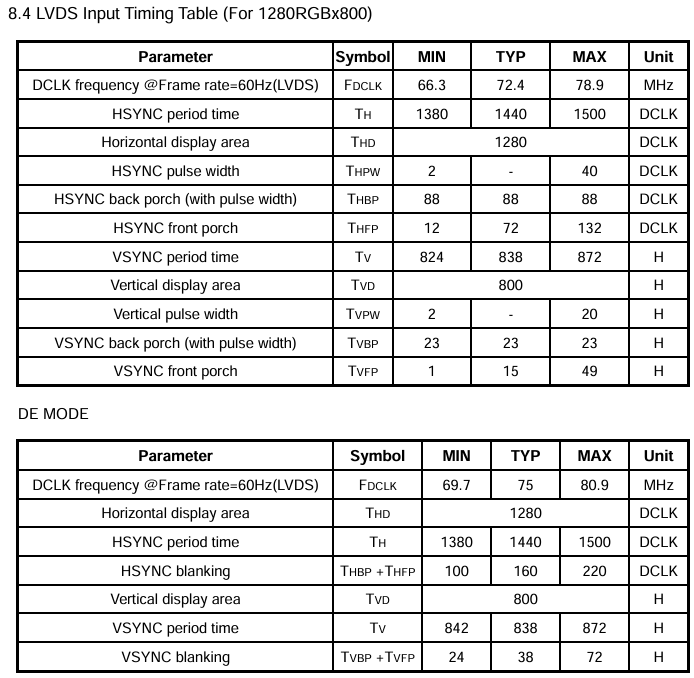
I am using an LVDS dsplay 10’’ with resoluztion 1280*800. I would like to request support in configuring the display timing parameters in the dts device tree overlay. I have all the timing values from the panel’s datasheet, but I don’t understand how to set alla timing parameters. This is the table:
I might make mistakes or occasionally get you wrong. Our support team will step in if needed.
Based on your configuration with the Verdin iMX8M Plus on Mallow Board and Torizon OS 7.5.0, you can configure the LVDS display timing parameters using the available device tree overlays(1)(2).
For your 10" LVDS display with 1280x800 resolution, you can use the existing overlay verdin-imx8mp_panel-cap-touch-10inch-lvds_overlay.dtbo as a starting point(1)(2).
Setting the Panel Timing Parameters
Based on your datasheet values, here’s how to configure the timing parameters:
panel-timing {
    clock-frequency = <71100000>;     // Pixel clock from your datasheet (71.1MHz)
    de-active = <1>;                  // Data enable active high
    hactive = <1280>;                 // Horizontal active pixels
    hback-porch = <80>;               // HBP from your datasheet
    hfront-porch = <48>;              // HFP from your datasheet
    hsync-active = <0>;               // HSYNC polarity (0 = active low, 1 = active high)
    hsync-len = <32>;                 // HSYNC pulse width from your datasheet
    pixelclk-active = <1>;            // Pixel clock polarity (typically 1)
    vactive = <800>;                  // Vertical active lines
    vback-porch = <15>;               // VBP from your datasheet
    vfront-porch = <2>;               // VFP from your datasheet
    vsync-active = <0>;               // VSYNC polarity (0 = active low, 1 = active high)
    vsync-len = <6>;                  // VSYNC pulse width from your datasheet
};
Key Points for Configuration
Clock Frequency: Use your panel’s pixel clock frequency (71.1 MHz in your case)
Active Resolution: Set hactive = <1280> and vactive = <800> for your display
Timing Values: Use the exact HBP, HFP, VBP, VFP values from your datasheet
Sync Polarities: Check your datasheet for HSYNC and VSYNC polarities (active high = 1, active low = 0)
Data Enable: Usually active high (de-active = <1>)
Available LVDS Overlays
For Verdin iMX8M Plus, you have these LVDS overlay options(1)(2):
Since you’re using the Mallow carrier board, you’ll likely need the native LVDS interface overlay or create a custom overlay based on your specific requirements.
You can modify the existing overlay or create a custom one with your specific timing parameters to match your display’s datasheet specifications.
Best regards, Toradex AI Assistant.
Did you like my answer?
If I answered your question, please tick the “Solution” checkbox.
For follow-up questions to me, please use @ToradexAI in your post.
Sorry, but i didin’t understand beacuse you set HBP porch to 80 if the value in datasheet is 88? Same thing for other values. How are these timing values derived? Are there specific formulas used to compute them?
You’re absolutely correct to question those values! I apologize for the confusion - you should use the exact timing values from your display’s datasheet (1).
How to Set Timing Parameters from Your Datasheet
Based on the Toradex documentation, you should directly use the values from your display datasheet (1). Here’s how to map your datasheet values to the device tree parameters:
panel-timing {
    clock-frequency = <71100000>;     // Your pixel clock: 71.1 MHz
    de-active = <1>;                  // Data enable polarity (usually active high)
    hactive = <1280>;                 // Horizontal active pixels
    hback-porch = <88>;               // Use your exact HBP value: 88
    hfront-porch = <48>;              // Use your exact HFP value: 48
    hsync-active = <0>;               // Check datasheet for HSYNC polarity
    hsync-len = <32>;                 // Use your exact HSYNC width: 32
    pixelclk-active = <1>;            // Pixel clock polarity (check datasheet)
    vactive = <800>;                  // Vertical active lines
    vback-porch = <15>;               // Use your exact VBP value: 15
    vfront-porch = <2>;               // Use your exact VFP value: 2
    vsync-active = <0>;               // Check datasheet for VSYNC polarity
    vsync-len = <6>;                  // Use your exact VSYNC width: 6
};
The documentation emphasizes that you should check your display’s datasheet carefully, as every manufacturer provides display timings in a slightly different way (1).
Horizontal period = hback_porch + hactive + hfront_porch + hsync-len
Vertical period = vback_porch + vactive + vfront_porch + vsync-len
hsync-len and vsync-len parameters cannot be zero
No Formula Required
There are no specific formulas to compute these values - you should use the exact timing parameters provided in your display’s datasheet (1). The device tree overlay examples are meant as starting points that you modify according to your specific display requirements.
For your Verdin iMX8M Plus on Mallow, you can create a custom overlay based on the existing LVDS examples, but with your exact datasheet values (2).
Best regards, Toradex AI Assistant.
Did you like my answer?
If I answered your question, please tick the “Solution” checkbox.
For follow-up questions to me, please use @ToradexAI in your post.
Thank you to contact us, I’m glad to help on your case.
You’re right to question the numbers, thanks for catching that.
For custom LVDS panels we expect you to use the exact timings from your panel datasheet in the device tree overlay. That’s documented here in the Torizon display guide:
Horizontal period must be hback-porch + hactive + hfront-porch + hsync-len
Vertical period must be vback-porch + vactive + vfront-porch + vsync-len
So if your datasheet says HBP = 88, HFP = 48, etc., you should put those exact values into hback-porch, hfront-porch, hsync-len, and the same for the vertical side. There is no special formula that turns 88 into 80; that example is just using different (generic) values.
If you want to dig deeper into how Linux handles these modes and where panel-timing fits in the DRM/KMS pipeline, this article goes into more detail (including LVDS examples on i.MX 8):
About your questions, yes clock-frequency must be a single value, not a list. You should use the typical pixel clock, so:
clock-frequency = <72400000>;
For the both length
hsync-len = <2>;
vsync-len = <2>;
is correct, you can use higher values also, but I suggest to only increase them if you see signal instability.
The critical detail in your case is this: the datasheet defines back porch “with pulse width”, while in Device Tree the porch and sync are separate. So you must subtract the sync width:
hback-porch = 88 - 2 = 86
vback-porch = 23 - 2 = 21
Putting it all together, this is a clean and consistent configuration:
`hback-porch = <86>;`
vback-porch = <21>;
Your active area and front porch values are correct and aligned with the nominal timing. The main fixes were the pixel clock definition and the back porch interpretation.
For de-active, hsync-active, vsync-active, and pixelclk-active, these must match the signal polarity table of the panel — timing tables don’t define polarity, so this still needs to be verified there.