Hi,
I’m powering the system with a 5V 5A power supply using the barrel jack. The system fails to power on if I have any USB peripherals (Memory stick, keyboard) or an ethernet cable connected. JP1 is not connected.
The system powers on until it tries to power on the display backlight (Display flashes once), resets and starts again.
I’ve measured the power supply with an oscilloscope and the supply voltage doesn’t dip due to the inrush current.
Peripherals do work if they are connected after the system has successfully powered on or if the system is powered on without the display connected.
What should be done to be able to power on or reboot the system with necessary devices already connected?
I might make mistakes. Our support team will step in if needed. If I answered your question, please tick the “Solution” checkbox. For follow-up questions to me, please use @ToradexAI in your post.
Did you like my answer?
Power Supply Issue Analysis
Based on your configuration with the Colibri iMX7 Dual, Aster Carrier Board V1.1B, and Capacitive Touch Display 7" Parallel, the issue you’re experiencing appears to be related to power supply limitations during startup with multiple peripherals connected.
Power Supply Specifications
According to the Aster Carrier Board datasheet, the board requires 5V DC +/- 5% supply voltage with 3.3V 3A on-board power supplies (1). Your 5V 5A external power supply should be adequate for the system requirements.
Power Supply Configuration
The Aster Carrier Board provides power through the Barrel Power Supply Connector (X2) which accepts 5V, +/- 0.25V Only(2). Since you mentioned JP1 is not connected, you’re correctly using the external power supply configuration rather than USB power.
Display Power Requirements
The Capacitive Touch Display 7" Parallel has a 3.3V supply voltage requirement (3). The display backlight activation during startup, combined with USB peripherals and Ethernet, likely creates a power demand spike that exceeds your current power budget.
Recommended Solutions
Verify Power Supply Capacity: While your 5A supply should be sufficient, consider testing with a higher capacity supply (7-10A) to rule out peak current limitations during startup.
Staged Power-On: The fact that peripherals work when connected after boot suggests the system can handle the steady-state power but struggles with simultaneous inrush currents.
Check Power Supply Quality: Even though your oscilloscope shows no voltage dip, ensure your power supply can handle the combined inrush current of:
Colibri module startup
Display backlight activation
USB peripheral enumeration
Ethernet PHY initialization
Power Sequencing: Consider implementing a power sequencing approach where non-critical peripherals are powered after the main system stabilizes.
The Aster Carrier Board’s 3.3V 3A on-board power supply specification (4) indicates the maximum current available for peripherals, which may be the limiting factor when multiple devices initialize simultaneously.
Since the 5V input looks stable, the issue may be on the carrier’s internal rails. Could you measure the 5V rail directly on the board near the USB port, and also monitor the 3.3V and 1.8V rails (and the backlight supply if possible) during boot to check for dips? Also, please check that the JP1 jumper is disconnected.
As another option, you should also consider using a powered USB hub for your peripherals. This way, the hub provides stable power to the devices and reduces the demand on the carrier board during boot.
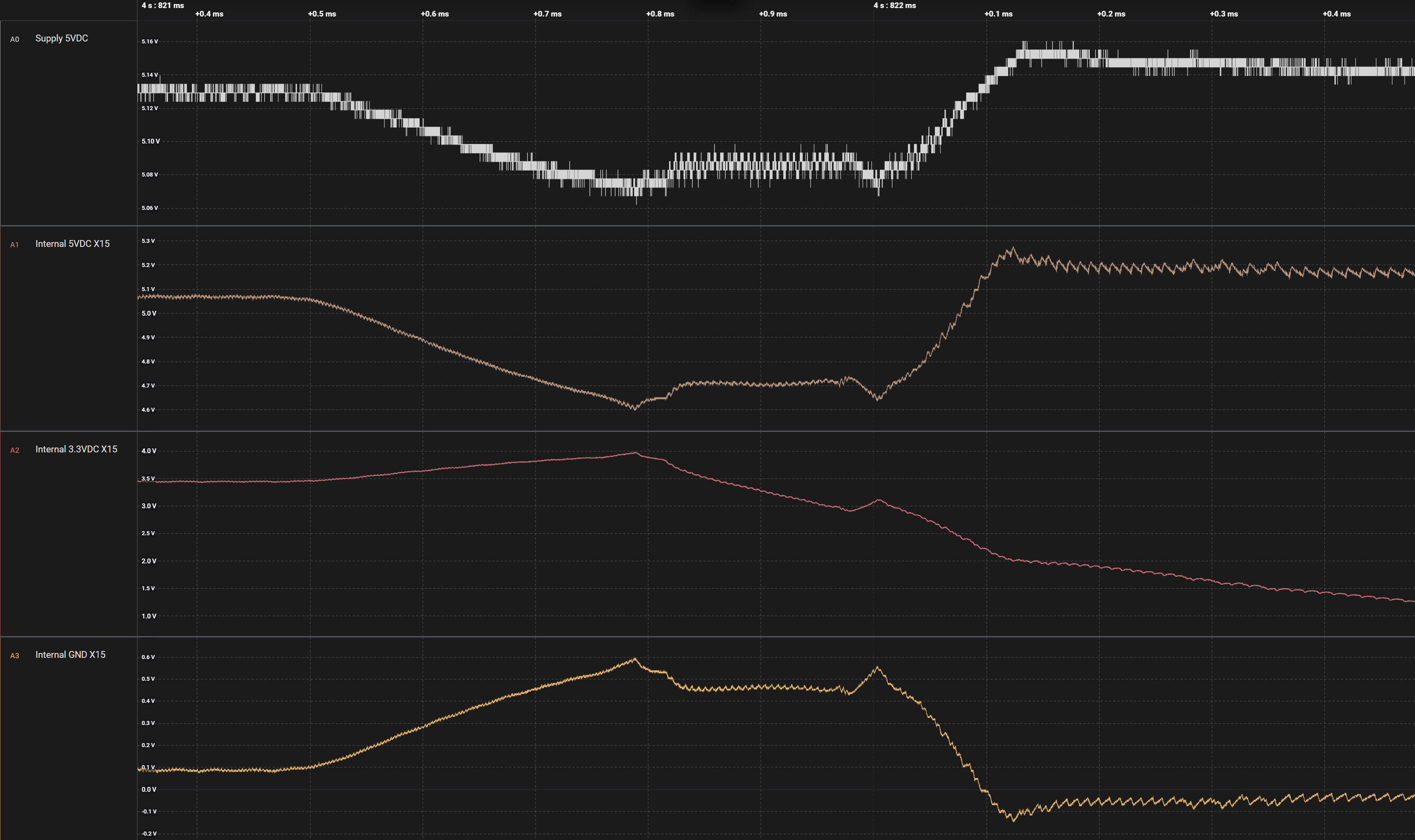
Here are the measurements with internal rails measured from X15. Internal GND is from X15 as well. Couldn’t find a 1V8 to be measured and the backlight supply seems to be PWR_IN_FILT, which is the same as the 5V at X15.
Supply 5V is stable 5.06-5.16V.
Internal filtered 5V drops significantly to 4.6V and Internal GND rises by 0.6V. This voltage drop and the ground shift means that the 3.3V Buck’s VIN is only @~4V while the minimum VIN by the datasheet is 4.7V.
These measurements are done with ethernet connected and without USB peripherals. I don’t currently have a powered USB hub to test with.
João Victor Couto de Oliveira Martins, Sep 1, 2025, 08:59
Since the 5 V input looks stable, and considering the drop on other rails, the issue seems to be related to how the carrier’s internal rails handle the startup load, please consider testing with a power supply that has larger output capacitance, or by adding a bulk capacitor close to the input. This can help absorb the inrush current when the display and peripherals power up simultaneously. As another option, you may also try a powered USB hub to offload USB peripherals from the carrier board’s 5 V rail.