

Please, some human developer have a look at this issue.
Edit:- No, wait, this is the latest OS :-
Software summary
------------------------------------------------------------
Bootloader:               U-Boot
Kernel version:           6.6.84-7.3.0-devel-g54d6d91867a1 #1-Torizon SMP PREEMPT Fri May 30 12:17:11 UTC 2025
Kernel command line:      root=LABEL=otaroot rootfstype=ext4 quiet logo.nologo vt.global_cursor_default=0 plymouth.ignore-serial-consoles splash fbcon=map:3 ostree=/ostree/boot.1/torizon/db56ad929f113f016ed531ec3b5e94f9544c4065565c7ea5c9365f82bc25580a/0 clk-imx8qx.m4_booted=1
Distro name:              NAME="Torizon OS"
Distro version:           VERSION_ID=7.3.0-devel-202506-build.9
Distro variant:           VARIANT="Docker"
Hostname:                 colibri-imx8x-06996015
------------------------------------------------------------

Hardware info
------------------------------------------------------------
HW model:                 Toradex Colibri iMX8QXP on Colibri Evaluation Board V3
Toradex version:          0038 V1.0D
Serial number:            06996015
Processor arch:           aarch64
------------------------------------------------------------
The hmp overlay is active
Device tree
------------------------------------------------------------
Device tree enabled:      imx8qxp-colibri-eval-v3.dtb
Compatible string:        toradex,colibri-imx8x-eval-v3toradex,colibri-imx8xfsl,imx8qxp
Device trees available:
                          imx8dx-colibri-aster.dtb
                          imx8dx-colibri-eval-v3.dtb
                          imx8dx-colibri-iris-v2.dtb
                          imx8dx-colibri-iris.dtb
                          imx8qxp-colibri-aster.dtb
                          imx8qxp-colibri-eval-v3.dtb
                          imx8qxp-colibri-iris-v2.dtb
                          imx8qxp-colibri-iris.dtb
------------------------------------------------------------

Device tree overlays
------------------------------------------------------------
Overlays enabled:         fdt_overlays=colibri-imx8x_vga-640x480_overlay.dtbo colibri-imx8x_hmp_overlay.dtbo
Overlays available:
I check my M4 code is running from boot :- ´rpmsg_lite starting remote link…´
cat /proc/device-tree/chosen/overlays/colibri-imx8x_hmp_overlay.dtbogives 0
Now dmesg | grep -i rpms only gives [ 0.046649] imx rpmsg driver is registered. which has changed. dmesg | grep -i virtio gives nothing though…
I run sudo modprobe imx_rpmsg_tty then lsmod | grep -i rpmsg which gives me imx_rpmsg_tty 16384 0
But still ls /dev/ | grep -i rpmsgives nothing.
Am I missing something ?!
Hello @Timo,
Thanks for providing all this relevant information. I am trying to reproduce this behavior; however, due to a missing file in the NXP MCUXpresso SDK for the iMX8QXP board, I haven’t been able to compile an example code successfully yet. I wonder if you have somehow fixed this and loaded the binary for an example into the M4 core. If yes, could you please share your solution with me?
Hi @rudhi.tx - thanks for looking at this  !
!
Actually the code I am using for the M4 is based in our in-house code (which is based on an original NXP download from about 2022). I trust this since it is working on the same hardware, communicating with software running on a Yocto (dunfell) build. [I did try downloading an example build from NXP, but was baffled by all the different options  ]
]
Does it sound as though I am following all the correct steps above ? If so, we should probably pursue getting the canonical ping-pong example working (ideally it could be worked into the testing script  ). Maybe I can send you the missing file, from my older NXP download, as an interim measure ?
All the best,
Tim
Hi @Timo,
Thanks for the information. I am failing at compiling multiple examples from the toolkit for this processor. So I haven’t been able to make much progress. If you could try and build the ping-pong example and try loading it, that would be great.
Hi @rudhi.tx
I am failing at compiling multiple examples from the toolkit for this processor
 I guess you should raise a toradex-level ticket with NXP - these examples should work out-the-box.
If you could try
I will see if one of my colleagues has a copy of an original download from NXP, on which our FW is based.
But don’t hold your breath - I’ve got hooked into another internal issue so it may take me a few days.
In the meantime, let me know if you hear anything about the examples…
Tim
Hi @timo,
No worries, after some time, I figured out how to solve the failing build problem. It is fixed by NXP in this commit: utility:misc: Update the _sbrk prototype · nxp-mcuxpresso/mcux-sdk@e345b8b · GitHub
I applied the patch and now I can compile my code. I am working on loading and testing a ping-pong example. I will keep you updated.
Great
Tim
Hello @Timo,
I was too busy to try this out again. Now I had some time to play with it, and I got the RPMsg TTY demo working.
You need this overlay enabled (as you already have it):
fdt_overlays=colibri-imx8x_hmp_overlay.dtbo
First of all, I applied the patch from NXP that I linked above to get my toolkit working.
Then I applied these changes in the pinmux files following the example for hello world:
diff --git a/boards/mekmimx8qx/multicore_examples/rpmsg_lite_str_echo_rtos/pin_mux.c b/boards/mekmimx8qx/multicore_examples/rpmsg_lite_str_echo_rtos/pin_mux.c
index 7339c00..391d914 100644
--- a/boards/mekmimx8qx/multicore_examples/rpmsg_lite_str_echo_rtos/pin_mux.c
+++ b/boards/mekmimx8qx/multicore_examples/rpmsg_lite_str_echo_rtos/pin_mux.c
@@ -70,12 +70,12 @@ void BOARD_InitPins(sc_ipc_t ipc)                          /*!< Function assigne
   {
       assert(false);
   }
-  err = sc_pad_set_all(ipc, BOARD_INITPINS_M40_UART0_RX_PIN_FUNCTION_ID, 1U, SC_PAD_CONFIG_NORMAL, SC_PAD_ISO_OFF, 0x0 ,SC_PAD_WAKEUP_OFF);/* IOMUXD_ADC_IN2 register modification value */
+  err = sc_pad_set_all(ipc, BOARD_INITPINS_M40_UART0_RX_PIN_FUNCTION_ID, 2U, SC_PAD_CONFIG_NORMAL, SC_PAD_ISO_OFF, 0x0 ,SC_PAD_WAKEUP_OFF);/* IOMUXD_ADC_IN2 register modification value */
   if (SC_ERR_NONE != err)
   {
       assert(false);
   }
-  err = sc_pad_set_all(ipc, BOARD_INITPINS_M40_UART0_TX_PIN_FUNCTION_ID, 1U, SC_PAD_CONFIG_NORMAL, SC_PAD_ISO_OFF, 0x0 ,SC_PAD_WAKEUP_OFF);/* IOMUXD_ADC_IN3 register modification value */
+  err = sc_pad_set_all(ipc, BOARD_INITPINS_M40_UART0_TX_PIN_FUNCTION_ID, 2U, SC_PAD_CONFIG_NORMAL, SC_PAD_ISO_OFF, 0x0 ,SC_PAD_WAKEUP_OFF);/* IOMUXD_ADC_IN3 register modification value */
   if (SC_ERR_NONE != err)
   {
       assert(false);
diff --git a/boards/mekmimx8qx/multicore_examples/rpmsg_lite_str_echo_rtos/pin_mux.h b/boards/mekmimx8qx/multicore_examples/rpmsg_lite_str_echo_rtos/pin_mux.h
index 900d8ef..def1e22 100644
--- a/boards/mekmimx8qx/multicore_examples/rpmsg_lite_str_echo_rtos/pin_mux.h
+++ b/boards/mekmimx8qx/multicore_examples/rpmsg_lite_str_echo_rtos/pin_mux.h
@@ -14,10 +14,10 @@
  **********************************************************************************************************************/

 /* ADC_IN2 (coord V32), M40_UART0_RX */
-#define BOARD_INITPINS_M40_UART0_RX_PIN_FUNCTION_ID                 SC_P_ADC_IN2   /*!< Pin function id */
+#define BOARD_INITPINS_M40_UART0_RX_PIN_FUNCTION_ID            SC_P_SCU_GPIO0_00   /*!< Pin function id */

 /* ADC_IN3 (coord V30), M40_UART0_TX */
-#define BOARD_INITPINS_M40_UART0_TX_PIN_FUNCTION_ID                 SC_P_ADC_IN3   /*!< Pin function id */
+#define BOARD_INITPINS_M40_UART0_TX_PIN_FUNCTION_ID            SC_P_SCU_GPIO0_01   /*!< Pin function id */

 /* ADC_IN0 (coord U35), M4_I2C0_1V8_SCL */
 #define BOARD_INITPINS_M4_I2C0_1V8_SCL_PIN_FUNCTION_ID              SC_P_ADC_IN0   /*!< Pin function id */
With this it should work once the imx_rpmsg_tty kernel module and RPMsg linux driver is loaded:
torizon@colibri-imx8x-14740785:~$ ls /dev/ | grep -i rpms
rpmsg_ctrl0
rpmsg_ctrl1
ttyRPMSG30
The demo example:
torizon@colibri-imx8x-14740785:~$ echo Toradex! > /dev/ttyRPMSG30
On Cortex-M UART:
Get Message From Master Side : "Toradex!" [len : 8]
Get New Line From Master Side
Let me know if this works for you!
Great ! It’s good to know that it should work !
Perhaps I need to update my firmware with these patches from NXP…
Well, I will try and have a look at this soon, and reply with my findings.
Many thanks,
Tim
1 Like
Hi @rudhi.tx
I am getting issues trying to build the rpmsg_lite_str_echo_rtos/armgcc example. I have tried both in Windows, using NXP’s VSCode extension downloading from their repository (which is failing to clone), and also in Ubuntu-22.04 following toradex instructions.
Which build platform/system did you use ?!
Tim
Hi Timo,
I have an Ubuntu 24.04 system.
I used the MCUXpresso toolkit SDK_2_9_0_MIMX8QX5xxxFZ from NXP and applied the patches I linked in my previous messages. What kind of issue are you facing? Could you share some details?
Hi,
Thanks - right - I’ll try to get the equivalent working.
I’m working with Ubuntu 22.04 in WSL.
I’ve downloaded the Linux hosted 32bit cross-compiler arm-gnu-toolchain-14.3.rel1-aarch64-arm-none-eabi.tar.xz from Arm in Windows, copied it to my Ubuntu ~, and then tar -xf arm-gnu-toolchain-14.3.rel1-aarch64-arm-none-eabi.tar.xz
I selected options from the NXP SDK builder tool, rendering “SDK_2.9.0_MIMX8QX5xxxFZ” including FreeRTOS and “multicore”. I download this in Windows and copy it to my Ubuntu home folder.
Then I $ tar -xzf SDK_2_9_0_MIMX8QX5xxxFZ_Linux.tar.gz -C NXP_SDK and cd to ~/NXP_SDK/boards/mekmimx8qx/multicore_examples/rpmsg_lite_str_echo_rtos/armgcc.
Then export ARMGCC_DIR=~/arm-gnu-toolchain-14.3.rel1-aarch64-arm-none-eabi and ./build_debug.sh
This gives me the somewhat worrying cmake introduction
-- TOOLCHAIN_DIR: /home/tim/arm-gnu-toolchain-14.3.rel1-aarch64-arm-none-eabi
-- BUILD_TYPE: debug
-- TOOLCHAIN_DIR: /home/tim/arm-gnu-toolchain-14.3.rel1-aarch64-arm-none-eabi
-- BUILD_TYPE: debug
-- The ASM compiler identification is unknown
-- Found assembler: /home/tim/arm-gnu-toolchain-14.3.rel1-aarch64-arm-none-eabi/bin/arm-none-eabi-gcc
-- Warning: Did not find file Compiler/-ASM
-- The C compiler identification is unknown
-- The CXX compiler identification is unknown
Then some apparently successful building of .c.obj files (!) such as
[ 14%] Building C object CMakeFiles/rpmsg_lite_str_echo_rtos_imxcm4.elf.dir/home/tim/NXP_SDK/components/codec/cs42888/fsl_cs42888.c.obj
[ 15%] Building C object CMakeFiles/rpmsg_lite_str_echo_rtos_imxcm4.elf.dir/home/tim/NXP_SDK/devices/MIMX8QX6/drivers/fsl_common.c.obj
until it fails with
[ 33%] Building C object CMakeFiles/rpmsg_lite_str_echo_rtos_imxcm4.elf.dir/home/tim/NXP_SDK/devices/MIMX8QX6/drivers/fsl_lpi2c.c.obj
/home/tim/arm-gnu-toolchain-14.3.rel1-aarch64-arm-none-eabi/bin/arm-none-eabi-gcc: 1: /home/tim/arm-gnu-toolchain-14.3.rel1-aarch64-arm-none-eabi/bin/arm-none-eabi-gcc: 1: ELF��?@@��#@8: not found
ELF��?@@��#@8: not found
/home/tim/arm-gnu-toolchain-14.3.rel1-aarch64-arm-none-eabi/bin/arm-none-eabi-gcc: 1: Syntax error: word unexpected (expecting ")")
/home/tim/arm-gnu-toolchain-14.3.rel1-aarch64-arm-none-eabi/bin/arm-none-eabi-gcc: 1: Syntax error: word unexpected (expecting ")")
/home/tim/arm-gnu-toolchain-14.3.rel1-aarch64-arm-none-eabi/bin/arm-none-eabi-gcc: 1: ELF��?@@��#@8: not found
/home/tim/arm-gnu-toolchain-14.3.rel1-aarch64-arm-none-eabi/bin/arm-none-eabi-gcc: 1: Syntax error: word unexpected (expecting ")")
make[2]: *** [CMakeFiles/rpmsg_lite_str_echo_rtos_imxcm4.elf.dir/build.make:75: CMakeFiles/rpmsg_lite_str_echo_rtos_imxcm4.elf.dir/home/tim/NXP_SDK/boards/mekmimx8qx/multicore_examples/rpmsg_lite_str_echo_rtos/main_remote.c.obj] Error 2
Followed by a lot of similar errors.
So I’m guessing that there’s some issue detecting the correct C/C++ compiler binaries. I imagine this is done in the .sh script ? Maybe I should try an earlier gcc toolchain… I am downloading 11.2…
Tim
Okay, using the gcc-arm-11.2-2022.02-x86_64-arm-none-eabi toolchain, it builds
Tim
1 Like
Hi @Timo,
I was using the toolchain 14.2 and that worked for me.
Anyway, I assume this is now resolved for you?
Hi @rudhi.tx ,
Sadly not. I am still not getting a ttyRPMSG.
I’ve reinstalled Torizon on my mx8 using TEZI and got the latest monthly build from the Torizon Cloud.
Then I’ve changed the device tree to
sudo fw_printenv fdtfile
fdtfile=imx8qxp-colibri-iris-v2.dtb
And added the hmp overlay
 sudo cat /sysroot/boot/ostree/torizon-db56ad929f113f016ed531ec3b5e94f9544c4065565c7ea5c9365f82bc25580a/dtb/overlays.txt
fdt_overlays=colibri-imx8x_vga-640x480_overlay.dtbo colibri-imx8x_hmp_overlay.dtbo
I put the bin in ~ and set it to run in U-Boot
$ sudo fw_printenv m4_0_image bootcmd
m4_0_image=/ostree/deploy/torizon/var/rootdirs/home/torizon/rpmsg_lite_str_echo_rtos.bin
bootcmd=run m4boot_0; run distro_bootcmd;
After a reboot,
$ sudo modprobe imx_rpmsg_tty
$ ls /dev/ | grep -i rpms
gives nothing.
Software summary
------------------------------------------------------------
Bootloader:               U-Boot
Kernel version:           6.6.84-7.3.0-devel-g54d6d91867a1 #1-Torizon SMP PREEMPT Fri May 30 12:17:11 UTC 2025
Kernel command line:      root=LABEL=otaroot rootfstype=ext4 quiet logo.nologo vt.global_cursor_default=0 plymouth.ignore-serial-consoles splash fbcon=map:3 ostree=/ostree/boot.0/torizon/db56ad929f113f016ed531ec3b5e94f9544c4065565c7ea5c9365f82bc25580a/0
Distro name:              NAME="Torizon OS"
Distro version:           VERSION_ID=7.3.0-devel-202506-build.9
Distro variant:           VARIANT="Docker"
Hostname:                 colibri-imx8x-06996015
------------------------------------------------------------

Hardware info
------------------------------------------------------------
HW model:                 Toradex Colibri iMX8QXP on Colibri Iris V2 Board
Toradex version:          0038 V1.0D
Serial number:            06996015
Processor arch:           aarch64
------------------------------------------------------------
If we have the same HW and OS, then the only difference must be in the rpmsg_lite_str_echo_rtos binary we are running.
I patched my pin_mux files, and my fsl_sbrk.c file, and built with arm-gnu-toolchain-14.2.rel1-x86_64-arm-none-eabi .(BTW my earlier build problem was due to downloading the incorrect arm64 host toolchain).
Next question, do you know which UART I should expect output from the app on the Iris board ? I see nothing on UART-A or -B.
My only other thought is that you could send me your bin file for me to test.
I will go and see if I can find out which UART I should expect some output from…
Tim
So, iiuc the NXP code, modified as discussed above, should be expected to output messages on the “M4_0” UART, connected to SODIMM 144/146. Unfortunately these don’t seem to be available externally on the Iris V2.
Currently I have modified the firmware code to output on UART-B following hints from here.
This is working - I see RPMSG String Echo FreeRTOS RTOS API Demo....
But, no more than that.
I should expect to see Nameservice sent, ready for incoming messages... after sudo modprobe imx_rpmsg_tty has run on the Linux side, but no. Since UART-B is mounted by Linux, this may be the reason.
Anyway, it gives me some confidence that the M4 binary is running.
I will revert to the earlier M4 binary, which transmits on M4_0_UART now. Unless Toradex has a Torizon-compatible pre-built imx8x-disable-uart-b overlay available…
In any case, I am still not seeing any /dev/ttyRPMSG30.
Tim
Hi @rudhi.tx,
The only thing I can think to do is to test your bin file on my board. Would you be able to share that ? That would prove whether or not I have built my rpmsg_lite_str_echo_rtos.bin example correctly.
Tim
Hi @Timo,
That is a good idea. Here is the bin file:
rpmsg_lite_str_echo_rtos.bin (65.6 KB)
Let me know how it goes!
Hello again,
If we have the same HW and OS, then the only difference must be in the rpmsg_lite_str_echo_rtos binary we are running.
I have not tested on an Iris board. I had the colibri evaluation board instead.
Next question, do you know which UART I should expect output from the app on the Iris board ? I see nothing on UART-A or -B
I found from the datasheet of Colibri iMX8X that UART0.RX and UART0.TX (available on SODIMM 144 and 146) is tightly coupled to M4 core:
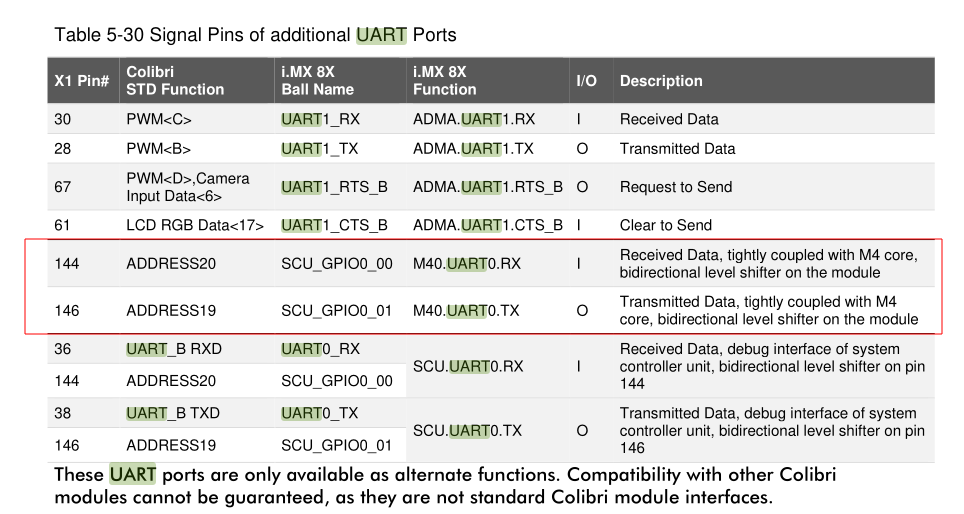
Therefore, I used the pins from the extension header X9 of the evaluation board where these SODIMM pins were available. Mind the modification I made in the pin function ID (in the patch above) as well to get it working. I see that the Iris board does not have these SODIMM pins available on any extension headers by default. So my guess is that you will have to use one of the GPIO pins available on the extension header as UART for M4. I have not tested this on my side as I am a little occupied at the moment. Let me know if this guides you in the right direction and you could get it working from your side. Otherwise, I will try to work on this next week.