

I also tried removing the serial port driver and re-running the recovery-windows.bat. Same error. I then installed WinUSB using ZaDig after which I tried updating the serial port driver with WinUSB however WinUSB was not listed as a selection.
Hey @ramaral1090,
Looking into this with some colleagues. I was able to do recovery mode on linux, as expected, but windows also gave me some issue. I will update you as I know more.
-Eric
I switched carrier boards from Mallow to Dahlia (we happen to have one hanging around).
This made all the difference - I don’t know why. The instructions for loading the Toradex Installer now make sense although I had to repeat updating the driver a few times until the recovery-windows.bat script finally ran successfully.
Now to the next step in loading a new OS image…
BTW: Eric, I appreciate your help as always
Hi Eric,
After swapping out the Mallow for the Dahlia carrier board, I decided to take a step back and follow the instructions outlined here:
and proceed step by step through the tutorial.
- I downloaded the source code for application the app alsa-alsa_example.cpp from GitHub.
- When I execute:
cat /proc/asound/cards
I get — no sound cards —
I know the Dahlia board has a built in WM8904G codec. I also know that I a device tree overlay is needed for this codec as well as the installation of ALSA package to play audio.
This is the step that has prevented me from making any progress in the past. I don’t know where an overlay for this board is located. I also don’t know overlay syntax or how to write one from scratch. It seems that Toradex should supply all support software for the hardware they provide, that is what other companies do.
I need to solve this problem first with easy to follow instructions with predictable results. Next, I need to install the ALSA package and then some how get a sound card to appear when “cat /proc/asound/cards” is executed. Again, I have to think this should be straight forward since I’m using stock Toradex hardware.
I can’t imagine I would have re-image the OS just to get the audio to work, maybe I’m wrong. Re imaging the OS would not be a problem if simple straight forward instructions were provided with predictable results. So far, that has not been my experience when attempting to follow Toradex’s tutorials.
Hey @ramaral1090,
Glad you had a work around for recovery mode. A colleague and I are still looking into this.
For the carrier board, you do need to use use the torizoncore-builder tool to implement the new carrier board device tree.
You can see in this guide under " Approach 1: Applying a Device Tree and Device Tree Overlays to a Custom Image Using the Build Command" Approach 1 will lead you to cloning the linux source code, and you can find the correct dahlia device tree file.
You don’t, but this would require you to know which device tree nodes are required, build a .dtbo file from source and deploy it. Possible, but most likely more work.
-Eric
Hi Eric,
I’m not sure if I was clear, could you provide me the device tree overlay file for the WM8904G codec that is on the Dahlia carrier board? Along with instructions on how to install it.
Thanks
Hey @ramaral1090,
We don’t have an overlay file just for the audio codec, its weaved into the dahlia carrier board device tree file (non-overlay).
Which you can see here: k3-am62-verdin-dahlia.dtsi « ti « dts « boot « arm64 « arch - linux-toradex.git - Linux kernel for Apalis, Colibri and Verdin modules
Instead of trying to parse out all of the relevant information for an overlay file, its much easier just to include the whole dahlia device tree file via the builder tool.
-Eric
Ok, so the codec overlay is already included in the Torizon OS image, that makes sense.
What is the next step in getting audio to play from the codec?
Hey @ramaral1090,
It’s included in a torizon image that has the base dahlia dts included. If you are ssh into a module you can type “sudo tdx-info” and there will be a line of what base dts file is included. Without modification there is the “Verdin Development Board,” for the dahlia you would have to make the customized Torizon OS image (torizoncore-builder tool).
The next step is this guide here for playing audio on Torizon OS.
-Eric
Software summary
Bootloader: U-Boot
Kernel version: 6.6.84-7.2.0-g8bf00740f043 #1-Torizon SMP PREEMPT Thu Mar 27 16:42:10 UTC 2025
Kernel command line: root=LABEL=otaroot rootfstype=ext4 quiet logo.nologo vt.global_cursor_default=0 plymouth.ignore-serial-consoles splash fbcon=map:3 ostree=/ostree/boot.1/torizon/ec9ba211477b683a44806a237c2aef7ced86fcf9aaf09a12fbbb778532976ed6/0
Distro name: NAME=“Torizon OS”
Distro version: VERSION_ID=7.2.0-build.13
Distro variant: VARIANT=“Docker”
Hostname: verdin-am62-15600883
Hardware info
HW model: Toradex Verdin AM62 on Verdin Development Board
Toradex version: 0074 V1.2A
Serial number: 15600883
Processor arch: aarch64
I’m not sure I see the “base dts file” above?
Hey Richard,
This line here.
…
HW model: Toradex Verdin AM62 on Verdin Development Board
..
The “..on Verdin development board” is the base dts that Torizon OS includes (for Verdin family). So with TorizonCore builder, you can customize a Torizon OS image to change the default dts to Dahlia (which has the dahlia codec device tree already included).
Eric Singer
Toradex
Based on the requirement to re-image the verdin-am62 board, I followed the instructions here:
Loading Toradex Easy Installer | Toradex Developer Center
Towards the bottom of the page: section “Using Toradex Easy Installer”
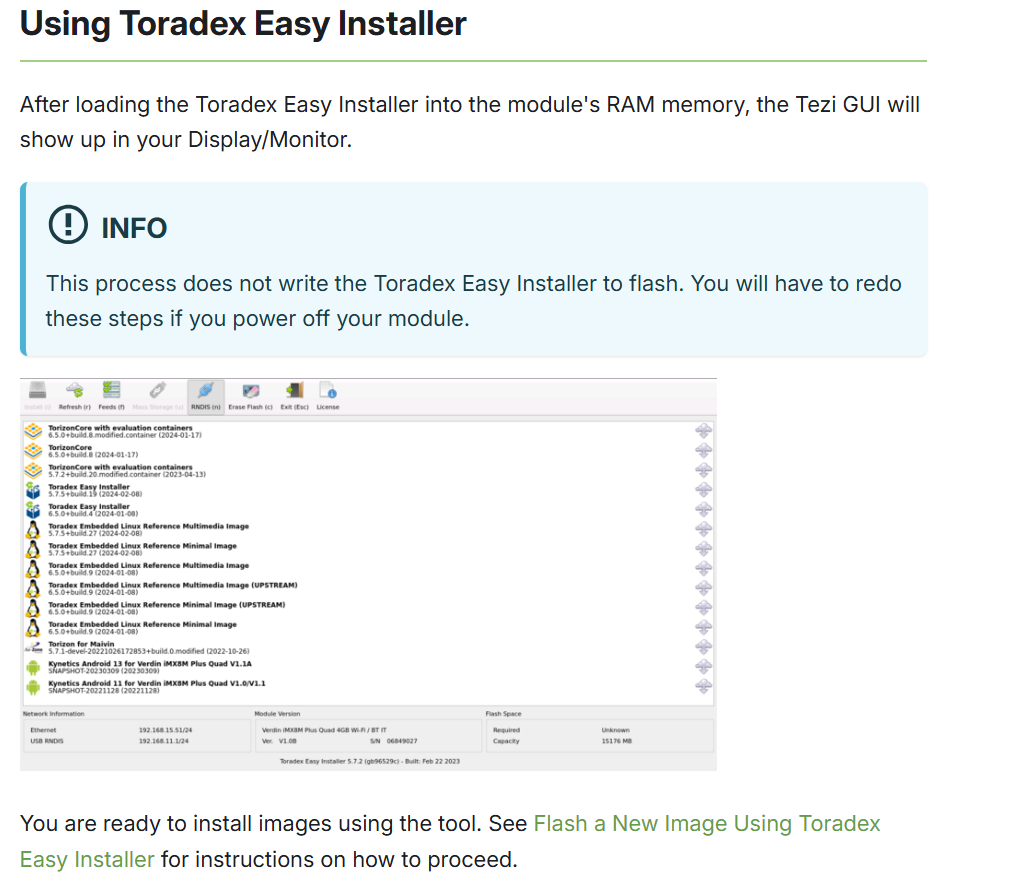
Although my Dahlia carrier board has a physical HDMI port, no video comes out, so I can’t follow the instructions. What now?
Hey @ramaral1090,
You can use a a remote desktop to gain access via a host computer. option 2 described here: . The device must be on the same network or the OTG guide.
Hey Richard,
Just an update on the Mallow board + recovery mode ( I know you switched to the dahlia). I had to change a to a few different USB cables and it was able to work on my setup, as well as my coworkers.
Eric Singer
Toradex
Hi Richard,
As I mentioned in another email this simplistic solution is indeed what helped Eric himself and other customers of ours. Let us know when you try other cables.
Michael Park
Toradex